MultiVendorX vs Dokan: Which Multivendor Solution Truly Delivers?
Choosing the right multi-vendor marketplace plugin can define the success or struggle of your eCommerce venture. While both MultiVendorX and Dokan have become dominant players in the WooCommerce ecosystem, the way they approach marketplace building is vastly different.
Whether you’re launching a niche store or scaling an enterprise-level platform, understanding these differences is key to making a future-proof decision.
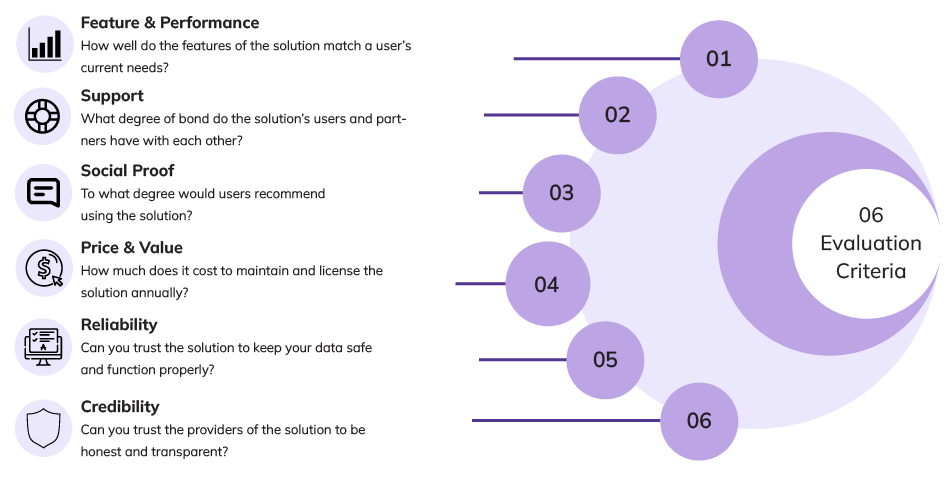
6-Criteria Evaluation Framework
Rather than relying on flashy features or pricing gimmicks, this comparison is built on six core criteria that matter most to real marketplace owners: Feature & Performance, Ecosystem, Reference, Cost, Reliability, and Credibility. Each area uncovers not just what the platforms promise, but how they perform in real-world marketplace operations.
Criterion 1: Features & Performance – The Engine Under the Hood
Your marketplace is only as powerful as the features it runs on.
While both MultiVendorX and Dokan use a modular structure, the key difference lies in pricing. With MultiVendorX Pro, you get access to all modules, unlocking the full potential of your store right away. In contrast, Dokan’s capabilities scale with its price – the more you pay, the more modules you unlock.
Features :
Product management can make or break your marketplace efficiency. When you’re handling thousands of products from dozens of vendors, every minute saved multiplies across your entire operation.These are the essential tools that determine whether you’ll spend your time growing your business or fighting with your platform.
| MultiVendorX | Dokan | |
|---|---|---|
| Modules/Extensions | 59 Modules | 40 Modules |
| Total Features | 173 | 152 |
[A] Seller Management
A marketplace thrives on its vendors – and the smoother their onboarding, the faster you scale. MultiVendorX offers granular control over seller permissions, custom registration flows, and real-time moderation. Dokan covers the basics well but offers limited flexibility out-of-the-box for customizing seller journeys.
| Vendor Registration | MultiVendorX | Dokan |
|---|---|---|
| ReCaptcha | ✓ | ✓ |
| Customizable Registration Form | ✓ | × |
| EU Compliance | ✓ | ✓ |
| Seller Management | MultiVendorX | Dokan |
|---|---|---|
| Seller Progress Bar | ✓ | ✓ |
| (Automatic/ Manual) Vendor Approval | ✓ | ✓ |
| Quick Vendor Activation | ✓ | ✓ |
| Advanced Seller List | ✓ | ✓ |
| Seller Verification | MultiVendorX | Dokan |
|---|---|---|
| Photo ID and Address verification | ✓ | ✓ |
| Social profile verification | ✓ | ✓ |
| Email & Phone verification | ✓ | ✓ |
| Configurable verification badge | ✓ | ✓ |
| Product limit restriction before vendor gets verified | ✓ | × |
| Marketplace Membership | MultiVendorX | Dokan |
|---|---|---|
| Free & Paid plans | ✓ | ✓* |
| Restrict allowed product types | ✓ | ✓ |
| Restrict product categories | ✓ | ✓ |
| Restrict gallery image upload | ✓ | ✓ |
| Recurring payment | ✓ | ✓ |
| Trial Period | ✓ | ✓ |
*Dokan does offer paid membership options via their Subscription add-on, but it lacks the granularity and flexibility offered by MultiVendorX.
[B] Product Management
From simple listings to complex variable products, product management defines a vendor’s experience. MultiVendorX empowers sellers with guided flows, conditional form fields, and moderation options. Dokan offers a clean UI but lacks the deep configurability power users often seek.
Product Management MultiVendorX Dokan CPG ✓ × Assign Products ✓ ✓ Product Location ✓ ✓ Bulk Product Management ✓ ✓ Import/Export Product ✓ ✓ Custom Product Field ✓ ✓ Featured Product ✓ ✓ Duplicate Product ✓ ✓ Product Bulk Edit ✓ ✓ Submit Product ✓ ✓ Publish Product ✓ ✓ Edit Published Product ✓ ✓ Published & Submit Product ✓ ✓ Add Coupon ✓ ✓ Upload Media Files ✓ ✓
| Single Product Multiple Vendor | MultiVendorX | Dokan |
|---|---|---|
| Assign SPMV Product | ✓(Free) | ✓(Pro) |
| Direct store access | ✓ | ✓(Pro) |
| Let different sellers sell the same product | ✓ | ✓(Pro) |
| Search SPMV Products | ✓ | ✓(Pro) |
| Show A Comparison Tablet | ✓ | ✓(Pro) |
| Display Other Vendors to Customers | ✓ | ✓(Pro) |
| Product Import and Export | MultiVendorX | Dokan |
|---|---|---|
| Import Products in CSV format | ✓ | ✓ |
| One-Click Import/ Export Process | ✓ | ✓ |
| Inventory Management | MultiVendorX | Dokan |
|---|---|---|
| Subscribe Out of Stock Product | ✓ | × |
| Display Out of Stock Subscribers | ✓ | × |
| Low stock Alert | ✓ | ✓ |
| Out of stock Alert | ✓ | ✓ |
| Low stock limit | ✓ | ✓ |
| Out of stock limit | ✓ | ✓ |
| Product Inquiry | MultiVendorX( with CatalogX ) | Dokan |
| Enquiry Form Placement | Multiple options – popup, tab, or under product description | Fixed placement in a separate tab on product page |
| Form Customization | Drag-and-drop form builder (Pro users get custom blocks) | Limited to default fields – no drag-and-drop customization |
| Auto-Capture for Logged-In Users | Captures name/email for logged-in users | Captures customer info for existing users |
| Anonymous Query Support | Optional – allow or restrict anonymous enquiries | Limited – relies on user to input correct data manually |
| Enquiry Access Control | Admin can set who sees enquiry form (logged-in/logged-out/both) | No granular control – always visible |
| Modular & Extendable | Part of larger Enquiry Module, easily works with Quote & Catalog modules | Standalone feature with limited flexibility |
| Product Types | MultiVendorX | Dokan |
|---|---|---|
| Bookable | ✓ | ✓ |
| Rental | ✓ | ✓ |
| Auctionable | ✓ | ✓ |
| Subscription | ✓ | ✓ |
| External/Affiliate | ✓ | ✓ |
| Variable | ✓ | ✓ |
| Grouped | ✓ | ✓ |
| Downloadable | ✓ | ✓ |
| Virtual | ✓ | ✓ |
| Accommodation | ✓ | ✓ |
| Appointment | ✓ | × |
| Coupon Management | MultiVendorX | Dokan |
|---|---|---|
| Flat Discount | ✓ | ✓ |
| Percentage Discount | ✓ | ✓ |
| Flat Cart Discount | ✓ | ✓(Pro) |
| Coupon Usage Restriction | ✓ | ✓(Pro) |
| Coupon User Limit Restriction | ✓ | ✓(Pro) |
| Minimum spend Restriction | ✓ | ✓(Pro) |
| Product & Catagories Restriction | ✓ | ✓(Pro) |
| Exclude Sale Items | ✓ | ✓(Pro) |
| Maximum Spend Restriction | ✓ | ✓(Pro) |
| Limit Usage on Number of Items | ✓ | ✓(Pro) |
| Choose Discount Payee | ✓ | × |
[C] Shipping
MultiVendorX offers advanced shipping capabilities – including vendor-specific overrides, zone-based rules, and flexible configurations – giving vendors full control.
In contrast, Dokan provides only the basic WooCommerce-compatible shipping options, with limited flexibility out of the box.
| Shipping Options | MultiVendorX | Dokan |
|---|---|---|
| Seller Shipping | ✓ | ✓(Pro) |
| Zone-Wise Shipping | ✓ | ✓(Pro) |
| Distance Shipping | ✓ | × |
| Country-Wise Shipping | ✓ | × |
| WooCommerce Per Product Shipping | ✓(Pro) | ✓(Pro) |
| WooCommerce Table Rate Shipping | ✓ | ✓(Pro) |
| Shipping Management | MultiVendorX | Dokan |
|---|---|---|
| Shipping Management | ✓ | × |
| Shipping Cost Widget | ✓(Free) | ✓(Pro) |
| Processing Time | ✓(Free) | ✓(Pro) |
| Free Shipping On Minimum Order | ✓(Free) | ✓(Pro) |
| Flat Rate Shipping | ✓(Free) | ✓(Pro) |
| Local Pick UP | ✓(Free) | ✓(Pro) |
| Free Shipping | ✓(Free) | ✓(Pro) |
| Ship Station Integration | ✓ | ✓ |
[D] Order and Refund Management
| Order Management | MultiVendorX | Dokan |
|---|---|---|
| Communicate through Order Notes | ✓(Free) | ✓(Pro) |
| VAT/GSTIN field | ✓(Free) | × |
| Split Order Module | ✓(Free) | ✓(Pro) |
| Log Orders/ Order List | ✓(Free) | ✓(Pro) |
| Manage Order Status | ✓(Free) | ✓(Pro) |
| Bulk Order Management | ✓(Free) | × |
| Back Ordering System | ✓(Free) | × |
| Order Shipping Tracker | ✓(Free) | ✓(Pro) |
| Refund Management | MultiVendorX | Dokan |
|---|---|---|
| Set Conditions for Refund | ✓(Free) | ✓(Pro) |
| Accept or Reject Refund | ✓(Free) | ✓(Pro) |
| Request List | ✓(Free) | ✓(Pro) |
| Request Refunds | ✓(Free) | ✓(Pro) |
| Invoice Manager | MultiVendorX | Dokan |
|---|---|---|
| Customise Invoice | ✓ | ✓(Limited Customization) |
| Vendor’s Invoice | ✓ | ✓ |
| Packaging Slip | ✓ | ✓ |
[E] Payment Options
| Payment Options | MultiVendorX | Dokan |
|---|---|---|
| PayPal Marketplace | ✓ | ✓ |
| Mangopay | ✓ | ✓ |
| Razorpay | ✓ | ✓ |
| PayPal Masspay/ PayPal Payout | ✓ | ✓ |
| Stripe Connect | ✓ | ✓ |
| Stripe Marketplace | ✓ | ✓ |
| Stripe Marketplace direct charge | ✓ | × |
| Commission Parameters | MultiVendorX | Dokan |
|---|---|---|
| Commission By Purchase Quantity | ✓ | × |
| Percentage-Wise Commission | ✓ | ✓ |
| Percentage + Fixed Per Transaction | ✓ | ✓ |
| Percentage+Fixed Per Unit | ✓ | × |
| Commission By Product Price | ✓ | × |
| Commission By Vendor Sales | ✓ | × |
| Commission Catagories | MultiVendorX | Dokan |
|---|---|---|
| Product | ✓ | ✓ |
| Category | ✓ | ✓ |
| Vendor | ✓ | ✓ |
| Membership | ✓ | ✓ |
| Global | ✓ | ✓ |
| Disbursement Management | MultiVendorX | Dokan |
|---|---|---|
| Tax Management | ✓ | ✓ |
| Payment Gateway Management | ✓ | ✓ |
| Manual disbursal via Bank Transfer | ✓(Free) | ✓(Pro) |
| Realtime disbursal using Stripe Split Pay | ✓ | ✓ |
| Deduct withdrawal charges | ✓ | ✓ |
| Manual disbursal via Cash Pay | × | × |
| Minimum withdrawal limit | ✓ | ✓ |
| Withdrawal threshold (in days) | ✓(Free) | ✓(Pro) |
| Auto-disbursal based on order status | ✓(Free) | ✓(Pro) |
| Auto-disbursal with schedule | ✓(Free) | ✓(Pro) |
[G] Marketplace Analytics
| Marketplace and Store Analytics | MultiVendorX | Dokan |
|---|---|---|
| Overview | ✓ | ✓ |
| Vendor Product Sales Report | ✓ | ✓ |
| Product Sales Report | ✓ | ✓ |
| Transaction History | ✓ | ✓ |
| Top sales/ sellers/ products | ✓ | ✓ |
| Sales/Product & Category Overview | ✓ | ✓ |
| Transactions Overview | ✓ | ✓ |
| Tax Report | ✓ | ✓ |
| Customer Downloads | ✓ | × |
| Store SEO | MultiVendorX | Dokan |
|---|---|---|
| SEO Support | ✓ | ✓ |
| Social Media Open Graph support | ✓ | ✓(Basic support only) |
| Google Analytics Integration | ✓ | ✓ |
| Yoast & Rank Math SEO integration | ✓ | ✓ |
To know more on the feature wise comparison please check our compare page.
Support – the foundation of your success
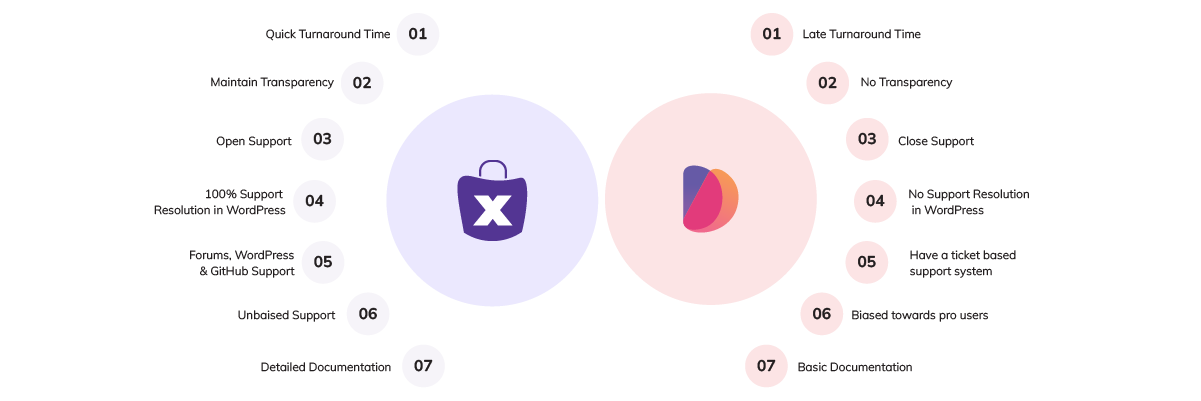
Community Strength :
An engaged community means faster learning, idea sharing, and problem-solving. MultiVendorX has been growing its footprint across forums and Slack, while Dokan’s community remains active on Facebook and WordPress.org, but with limited technical depth in discussions.
| MultiVendorX | Dokan |
|---|
| Platform | Facebook Group + Community Page | Facebook Group + Community Page |
| Members | Developers | Users | Experts | Users | Experts |
| Activities | Discussion | Knowledgebase | FAQ | Forum | Support ticket | Live chat only |
| Assistance | In Progress | N/A |
Expert Guidance :
Blogs
Webinars
Interviews
Social Proof – real users, real experiences
Reviews & Ratings :
| MultiVendorX | Dokan |
|---|
| Rating | 4.9 | 4.6 |
| 5 star Reviews | 401 | 641 |
| Total Review | 431 | 746 |
Client Testimonials :
Real users, real experiences, and real impact. They help establish credibility, build trust, and often say more than marketing ever could.
So instead of us telling you why MultiVendorX outshines Dokan…
Let’s hear it from the people who’ve actually used both.
Pricing & value – true cost of ownership
| MultiVendorX | Dokan |
|---|
| Installation Cost | ||
|---|---|---|
| Set up Cost | No Installation Cost | No Installation Cost |
| License Cost | ||
|---|---|---|
| 1 Sites with only 3 Modules | N/A | $149 |
| 3 Sites with All Modules | $399 | N/A |
| Maintenance Cost | ||
|---|---|---|
| Bug Fixes: | ✓(Every 2 weeks) | ✓(Inconsistent Frequency) |
| Updates and Patches: | ✓(Every 2 weeks) | ✓(Inconsistent Frequency) |
| Technical Support | Equal for all | Priority Support |
| Enhancements and Improvements | ✓ | ✓ |
| Documentation and Training | ✓ | ✓ |
| License Renewals | ✓ | ✓ |
Special Plans: MultiVendorX vs Dokan || Why Pay for What You Can Get for Free?
Before you hit “Buy Now” on another multivendor plugin, take a moment. You might be surprised at how much MultiVendorX offers in its free version – features that others, like Dokan, lock behind a paywall. If you’re just starting out or looking to cut down on costs without cutting down on features, this comparison might just be the game-changer your marketplace needs.
Let’s break it down
| Feature | Dokan (Requires Pro) | MultiVendorX (Free) |
| Commission Types | Pro version required for fully | Everything available in the free version |
| Admin Coupon Support | Available in Pro | Available in the free version |
| Vendor Management | Available in Pro | Possible with the free version |
| Min/Max Quantities | Pro-only feature | Available in the free version |
| Vendor Coupon Management | Available in Pro | Fully available in free version |
| Single Product MultiVendor | Pro-only feature | Fully available in free version |
| Shipping Management | Requires Pro | Weight-based, label printing, tracking all in free version |
| Vendor Store Customization | Store appearance editable in Pro | Free access to store logo, banner, and location settings |
| Product Management | Extended control in Pro | Vendors can add, manage, and publish products without Pro |
| Order Management | Requires Pro | Order lists, details, and email notifications available for free |
| Vendor Reviews | Pro-only feature | Full review and rating system available for vendors and their products |
At MultiVendorX, we believe in growing with you – that’s why we give you a powerful head start without charging a dime. No credit card, no pressure – just the tools you need to build your dream marketplace
Why Pay More? Build Your Marketplace Smarter
Why pay $999 with Dokan, when MultiVendorX gives it all for just $299? That’s right – everything from bookings and subscriptions to auctions and advanced vendor management is already packed into MultiVendorX Pro. No need to climb a pricing ladder just to get the basics.
Let’s be honest – launching a powerful multivendor marketplace shouldn’t feel like signing up for a luxury gym membership you’ll never use. Yet, with Dokan, unlocking all the essentials will cost you a steep $999/year.
At MultiVendorX, we believe your success shouldn’t come with a heavy price tag. That’s why we give you the tools, the freedom, and the support to build your dream marketplace – without making you choose between your vision and your wallet.
Feature Comparison: MultiVendorX vs. Dokan
| Feature | MultiVendorX ($299/year) | Dokan Enterprise ($999/year) |
| Advanced Commission Structures | ✅ | ✅ |
| Vendor Coupon Management | ✅ | ✅ |
| Vendor Dashboard Analytics | ✅ | ✅ |
| Shipping Management | ✅ | ✅ |
| Vendor Store Customization | ✅ | ✅ |
| Product Management | ✅ | ✅ |
| Order Management | ✅ | ✅ |
| Vendor Review System | ✅ | ✅ |
| Booking Integration | ✅ | ✅ |
| Auction Support | ✅ | ✅ |
| Subscription Products | ✅ | ✅ |
| Advanced Reporting & Analytics | ✅ | ✅ |
| Geolocation Support | ✅ | ✅ |
| Staff Management | ✅ | ✅ |
| Export/Import Functionality | ✅ | ✅ |
| Priority Support | ✅(Same for everyone) | ✅(Plan based) |
| MultiVendorX | Dokan | |
| Lowest Plan | $299 | $149 |
| No. of. Premium modules | All | 3 |
Check our pricing details here.
Reliability – building on unshakeable trust
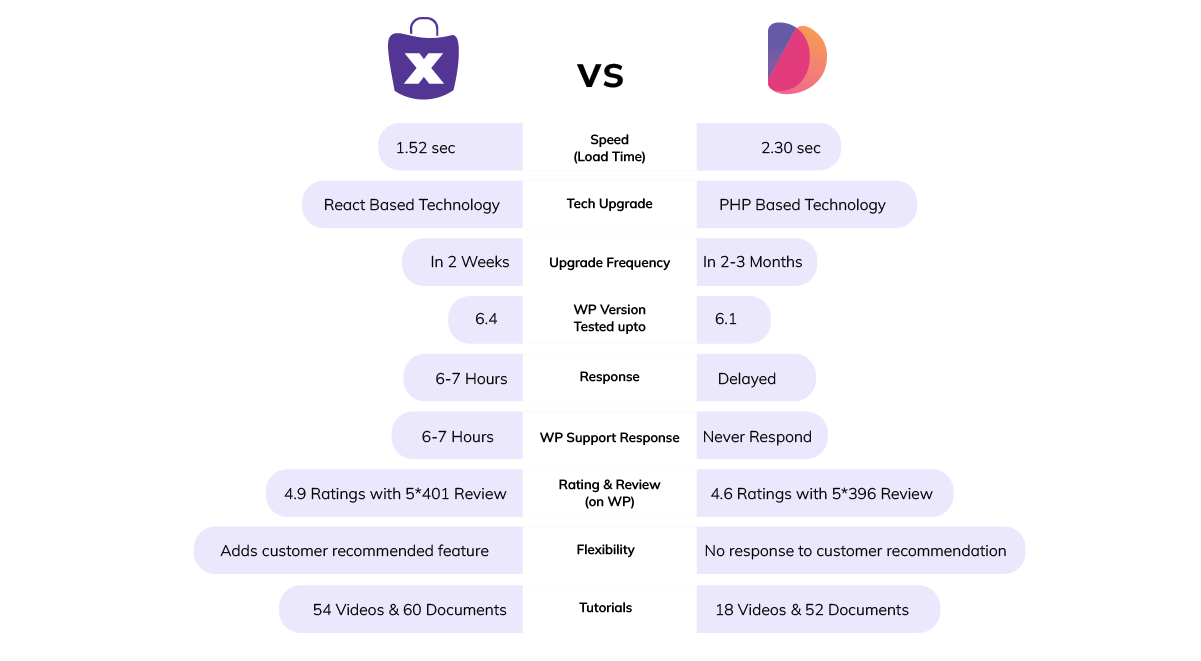
Credibility – what’s your brand value
Company maturity – years of building vs. bolting on
| MultiVendorX | Dokan |
|---|
| Founding Vision | Started as a project | Started as a basic multivendor solution |
| Development Journey | Developed over a span of 10-12 Years with continuous innovation | Developed over 8+ years |
| Tech Evolution | Rebranded as MultiVendorX using latest tech to upgrade the plugin | Actively maintained with updates and bug fixes |
Track record – performance you can count on
| MultiVendorX | Dokan |
|---|
Update Consistency | Consistent with updates delivered every month. | Inconsistent update frequency |
| User Ratings | 4.9 ratings | 4.6 rating |
| Customer Satisfaction | Over 401 customers have given it a 5 star rating. | Over 641 customers have given it a 5 star rating. |
Transparency & Ethics :
MultiVendorX earns trust by:
Publishing clear changelogs and public roadmaps
Communicating openly and consistently
Offering responsive support to both free and paid users
Actively engaging in community discussions and feedback
Dokan, on the other hand:
Shares limited information about development direction
Prioritizes paid users in support – leaving free users behind
Offers minimal transparency into product updates or plans
When you’re investing in your marketplace, choose the team that keeps you in the loop – not in the dark
Conclusion
| MultiVendorX | Dokan |
|---|
| About Product | MultiVendorX, formerly WC Marketplace, is a multivendor marketplace tool that enables users to build their own online marketplace. | Dokan is a multivendor tool for building an online marketplace. |
| Support | Equal for everyone | Priority based on how much you pay |
| Reviews & Rating | 4.9 out of 5.00 Ratings / 401 Positive Review | 4.6 out of 5.00 Ratings / 641 Positive Review |
| Innovation & Updates | In 2 Weeks | 1 -2 per Month |
| Features | 174 | 152 |
| Reliability | Used the latest tech to optimize the solution | Built and Optimized with modern tech |
| Cost | Budget-Friendly Price | Premium price for essentials |
The Hard Truth About Dokan
The Final Word: Your Marketplace Deserves the Best
When it comes to building a serious marketplace, it’s not just about checking boxes – it’s about choosing a platform that outperforms where it counts.
At MultiVendorX, we evaluated performance across six key criteria that matter most to real businesses – from scalability and flexibility to vendor experience and long-term cost.
The results? Not just a win – a clean sweep.
MultiVendorX doesn’t just meet expectations – it exceeds them across the board.
Meanwhile, alternatives like Dokan hover around the 6.8/10 mark – decent for testing, but not for scaling.
Because when you’re building something big, “good enough” just isn’t good enough.
Your marketplace deserves more than limitations.
Choose the platform built for growth. Choose MultiVendorX.