






- This topic has 32 replies, 2 voices, and was last updated 1 year, 1 month ago by
Sangita Support Squad.
-
AuthorPosts
-
-
December 16, 2024 at 11:11 PM #237799
Phillip May
Participantthis is with wp appointment module
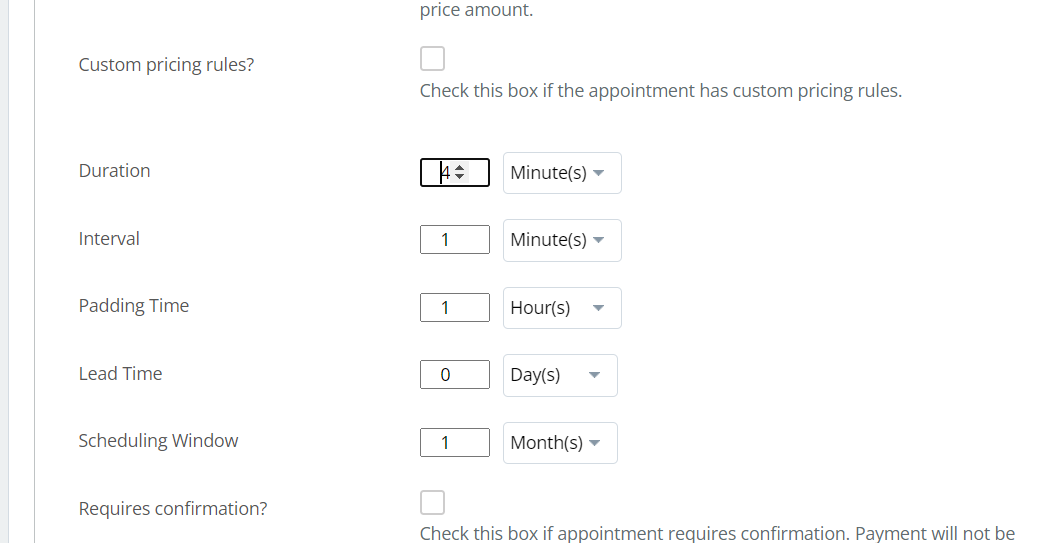
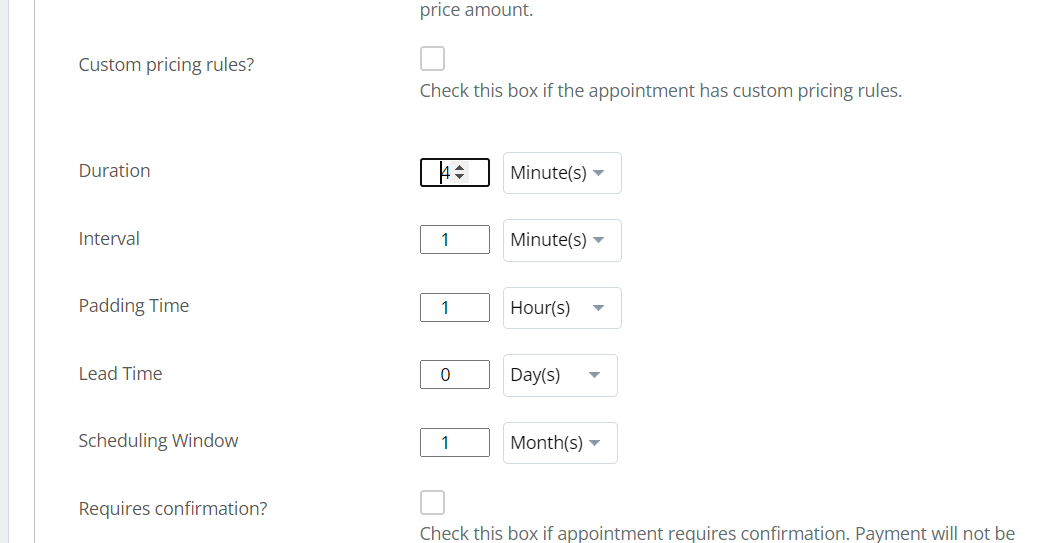
here as you can see the form is nit displayed correctly you can only see 1 digit and have to use arrows to see next
-
December 17, 2024 at 10:00 AM #237806
Sangita Support Squad
KeymasterHello There, Thank you for reaching out to us.
We have reviewed the settings section you mentioned, and it appears the same in the vendor dashboard as it does on the admin end when adding appointment products. You can manually input the digits or use the arrows provided to increase or decrease the number.
For your convenience, you can check the demonstration here: https://www.awesomescreenshot.com/video/34719809?key=a505099c3ee5157695f84e7318d18351.
Now may I know what issue have you faced with this functionality. Once we get the details we will be able to assist you further.
-
December 17, 2024 at 11:59 AM #237851Participant
Sangita as you can see even in your demo video the field only show a single digit, this is not correct display.
-
December 17, 2024 at 12:10 PM #237852Keymaster
Thank you for sharing this with us. I’ve informed our team, and they will include the necessary modifications in a future update.
We’ll also keep you updated once the changes are implemented.
If you need any further assistance, please don’t hesitate to let us know.
-
December 17, 2024 at 12:12 PM #237854Participant
i need shipping options to allow for miles not just kilometers I am in the USA we dont use km
-
December 17, 2024 at 5:25 PM #237862Keymaster
@Phillip May, You can use a plugin like Loco Translate to add translations for “km” to “miles” on your end. Once done, you can set up the shipping and test the flow accordingly.
Feel free to reach out if you need any further assistance from us. We’re here to help!
-
December 17, 2024 at 6:54 PM #237867Participant
translating the text will not change the math that the shipping plugin uses and this is a bad suggestion
-
December 17, 2024 at 7:02 PM #237868Keymaster
Could you please confirm whether you are using any third-party plugin for distance-based shipping calculations, or if you are using the Distance Shipping module of MultiVendorX?
-
December 17, 2024 at 7:03 PM #237870Participant
i am just using the distance module for now
-
December 17, 2024 at 8:30 PM #237872Keymaster
Thanks for sharing the information. Kindly provide us some time to check and we will get back to you accordingly.
-
December 18, 2024 at 12:04 PM #237890Keymaster
Hello, We have reviewed the flow on our end and found that the current system does not support distance-wise shipping calculations in miles. However, no need to worry! I have already informed our team, and support for shipping calculations based on distance in miles is planned for a future update. You can keep track of the same from here https://github.com/multivendorx/MultiVendorX/issues/883.
Please note that the implementation timeline will depend on the volume of requests from our users and the priority of this feature.
Thank you for your understanding and feedback!
-
December 18, 2024 at 3:28 PM #237900Participant
ok no worries is there some css i can add to my child theme to make the appointment time form fields wider
-
December 18, 2024 at 3:39 PM #237902Keymaster
Hello @Phillip May, I have shared this with our development team, and once they implement a fix on our end, I will promptly provide you with the updated plugin.
Thank you for your understanding and patience!
-
December 18, 2024 at 4:02 PM #237904Participant
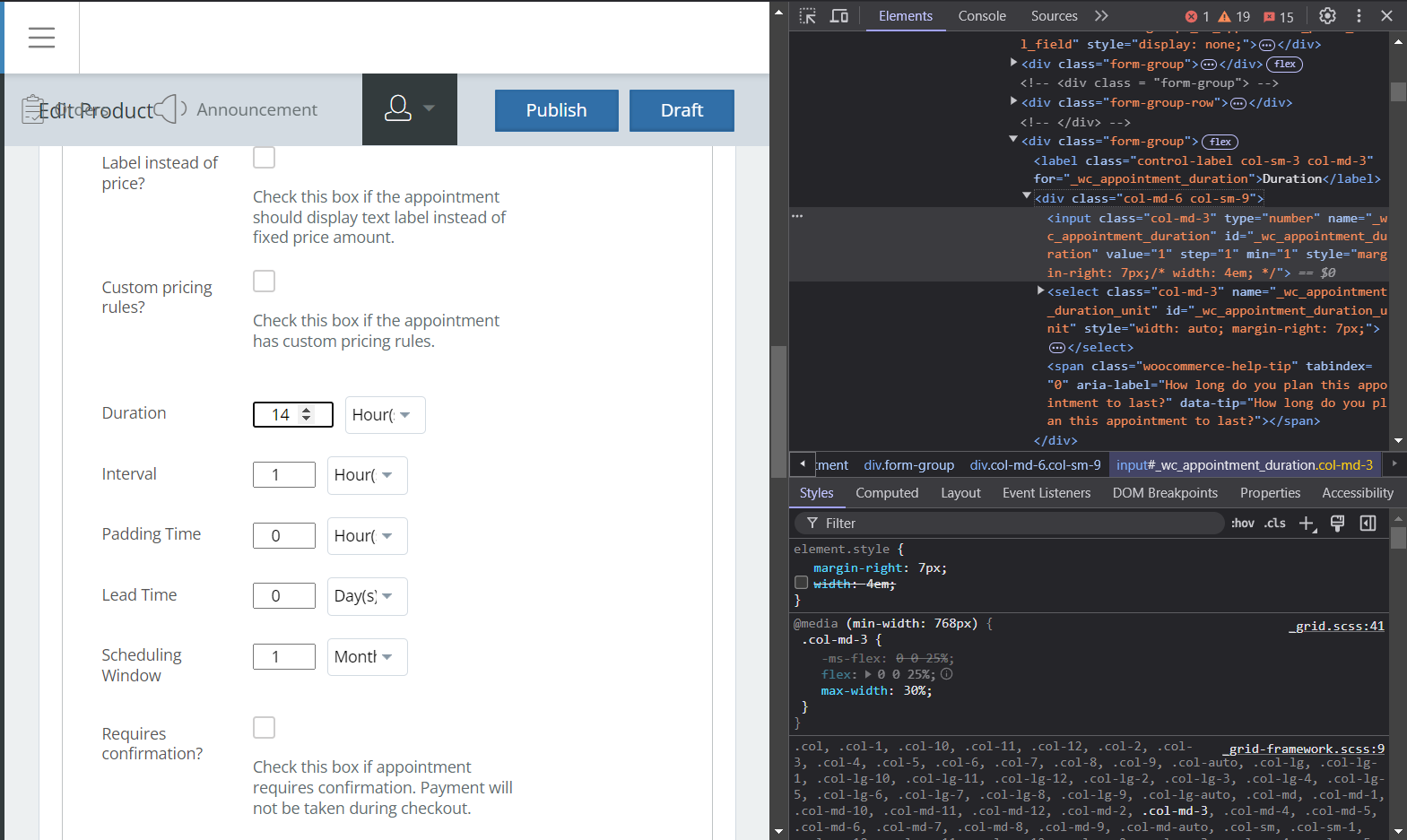
here you can see in brave browser your commented out “width: 4em” gets applied in brave.
also max width needs to be 30%Attachments:
-
December 18, 2024 at 4:31 PM #237906Keymaster
Hello @Phillip May, Thank you for getting back to us. Our team will implement the required modifications in the plugin file, and as soon as the updated version is ready, we will share it with you.
We appreciate your understanding and cooperation.
-
January 2, 2025 at 7:22 AM #238124Participant
why hasnt this been resolved in the latest update?
-
January 2, 2025 at 9:57 AM #238126Keymaster
@Phillip May, The update for the MultiVendorX (free) plugin has been released. However, the fix for the appointment product CSS issue will be implemented in MultiVendorX Pro.
No need to worry—we’ll include the necessary CSS modification in the upcoming MultiVendorX Pro update.
Once the update is available, we’ll notify you promptly.
Thank you for your understanding and cooperation!
-
January 2, 2025 at 8:47 PM #238132Participant
great, where do vendors sync their google calendars for appoinments, i dont see the option on my test vendor unless i install bookings addon
-
January 2, 2025 at 9:54 PM #238133Keymaster
Yes you will get the option of google calendar in the vendor dashboard once you will enable the booking module.
-
January 2, 2025 at 11:43 PM #238135Participant
the appointent addon sopports it natively, you guys need to fully integrate the appointments plugin and check for conflicts with booking ad product addons.
appointments should allow google without booking addon as you see it supports it:
https://bookingwp.com/plugins/woocommerce-appointments/ -
January 3, 2025 at 10:03 AM #238139Keymaster
Hi @Phillip May, Thank you for sharing this information with us. I’ll pass it along to our development team, and we’ll ensure the necessary integration is implemented for vendors, similar to what is available for the admin with the Appointment plugin.
Thanks again for your valuable input!
-
January 12, 2025 at 11:29 AM #238337Participant
so, whats the deal? This is not an extra, i expect things like this to work because you claim on your sales page that it does, yet the css in the backend AND all the features of the addon are not integrated properly.
I at least need a css fix for times and google calendar ability for appointments
-
January 12, 2025 at 7:32 PM #238340Keymaster
We sincerely apologize for the inconvenience and the delay in implementing the fixes. Our development team has been heavily occupied with their previously assigned tasks, which has caused a slight delay in addressing the fixes for the appointment module.
Please rest assured that our team is actively working on it, and we will keep you updated as soon as the fixes are implemented.
Thank you once again for your understanding and cooperation.
-
January 15, 2025 at 4:44 PM #238464KeymasterThis reply has been marked as private.
-
January 18, 2025 at 2:28 PM #238529Participant
i cant access the download maybe its better to just get a refund ad ill just use dokan
-
-
January 18, 2025 at 8:01 PM #238534Keymaster
We have shared the access with you. Please download the fixed plugin and check on your end.
Let us know if you need any further assistance from our end.
-
January 20, 2025 at 12:32 PM #238558Participant
i deactivated MVX and purchased Dokan. I should have done that from the very beginning. Everything in Dokan works as advertised, there are no incomplete features no css problems and no addons to have conflicts with each other. I purchased MVX and expected it to work as advertised, but it does not. You have a ton of work before MVX is worth what you charge, its not even ready for use yet unless people want very basic features, but everything that works correctly is already available in the free version of WCFM so why pay for MVX. I wish i figured this out within the 15 day refund window because now i own a plugin i cant use and even if you do eventually fix it however long it takes just comes off my yearly subscription, so lets say it takes you 3-4 months to fix all the issues and make it useable then I have to wait for you to do that while my subscription runs out. i regret my purchase.
-
January 20, 2025 at 4:42 PM #238575Keymaster
@Phillip May, We’re truly sorry to hear about your experience, and we deeply value your feedback. At MultiVendorX, we pride ourselves on being transparent about our features and offering dedicated support from day one to address issues critical to your business.
When you reported the CSS issue, we promptly provided a fix to ensure minimal disruption. Regarding your requests for miles support and google calendar integration, we understand their importance to your business. That’s why we’ve prioritized these feature enhancements, and once our team completes their current assignments, work will begin on them. In fact, you can expect these features within the next two updates.
That said, we were disheartened to hear your remark about us not delivering what we promote. We’ve thoroughly reviewed our communication and offerings and found no discrepancies. From the start, your concerns have been a priority to us, and we’ve always strived to deliver solutions as quickly as possible.
Thank you for your patience, and we’re here to assist further if needed.
-
January 20, 2025 at 5:53 PM #238582Participant
i submitted the css issue on december 16th and you provided a fix a full month later, that is not even close to prompt.
i shouldnt need to use special functions to get addons working correctly like the function you provided that allows WooCommerce product addons to activate because you havent updated your plugin to use woocomerce appointments correctly.
you advertise MVX as being compatible with these addons, yet they dint work correctly or are not integrated correctly , perfect example is appointments.
-
January 20, 2025 at 7:08 PM #238587Keymaster
@Phillip May, We completely understand your concerns and appreciate the opportunity to address them. To clarify, the integration of the add-on feature within the WooCommerce Appointment plugin is entirely a decision made by their team only.
Our Product Add-On module requires the WooCommerce Product Add-Ons plugin to get enabled and work accordingly. However, the issue arises because the WooCommerce Appointment plugin has introduced modifications that conflict with the activation of the WooCommerce Product Add-Ons plugin on your site.
Despite this being an external change beyond our control, when you reported the issue caused by the recent feature update in the WooCommerce Appointment plugin, we promptly provided a solution that successfully resolved the conflict on your end.
-
January 21, 2025 at 1:41 PM #238598Participant
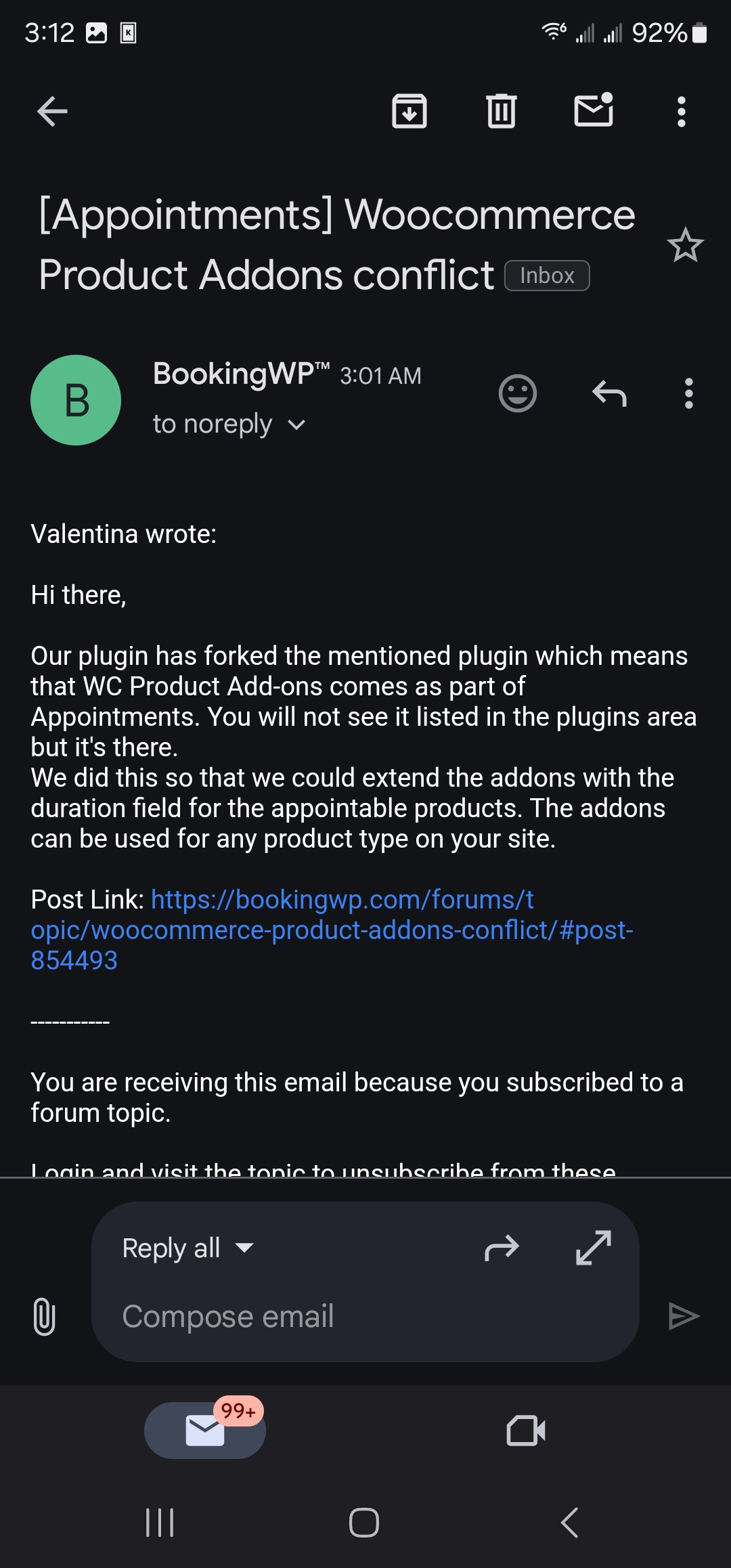
Accoridng to the author of apppintments extension, all they dis was fork woocommerce product addons. This means you need to fix MVX to detect when appointments is being used to it can get product addons from that instead
-
January 21, 2025 at 1:43 PM #238599Participant
See this email
Attachments:
-
January 21, 2025 at 6:26 PM #238612Keymaster
We truly value your insight in this regard.
-
-
AuthorPosts
- The topic ‘appointment time form too small’ is closed to new replies.
