






Tagged: Booking, Vendor Dashboard
- This topic has 9 replies, 2 voices, and was last updated 1 year, 5 months ago by
Sangita Support Squad.
-
AuthorPosts
-
-
September 4, 2024 at 9:45 AM #234983
Arturo Alvarez
ParticipantDear Support Team,
I am experiencing two fatal errors related to the booking functionality on this page:
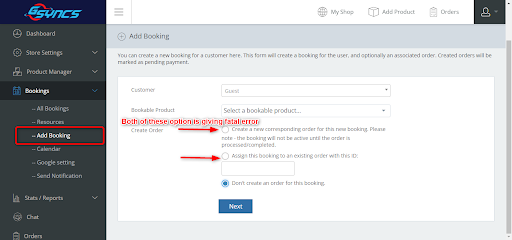
Create Booking From Vendor Dashboard
Screenshot of Page
https://www.screenpresso.com/cloud/T9ovf/?__r=1.f9dc72f3be98e576c5d7611f3b85cfaf1. Error When Creating a New Booking Order
When I try to create a new corresponding order for a booking, I encounter the following error:Fatal error: Uncaught Error: Call to a member function get_date_created() on array in /wp-content/plugins/dc-woocommerce-multi-vendor/classes/class-mvx-order.php:495
error screenshot https://www.screenpresso.com/cloud/xAnIc/2. Error When Assigning a Booking to an Existing Order
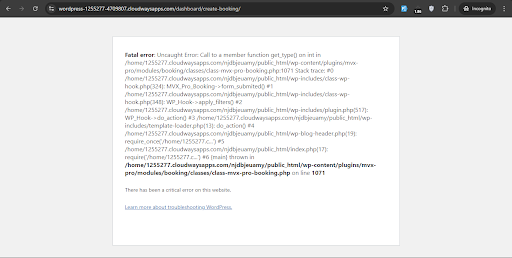
When I attempt to assign a booking to an existing order by providing the order ID, this error occurs:Fatal error: Uncaught Error: Call to a member function get_type() on int in /wp-content/plugins/mvx-pro/modules/booking/classes/class-mvx-pro-booking.php:1071
Error Screenshot https://www.screenpresso.com/cloud/jqoke/Troubleshooting Steps Taken:
– I have ensured that all related plugins, including WooCommerce, MVX Pro, and the free version of MVX, are updated to their latest versions.
– I have disabled all other plugins to identify possible conflicts, but the errors persist.Could you please assist in resolving these issues?
I appreciate your support. I look forward to your guidance.
Attachments:
-
September 4, 2024 at 11:23 AM #234995
Sangita Support Squad
KeymasterHi @Arturo Alvarez, Thank you for providing the details. We’ve been able to replicate the issues on our end and our team is currently investigating them. We’ll keep you updated as soon as we have news about a fix.
We appreciate your patience and understanding.
-
September 4, 2024 at 10:07 PM #235021ParticipantThis reply has been marked as private.
-
-
September 5, 2024 at 10:39 AM #235026Keymaster
Hello @Arturo Alvarez, Thank you for getting back to us.
The “Auto update not available” message is appearing because your site’s license hasn’t been activated. Once you activate the license on your site, the automatic update option for the MultiVendorX Pro plugin will become available.
Regarding the fatal errors you’ve encountered with the booking products, our team is actively working on a fix. We kindly ask for your patience, and we will notify you as soon as the issue is resolved.
Thank you for your understanding.
-
September 5, 2024 at 4:37 PM #235059Participant
Hi Support,
Thank you
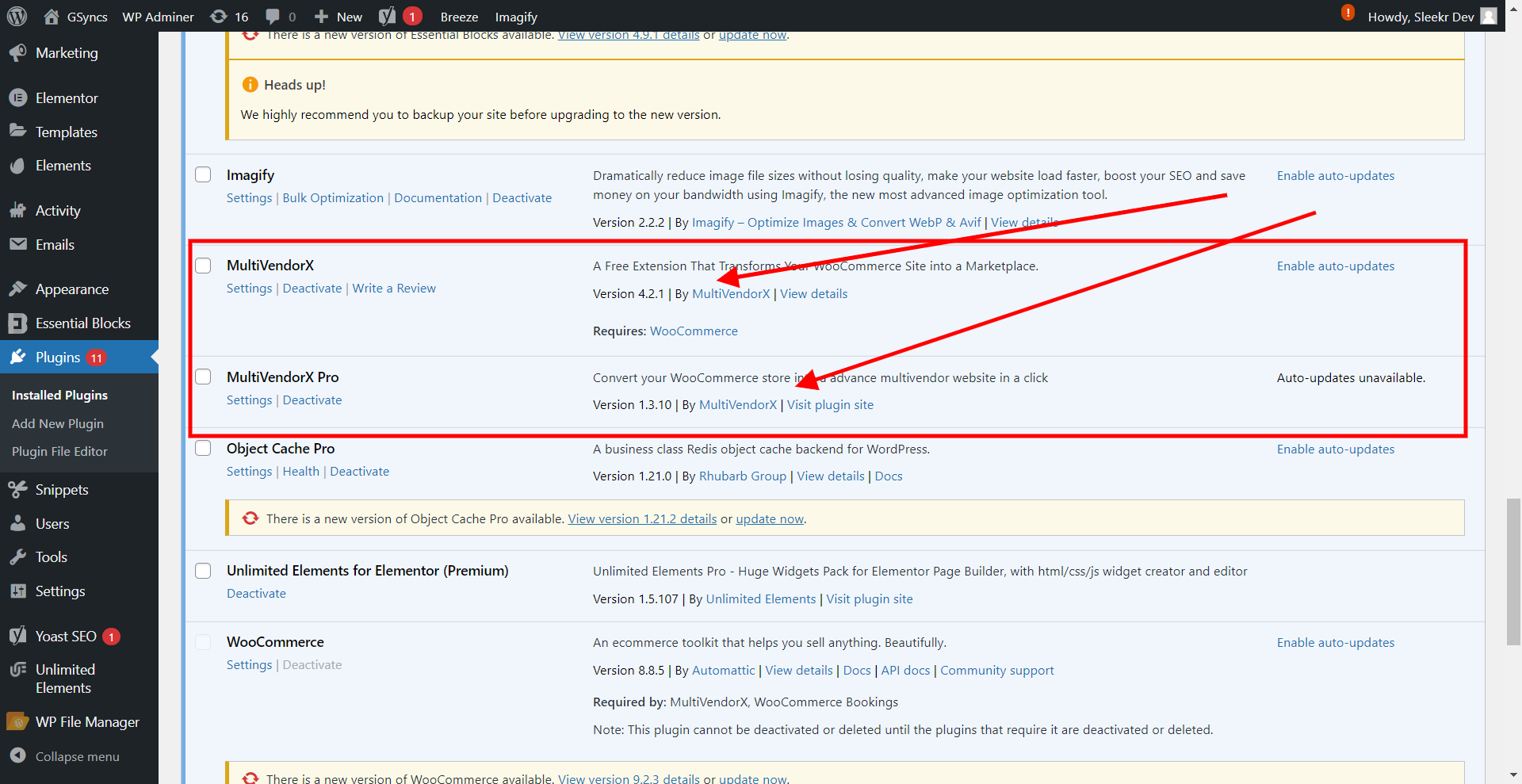
As per your email MultiVendorX 4.2.1 and MultiVendorX Pro 1.3.10 resolve these fetal errors
But now we are using latest versions but still we getting same error on vendor dashboard, Please check again and resolve these plugin fetal errors
Please find attachments …
-
-
September 5, 2024 at 5:01 PM #235067Keymaster
@Arturo Alvarez, we have not yet included fixes for the fatal errors in our latest version updates. Our development team is actively working on these issues, and we will provide you with the updated plugins as soon as they are resolved.
However, we need some assistance from you. We have resolved one of the errors, but for the remaining issue, we require support from the WooCommerce Bookings team. The problem is that the booking products are only assigned to the main order, and since we create suborders for vendor products, they are not being assigned to these suborders.
It would be very helpful if you could provide us with your WooCommerce Bookings account details so we can contact their support team using your account, as our license has expired and we are unable to reach them directly.
Please remember to mark your reply as private when sharing the account details.
We will look forward to hearing back from you with the details soon.-
September 5, 2024 at 5:50 PM #235069Participant
Hi Support,
Thank you for the update on the progress with the fixes. I appreciate your efforts in addressing the issues. Unfortunately, I do not have access to WooCommerce Bookings support. As it is a part of the plugin’s functionality to be compatible with WooCommerce, it is important that the development team ensures compatibility and resolves these issues directly. I understand that you need support from WooCommerce Bookings, but it would be more appropriate for your team to handle this communication since the plugin should inherently support WooCommerce. Please let me know if there is any other way I can assist you in resolving this matter.
Thank you for your understanding and continued support.
-
-
September 5, 2024 at 7:05 PM #235073Keymaster
Thank you for recognizing our efforts in addressing the issues. We sincerely appreciate your understanding and patience.
Our team is committed to resolving these issues effectively. We are actively working on the necessary fixes, and we will keep you updated as soon as these are implemented on our end.
Thank you once again for your continued understanding and cooperation.
-
September 20, 2024 at 2:25 PM #235476ParticipantThis reply has been marked as private.
-
September 20, 2024 at 2:39 PM #235477Keymaster
Thanks for the update. We are closing this thread. If you need help or face issue in the future please do create a new support ticket.
-
-
AuthorPosts





- The topic ‘Errors When Creating a Booking Order From Vendor Dashboard’ is closed to new replies.
