






Tagged: Membership, Vendor registration
- This topic has 16 replies, 2 voices, and was last updated 2 months, 4 weeks ago by
Sangita Support Squad.
-
AuthorPosts
-
-
December 30, 2025 at 11:17 AM #251033
Picflick
ParticipantHi,
A user purchased a vendor membership and recurring subscription however the process did not flow 100% – the recurring payment on PayPal was successful (i.e. the subscription) but the vendor was not registered on the MVX module under ‘vendors’ or ‘membership’ (i.e. the vendor membership).We are trying to work out how this occurred because the process should flow:
1. Vendor applies through /vendor-registration/ page (I do not see that there was a completed application in workboard)
2. Application comes through to admin for review (I did not get an email to notify of an application)
3. Vendor proceeds to PayPal to complete the recurring subscription setup (vendor completed this successfully and I received confirmation emails)
4. Admin approves and vendor can access dashboard (I don’t have the vendor application form to approve, and the user status is ‘customer’ and not even ‘pending vendor’)Do you potentially know how there was a break in the journey that could have led to this?
Also, how do you advise we resolve? The recurring payment is set up through PayPal, but I have no way of manually adding this vendor to a membership package and linking them back together. I tried to click ‘add vendor’ on this page https://picflick.co.za/wp-admin/admin.php?page=mvx#&submenu=vendor&name=add-new however it does not allow me to add them to a membership package.Looking forward to your advice and assistance. Thanks
-
December 30, 2025 at 12:53 PM #251038
Sangita Support Squad
KeymasterHello there, We’ve checked the flow on our end and were unable to reproduce the issue with the vendor registration.
Since you’re facing this issue on your site, we kindly request you to try the following steps:
— Deactivate all plugins except WooCommerce, MultiVendorX, and MultiVendorX Pro
— Switch to a default theme such as Twenty Twenty-Five or Storefront
— Recheck the vendor registration flow
If the issue still persists, please create a staging site (a replica of your live site) and share the staging URL along with temporary admin and FTP access, so we can investigate the issue further and assist you more effectively.
Also while sharing the access don’t forget to mark your reply as private.
Looking forward to your update.
-
December 30, 2025 at 1:34 PM #251040Participant
Ok. I will try that. Do you perhaps know what break in the journey led to this? How the user can sign up for a subscription but not be loaded on vendors. This will help me debug.
Secondly, now that we are in this situation how do I rectify my user? As mentioned above, they only have a paypal subscription and are not loaded as a vendor with a membership package. Thanks.
-
December 30, 2025 at 2:37 PM #251041Keymaster
Hello there, Thank you for getting back to us.
Since this issue has occurred recently, it appears that some change or modification on your end may have triggered it. As there haven’t been any changes made to the related flow from our side, it’s difficult for us to determine the exact cause at this moment. We kindly request you to first check whether the issue is reproducible by temporarily deactivating other plugins and switching to a default theme.
Regarding assigning a membership to the user, you can proceed in either of the following ways:
1. Manual method
You can update the user role to Vendor, create a non-recurring plan with the same capabilities, and assign it to the vendor. Once their current period ends, you can ask them to upgrade to the actual subscription plan.2. Automatic method
You can create a 100% discount coupon, share it with the user, and ask them to subscribe again to the same plan by applying the coupon so that only the signup fee is charged, and then complete the registration again.Please keep us informed of your findings, especially whether the issue can be replicated after the above checks. We’ll be happy to assist further based on your observations.
Looking forward to your update.
-
December 31, 2025 at 9:41 AM #251058Participant
Hi.
Thanks for sharing these suggestions below. The ‘Manual method’ worked just fine. As soon as we changed their status to ‘Vendor’, the membership pack got linked and their vendor profile was created. So somehow it all seemed to correct itself.
As for the root cause – I tested the flow on our end (with all my plugins activated) and it worked just fine. So there must have been a break in the processing of everything when the user clicked the ‘Submit’ button that prevented everything from processing/loading fully.
Now what we noticed is that when the user clicks ‘register’ on the /vendor-registration page it takes a VERY long time for it to load – does this occur on your test instance as well? We susspect that our users are getting impatient or concerned that nothing is happening and click the button again.
Interested to hear your feedback.
Regards,
PicFlick -
December 31, 2025 at 12:12 PM #251061Keymaster
Hi there,
Thank you for sharing the update. We’re glad to hear that the manual method worked and the issue was resolved on your end after updating the user role.
Regarding the registration flow, we’ve tested the same on our end and did not experience the delay you mentioned. This suggests that the issue may be caused by a third-party plugin or theme conflict in your setup.
To help identify the root cause, we kindly suggest testing the registration flow with only WooCommerce, MultiVendorX, and MultiVendorX Pro activated. Additionally, please try switching to a default theme such as Storefront or Twenty Twenty-Five and check if the delay still occurs. This should help narrow down whether the issue is related to a plugin or theme conflict.
On our test instance, the vendor registration page loads normally without any unusual delay after clicking the Register button. If the delay persists even after the above checks, it would be helpful if you could share any relevant server logs or error messages, as the issue may also be related to server performance or resource limitations.
We look forward to hearing back from you and will be happy to assist further based on your findings.
-
December 31, 2025 at 8:23 PM #251075Participant
Thanks. I will perform a test with those 3 plugins and a default theme. Please advise which server logs/error messages you would like to see? What should I expert and from where?
Appreciate you asissting to resolve this delay in registration to improve our customers’ experience.
-
December 31, 2025 at 9:25 PM #251080Keymaster
Hi there,
Thank you for getting back to us.
Could you please check the browser console while clicking the Register button to see if any errors appear? Additionally, it would be helpful if you could review the WooCommerce logs on your end.
Once you have those details, please feel free to share them with us so we can assist you further.
Looking forward to your update.
-
January 3, 2026 at 3:50 PM #251107Participant
Thanks for offering to investigate.
I can confirm that there are no material errors in the console -please see file attached.
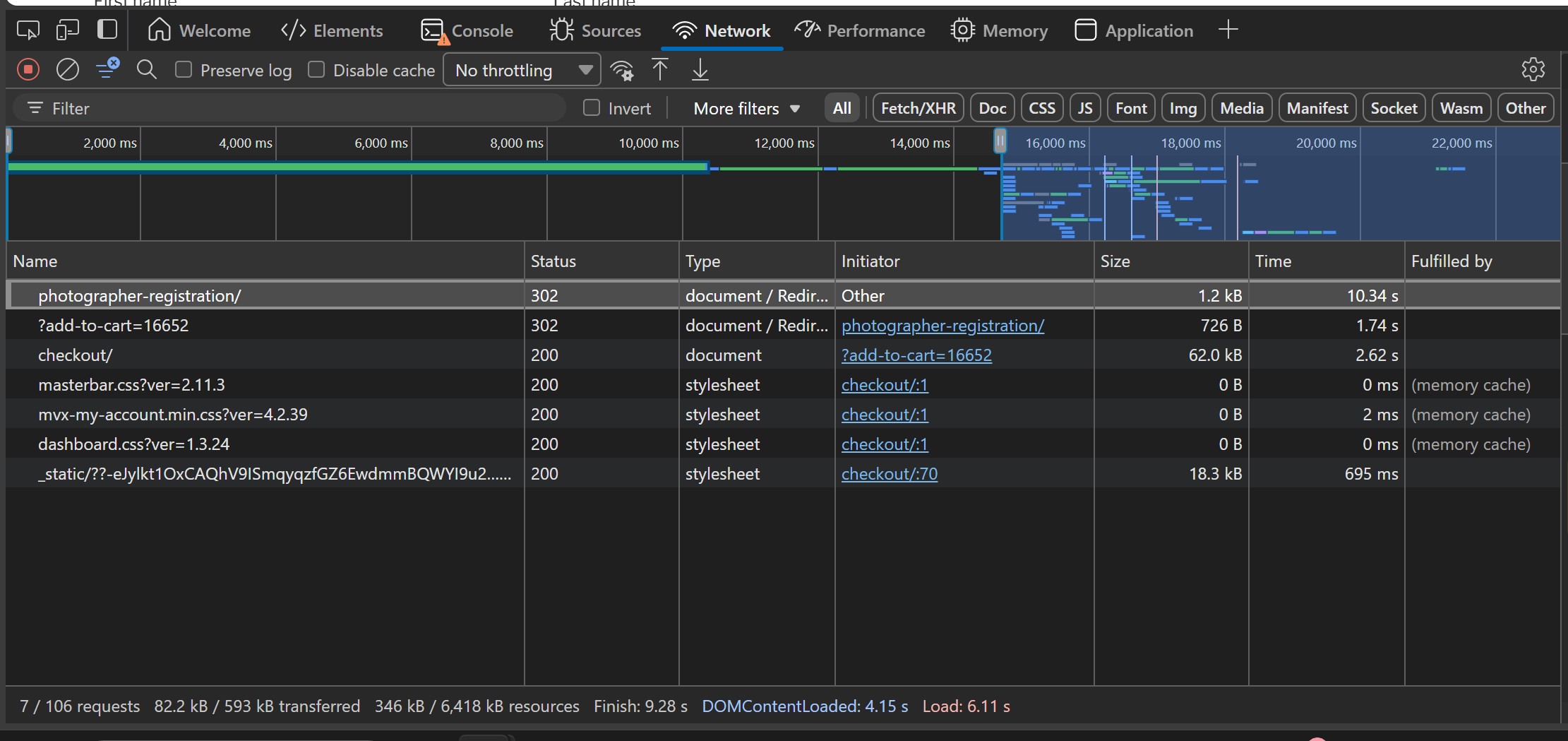
Here is the debug file[03-Jan-2026 10:09:56 UTC] PHP Deprecated: Creation of dynamic property WCPA_Settings::$dir is deprecated in /srv/htdocs/wp-content/plugins/woo-custom-product-addons-pro/includes/class-wcpa-settings.php on line 46 [03-Jan-2026 10:09:56 UTC] PHP Deprecated: Creation of dynamic property WCPA_Settings::$assets_url is deprecated in /srv/htdocs/wp-content/plugins/woo-custom-product-addons-pro/includes/class-wcpa-settings.php on line 47 [03-Jan-2026 10:09:56 UTC] PHP Deprecated: Creation of dynamic property WCPA_Updater::$beta is deprecated in /srv/htdocs/wp-content/plugins/woo-custom-product-addons-pro/includes/class-wcpa-updater.php on line 36 [03-Jan-2026 10:09:59 UTC] PHP Warning: session_start(): Session cannot be started after headers have already been sent in /srv/htdocs/wp-content/plugins/mvx-pro/modules/marketplace-membership/mvx-pro-marketplace-membership.php on line 21 [03-Jan-2026 10:10:04 UTC] PHP Warning: session_start(): Session cannot be started after headers have already been sent in /srv/htdocs/wp-content/plugins/mvx-pro/modules/marketplace-membership/mvx-pro-marketplace-membership.php on line 21 [03-Jan-2026 10:10:09 UTC] PHP Notice: Function WP_HTML_Tag_Processor::set_attribute was called <strong>incorrectly</strong>. Invalid attribute name. Please see <a href="https://developer.wordpress.org/advanced-administration/debug/debug-wordpress/">Debugging in WordPress</a> for more information. (This message was added in version 6.2.0.) in /wordpress/core/6.9/wp-includes/functions.php on line 6131 [03-Jan-2026 10:10:09 UTC] PHP Notice: Function WP_HTML_Tag_Processor::set_attribute was called <strong>incorrectly</strong>. Invalid attribute name. Please see <a href="https://developer.wordpress.org/advanced-administration/debug/debug-wordpress/">Debugging in WordPress</a> for more information. (This message was added in version 6.2.0.) in /wordpress/core/6.9/wp-includes/functions.php on line 6131 [03-Jan-2026 10:10:30 UTC] PHP Deprecated: Creation of dynamic property WCPA_Settings::$dir is deprecated in /srv/htdocs/wp-content/plugins/woo-custom-product-addons-pro/includes/class-wcpa-settings.php on line 46 [03-Jan-2026 10:10:30 UTC] PHP Deprecated: Creation of dynamic property WCPA_Settings::$assets_url is deprecated in /srv/htdocs/wp-content/plugins/woo-custom-product-addons-pro/includes/class-wcpa-settings.php on line 47 [03-Jan-2026 10:10:30 UTC] PHP Deprecated: Creation of dynamic property WCPA_Updater::$beta is deprecated in /srv/htdocs/wp-content/plugins/woo-custom-product-addons-pro/includes/class-wcpa-updater.php on line 36 [03-Jan-2026 10:10:32 UTC] PHP Warning: session_start(): Session cannot be started after headers have already been sent in /srv/htdocs/wp-content/plugins/mvx-pro/modules/marketplace-membership/mvx-pro-marketplace-membership.php on line 21 [03-Jan-2026 10:11:12 UTC] PHP Warning: session_start(): Session cannot be started after headers have already been sent in /srv/htdocs/wp-content/plugins/mvx-pro/modules/marketplace-membership/mvx-pro-marketplace-membership.php on line 21 [03-Jan-2026 10:11:15 UTC] PHP Warning: session_start(): Session cannot be started after headers have already been sent in /srv/htdocs/wp-content/plugins/mvx-pro/modules/marketplace-membership/mvx-pro-marketplace-membership.php on line 21 [03-Jan-2026 10:11:26 UTC] PHP Deprecated: Creation of dynamic property WCPA_Settings::$dir is deprecated in /srv/htdocs/wp-content/plugins/woo-custom-product-addons-pro/includes/class-wcpa-settings.php on line 46 [03-Jan-2026 10:11:26 UTC] PHP Deprecated: Creation of dynamic property WCPA_Settings::$assets_url is deprecated in /srv/htdocs/wp-content/plugins/woo-custom-product-addons-pro/includes/class-wcpa-settings.php on line 47 [03-Jan-2026 10:11:26 UTC] PHP Deprecated: Creation of dynamic property WCPA_Updater::$beta is deprecated in /srv/htdocs/wp-content/plugins/woo-custom-product-addons-pro/includes/class-wcpa-updater.php on line 36Also, please see attached image of the ‘Network’ Tab… you can see considerable amount of time was spent on loading the /photographer-registration page
Attachments:
-
January 3, 2026 at 4:15 PM #251113Keymaster
Hi There,
Thank you for sharing the logs. However as shared earlier, we’re unable to reproduce the same issue on our end. To help us investigate this more effectively, it would be really helpful if you could create a staging site (a replica of your live site) where the issue can be reproduced.
Once done please share the staging site access along with the FTP details with us so we can thoroughly check the vendor registration flow and assist you further.
Also while sharing the access details, kindly ensure that your reply is marked as private.
We will look forward to hearing back from you.
-
January 3, 2026 at 4:59 PM #251119ParticipantThis reply has been marked as private.
-
January 3, 2026 at 5:40 PM #251120Keymaster
Thank you for sharing the access details. Kindly provide us some time to check and we will get back to you accordingly.
-
January 5, 2026 at 11:34 AM #251137Keymaster
Hello There,
We’ve checked the registration flow on the staging site you shared using only the default theme and default plugins enabled, and we did not experience any unusual delay after clicking the Register button. The time taken was simply the standard page loading time after the button was clicked. You can review our test here for reference: https://www.awesomescreenshot.com/video/48032961?key=d6dfa1a0ca606d88d9f6004ef34a18f4.
Now, we kindly request you to test the same setup on your end using the same three plugins and a default theme. If you are noticing a delay under a different condition or at a different step, please let us know specifically where the delay occurs.
We will look forward to hearing back from you.
-
January 5, 2026 at 6:23 PM #251141Participant
Hi,
Thank you very much for performing the test and confirming.
Since the issue lies within loading the /photographer-registration page (as per above image), how can I deep-dive into analysing what is happening during that time period? Is there perhaps some code that can output the processing into the debug file? I’d appreciate your advice how we can have further insight into what is occurring during that extended processing period.
Thanks -
January 5, 2026 at 6:59 PM #251142Keymaster
Hi there,
Thank you for getting back.
If you’d like to review what’s happening during the delay, you can check the Network tab in your browser’s developer tools. Simply open the /photographer-registration page, and the Network panel will show the requests and processes being triggered while the page is loading, which should give you some visibility into the delay.
That said, we kindly request you not to spend additional time investigating this further on your end. Our team has already reviewed these behaviors as part of the ongoing revamp, and the updated version is designed to address such performance-related issues comprehensively. With the revamped version, you should no longer encounter this type of delay going forward.
Thank you again for your patience and understanding. Please feel free to reach out if you have any other questions or need further assistance.
-
January 5, 2026 at 7:05 PM #251144Participant
Noted. Thanks 🙂
-
January 5, 2026 at 8:08 PM #251152Keymaster
We’re happy to assist and will keep you informed of updates regarding the revamp.
-
-
AuthorPosts
- You must be logged in to reply to this topic.
