






- This topic has 17 replies, 2 voices, and was last updated 4 months ago by
Sangita Support Squad.
-
AuthorPosts
-
-
August 23, 2025 at 7:09 PM #249535
gymscouteracc
ParticipantWhen I go to the WooCommerce payment and I click manage the MVX Stripe Marketplace, I get a blank screen.
Other payment I get an error. There has been a critical error on this website. Please check your site admin email inbox for instructions. If you continue to have problems, please try the support forums.
and send me an email
WordPress έκδοση 6.8.2
Ενεργό θέμα: Listeo Child (έκδοση 1.9.68)
Τρέχων πρόσθετο: MultiVendorX Pro (έκδοση 1.3.24)
Έκδοση PHP 8.4.11
Λεπτομέρειες σφάλματος
===========================================
Ένα σφάλμα τύπου E_ERROR εντοπίστηκε στη γραμμή 112 του αρχείου /usr/www/users/gymscn/wp-content/plugins/mvx-pro/modules/stripe-marketplace/includes/abstract-mvx-stripe-payment-gateway.php. Κωδικός σφάλματος: Uncaught Error: Call to undefined function woocommerce_gateway_stripe() in /usr/www/users/gymscn/wp-content/plugins/mvx-pro/modules/stripe-marketplace/includes/abstract-mvx-stripe-payment-gateway.php:112
Stack trace:
#0 /usr/www/users/gymscn/wp-content/plugins/mvx-pro/modules/stripe-marketplace/includes/abstract-mvx-stripe-payment-gateway.php(102): MVX_Stripe_Payment_Gateway->render_upe_settings()
#1 /usr/www/users/gymscn/wp-content/plugins/woocommerce/includes/admin/settings/class-wc-settings-payment-gateways.php(267): MVX_Stripe_Payment_Gateway->admin_options()
#2 /usr/www/users/gymscn/wp-content/plugins/woocommerce/includes/admin/settings/class-wc-settings-payment-gateways.php(253): WC_Settings_Payment_Gateways->run_gateway_admin_options()
#3 /usr/www/users/gymscn/wp-content/plugins/woocommerce/includes/admin/settings/class-wc-settings-payment-gateways.php(131): WC_Settings_Payment_Gateways->render_classic_gateway_settings_page()
#4 /usr/www/users/gymscn/wp-includes/class-wp-hook.php(324): WC_Settings_Payment_Gateways->output()
#5 /usr/www/users/gymscn/wp-includes/class-wp-hook.php(348): WP_Hook->apply_filters()
#6 /usr/www/users/gymscn/wp-includes/plugin.php(517): WP_Hook->do_action()
#7 /usr/www/users/gymscn/wp-content/plugins/woocommerce/includes/admin/views/html-admin-settings.php(78): do_action()
#8 /usr/www/users/gymscn/wp-content/plugins/woocommerce/includes/admin/class-wc-admin-settings.php(190): include(‘/usr/www/users/…’)
#9 /usr/www/users/gymscn/wp-content/plugins/woocommerce/includes/admin/class-wc-admin-menus.php(358): WC_Admin_Settings::output()
#10 /usr/www/users/gymscn/wp-includes/class-wp-hook.php(324): WC_Admin_Menus->settings_page()
#11 /usr/www/users/gymscn/wp-includes/class-wp-hook.php(348): WP_Hook->apply_filters()
#12 /usr/www/users/gymscn/wp-includes/plugin.php(517): WP_Hook->do_action()
#13 /usr/www/users/gymscn/wp-admin/admin.php(260): do_action()
#14 {main} thrown -
August 23, 2025 at 7:21 PM #249536
Sangita Support Squad
KeymasterHi there, Sorry to hear that you have faced an issue on your end. I have shared the error details to the dev team and they are looking into it.
Kindly provide us some time and we will get back to you accordingly.
-
August 25, 2025 at 10:20 AM #249548Keymaster
Hello there,
Thank you for reaching out. We’ve thoroughly checked on our end but were unable to replicate the issue you’re experiencing. To assist you better, we kindly request you to create a staging site (an exact replica of your live site) where the issue can be reproduced.
Once created, please share the staging site URL along with temporary admin and FTP access so that our team can investigate further. Also while sharing the access don’t forget to mark your reply as private.
We look forward to your response.
-
August 25, 2025 at 2:55 PM #249572ParticipantThis reply has been marked as private.
-
August 25, 2025 at 4:03 PM #249573Keymaster
Hi there,
Thank you for the update. In that case, please take a full backup of your live site and then share the access details (including the FTP account) with us. This will allow our team to debug the issue directly and provide you with a fix.
We’ll look forward to your confirmation.
-
August 25, 2025 at 11:58 PM #249577
Anushka Sinha
ModeratorThis reply has been marked as private. -
August 26, 2025 at 12:08 AM #249578Participant
https://gymscouter.com/ thanks
-
August 26, 2025 at 10:12 AM #249579Keymaster
Hello there,
Thank you for sharing the access details. However, the user account provided does not have admin privileges. Kindly update the user role to Administrator and confirm if we have permission to deactivate plugins and themes on your site while troubleshooting the issue.
Additionally, for the FTP details, we’ll also need the host name. Also while sharing access details always make sure to mark your reply as private.
Please review and share the required information so we can proceed further.
-
August 26, 2025 at 11:04 AM #249584ParticipantThis reply has been marked as private.
-
August 26, 2025 at 11:38 AM #249585Keymaster
Hi there,
Thank you for updating the user role. We logged into your site and followed the exact steps you mentioned, but we weren’t able to replicate any errors. Regarding the blank screen, please note that there are no additional settings under that option—you simply need to enable it.
Now for assistance with configuring the MVX Stripe Marketplace, kindly navigate to MultiVendorX >> Payments and complete the setup accordingly. You may also find our documentation here for your guidance: https://multivendorx.com/docs/knowledgebase/stripe-marketplace/.
If you face any further issues or need assistance, please feel free to reach out—we’ll be happy to help.
-
September 3, 2025 at 12:51 PM #249698Participant
I fixed the problem, but I’m having trouble setting it up so that when a customer makes a purchase, the money goes directly to the vendor and not to my Stripe account.
-
September 3, 2025 at 1:56 PM #249699Keymaster
Hello there,
We’re glad to hear that you were able to resolve the issue on your end.
Regarding your query about paying vendors directly (without the full payment passing through the admin’s account), you can set the Stripe charge type to Direct. Once enabled, when a customer places an order, the admin’s commission will be credited to the admin’s account, and the vendor will receive their earnings directly.
For more details on different charge types, you can refer to our documentation here: https://multivendorx.com/docs/knowledgebase/stripe-marketplace/#stripe-marketplace-configuration-by-the-administrator.
Please note, however, that with the charge type set as Direct, payments can only be processed for one vendor at a time, since Stripe does not support splitting direct payments across multiple accounts simultaneously.
Let us know if you need any further assistance.
-
September 3, 2025 at 2:22 PM #249701Participant
For one vendor at a time
The correct settings are:
Stripe Connect Account Types: Standard
Stripe Charges: Direct Charges -
September 3, 2025 at 3:41 PM #249702Keymaster
Hello there, Yes, you are absolutely right. Please go ahead and configure the settings accordingly and check on your end.
If you need any further assistance, please don’t hesitate to let us know.
-
September 3, 2025 at 7:37 PM #249704Participant
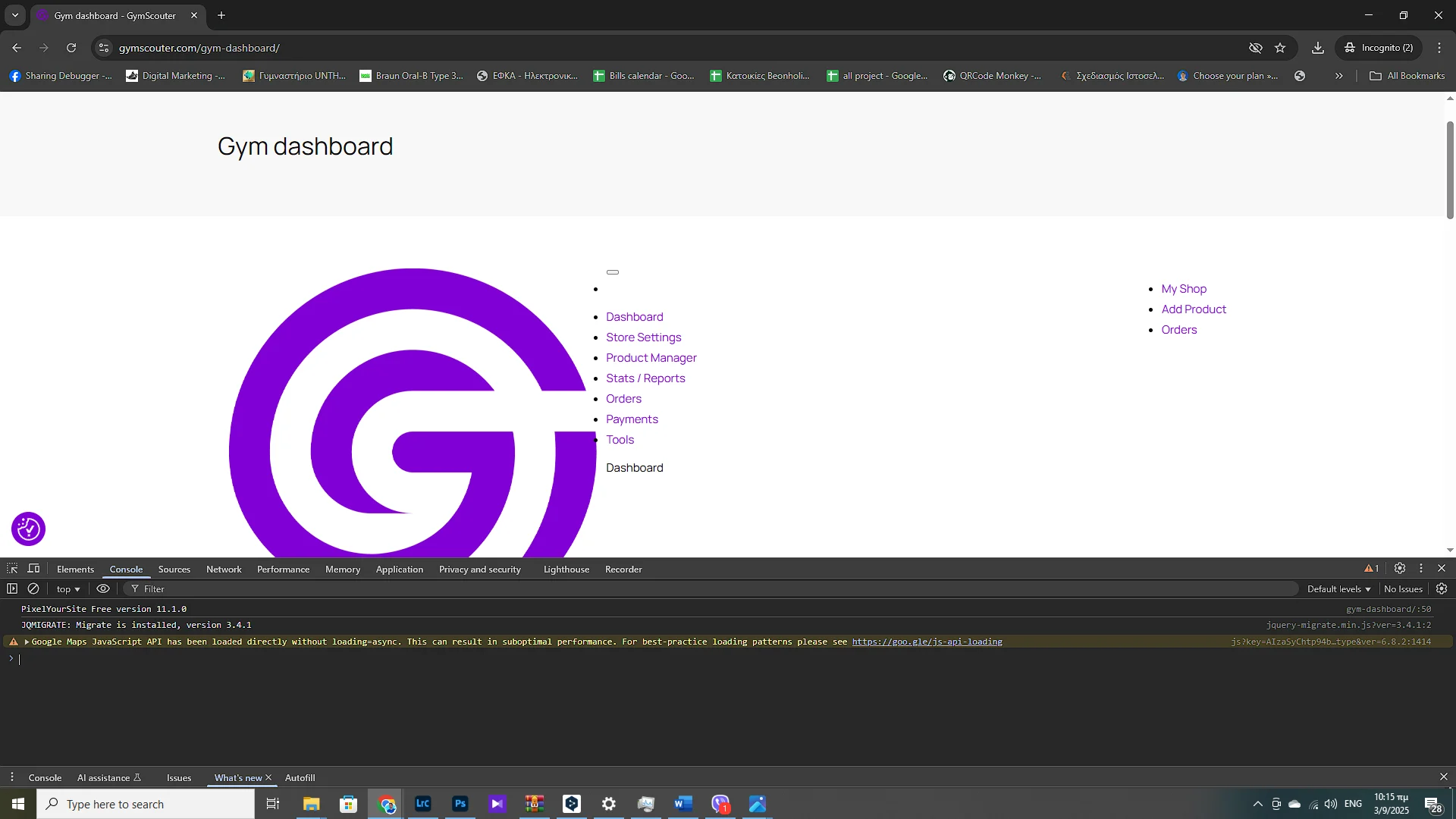
Hi right now i found another problem the main dashboard stop working correct. I send Screenshot
-
September 3, 2025 at 7:39 PM #249705ParticipantThis reply has been marked as private.
-
September 3, 2025 at 7:46 PM #249706Keymaster
Sorry to hear you’re experiencing this issue.
Please follow these steps to check the settings:
— Go to Admin Dashboard
— Navigate to MultiVendorX → Settings → General
— In the Vendor Dashboard Page section, make sure to select the page where you’ve added the vendor dashboard shortcode.
After updating this, please check if the issue is resolved.
If you need any further assistance, feel free to let us know. We’re here to help!
-
November 8, 2025 at 5:10 PM #250326Keymaster
Hello There, We haven’t heard from you in a while, so we’re assuming your issue has been resolved. We’ll be closing this thread for now.
If you need any further assistance or encounter any issues in the future, please feel free to create a new support thread – we’ll be happy to help.
-
-
AuthorPosts
- The topic ‘MVX Stripe Marketplace payment not working’ is closed to new replies.
