






- This topic has 92 replies, 2 voices, and was last updated 1 year, 4 months ago by
Sangita Support Squad.
-
AuthorPosts
-
-
November 4, 2024 at 9:24 PM #236613
Mike Staub
ParticipantHello, a question, the widget for the shop owner is activated on the left side. I can then set filters, images or whatever and nothing is displayed, any ideas?
Regards
-
November 5, 2024 at 11:01 AM #236621
Sangita Support Squad
Keymaster@Mike Staub, We’re sorry to hear you’ve encountered an issue. We’ve reviewed the process of adding widgets to the vendor store sidebar, and they appear to be displaying correctly (https://prnt.sc/-2ShKRfG6r9G).
Since you’re experiencing difficulties with widgets on the sidebar, please try the following steps:
1. Deactivate all plugins except WooCommerce and MultiVendorX.
2. Switch to a default theme, such as Twenty Twenty-Four or Storefront, and check if the issue persists.If the problem continues, please create a staging site that’s an exact replica of your live site. Share the staging site URL, along with temporary admin and FTP access, so we can investigate further and provide assistance.
While sharing the access don’t forget to mark your reply as private. -
November 5, 2024 at 2:02 PM #236627ParticipantThis reply has been marked as private.
-
November 5, 2024 at 3:08 PM #236636Keymaster
@Mike Staub, Great to hear that the widgets are displaying correctly on your end!
For changing the vendor banner image, go to Admin Dashboard > Vendors, select the vendor, and upload a store banner image under the Store section (https://prnt.sc/aZQnSSk_i-jC). Vendors can also update this by going to Vendor Dashboard > Store Settings > Storefront.
For the vendor list page, could you please provide more details about the changes you’re looking to make? This will help us assist you further
-
November 5, 2024 at 6:56 PM #236639Participant
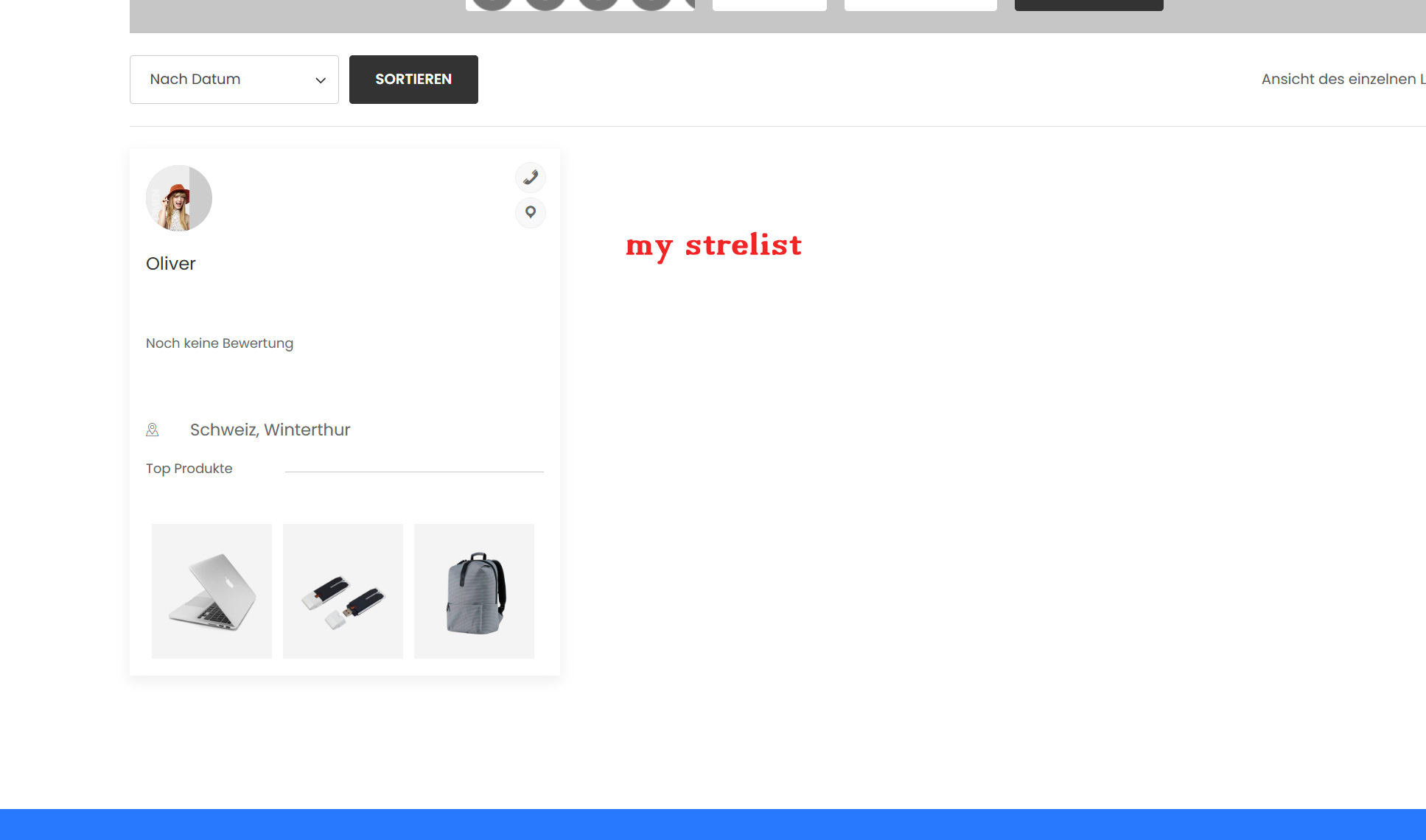
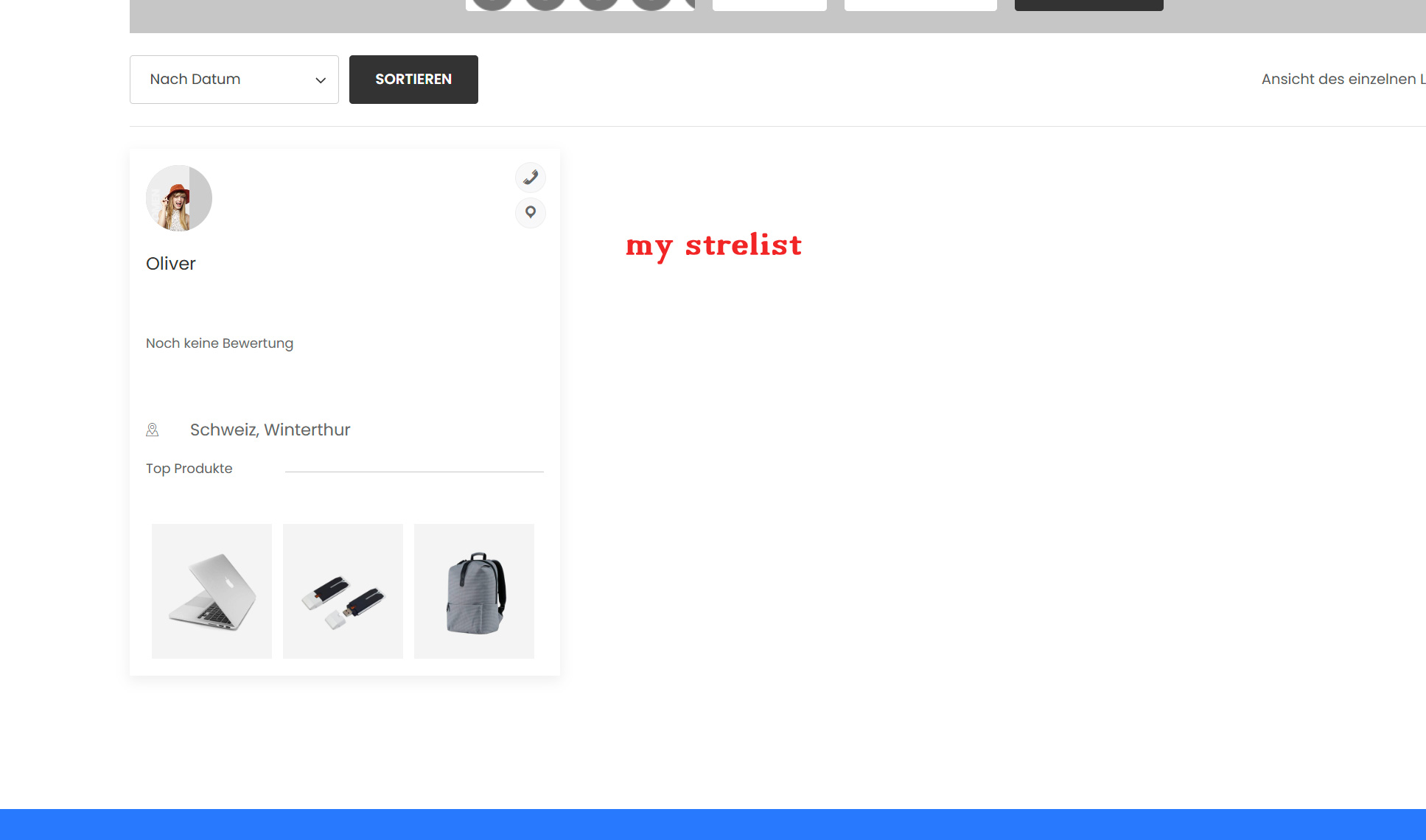
thanks for the info, but I know how the banner works, but the layout in the photo is not available as a selection. As soon as a seller uploads a product, the shopping basket buttons for these products no longer work “normal” see image. I am very happy for your support. thank you
on the photo mystorelist you can see how it looks like for me
Attachments:
-
November 5, 2024 at 6:58 PM #236643Participant
One image more, sorry for normalm admin products isent a button , i dont like the button ad to basket at to if i go wihte the mous over the product.
Attachments:
-
November 5, 2024 at 9:06 PM #236646Keymaster
Hi there, Thanks for getting back to us. Regarding the add to Cart button that comes from your theme so I would suggest you to reach out to your theme as they will be better equipped to assist you with this.
For the image on vendor store banner kindly share the store link with us so that we can look into it and assist you further.
-
November 6, 2024 at 9:54 AM #236654Participant
I cant see my reply , why
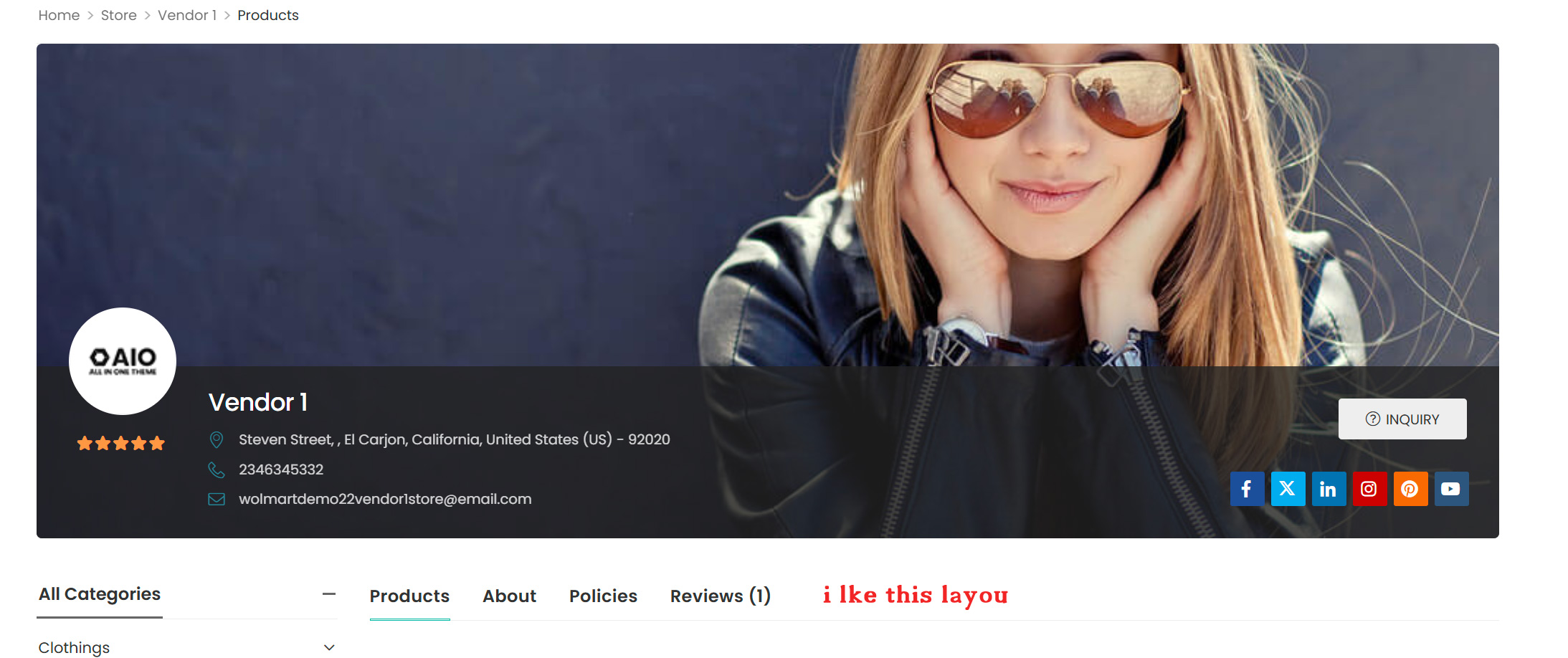
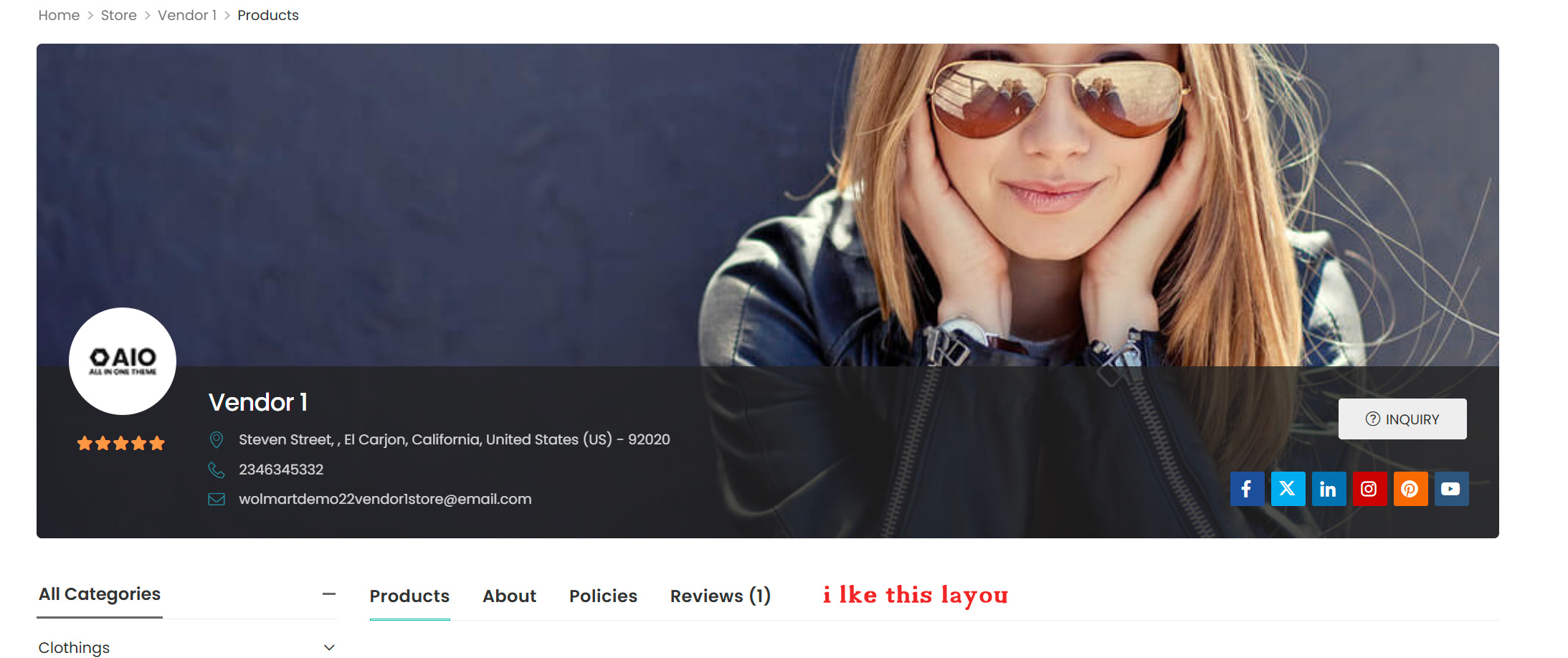
i like this : https://d-themes.com/wordpress/wolmart/demo-4/store-listing/
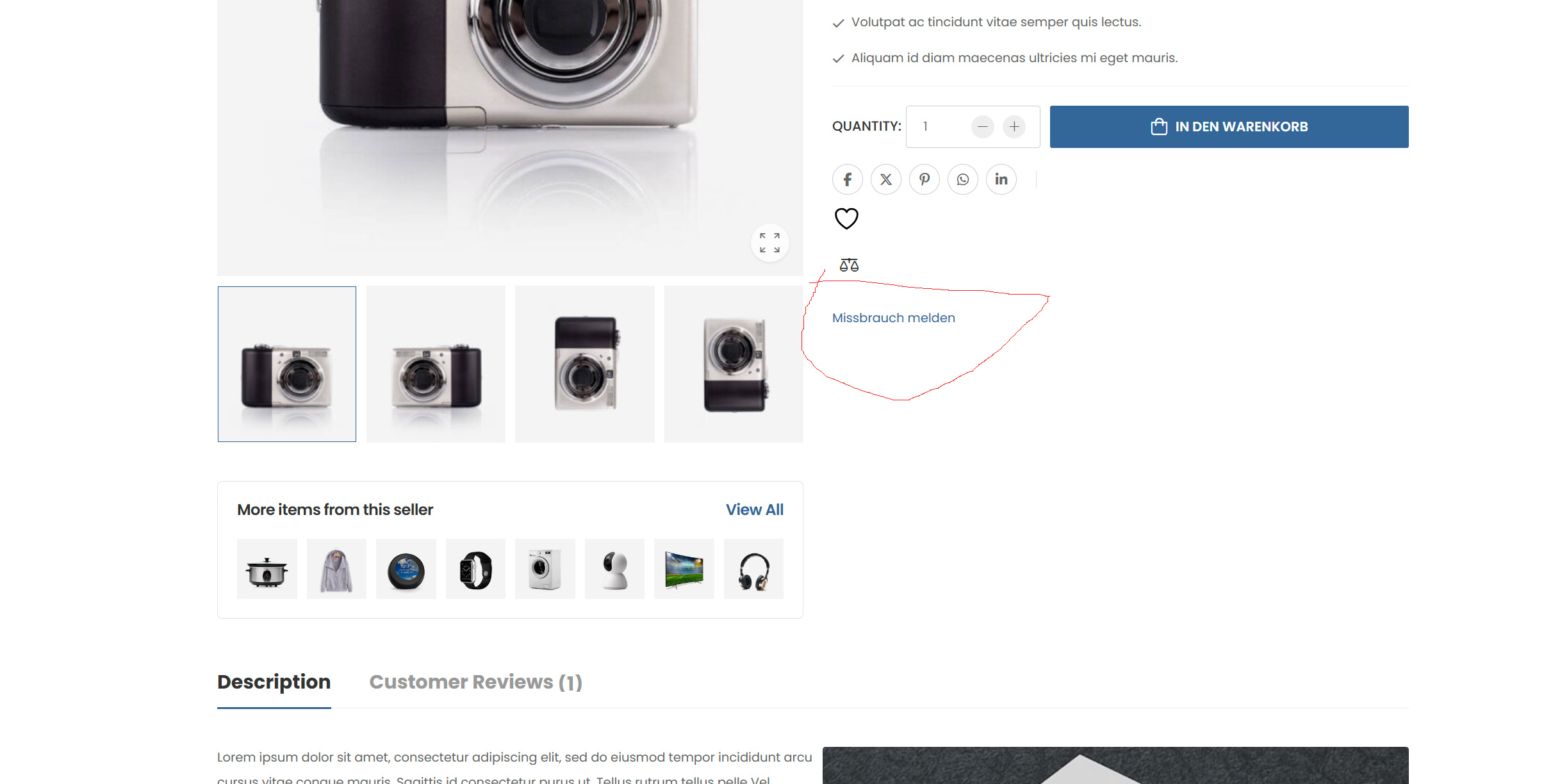
This Vendor Shop Banner Layout : https://d-themes.com/wordpress/wolmart/demo-4/store/vendor1/how can i delete “Report abuse”on Product Page ? Modul ar deactivatet , dosent help ?
THX
-
November 6, 2024 at 9:55 AM #236651ParticipantThis reply has been marked as private.
-
-
November 5, 2024 at 11:52 PM #236652Participant
In cant answer any more
Hello
i like this : https://d-themes.com/wordpress/wolmart/demo-4/store-listing/
This Vendor Shop Banner Layout : https://d-themes.com/wordpress/wolmart/demo-4/store/vendor1/how can i delete “Report abuse”on Product Page ? Modul ar deactivatet , dosent help ?
THX
-
November 6, 2024 at 9:54 AM #236648Participant
The site is not online yet, testing. At the storelist ist the vendorbox is only the aventar but backround is white
How can delete the Report abuse ? The modul is not acive. the ad to basket button works normal , but if your plugin is activ, not .i like this Banner : https://d-themes.com/wordpress/wolmart/demo-4/store/vendor1/
Vendor list zhis one is ok. https://d-themes.com/wordpress/wolmart/demo-4/store-listing/
But i cnt find it at your plugin .
Regards.
Is the MVX Core the free version? . i now both must be active.
-
November 6, 2024 at 9:55 AM #236650Participant
Hello
i like this : https://d-themes.com/wordpress/wolmart/demo-4/store-listing/
This Vendor Shop Banner Layout : https://d-themes.com/wordpress/wolmart/demo-4/store/vendor1/how can i delete “Report abuse”on Product Page ? Modul ar deactivatet , dosent help ?
THX
-
November 6, 2024 at 9:55 AM #236653Participant
Hello i dont see my repy
i like this : https://d-themes.com/wordpress/wolmart/demo-4/store-listing/
This Vendor Shop Banner Layout : https://d-themes.com/wordpress/wolmart/demo-4/store/vendor1/how can i delete “Report abuse”on Product Page ? Modul ar deactivatet , dosent help ?
THX
-
November 6, 2024 at 10:17 AM #236672Keymaster
Hello, Thank you for getting back to us.
As for the theme, the team has confirmed that their theme is compatible with our plugin, and we have also listed the Wolmart theme in our compatible themes here :https://multivendorx.com/third-party-themes/ .
Regarding the “Report Abuse” option on the product page, we have reviewed the functionality and it is working fine. Once the “Report Abuse” module is disabled, the option should be removed from the product page(https://prnt.sc/zTYUoR0et1Dx).
Please check the setup on your end by deactivating all plugins except WooCommerce and MultiVendorX and switching to a default theme like Twenty Twenty-Four or Storefront.
If you need further assistance, please feel free to reach out.
-
November 6, 2024 at 2:37 PM #236675ParticipantThis reply has been marked as private.
-
November 6, 2024 at 3:31 PM #236679Keymaster
@Mike Staub, Could you please check on your end by deactivating all plugins except WooCommerce and MultiVendorX? Additionally, try switching to a default theme like Twenty Twenty-Four or Storefront to see if the issues you mentioned persist.
Also please do keep us posted about your findings.
-
November 7, 2024 at 12:59 PM #236699ParticipantThis reply has been marked as private.
-
November 7, 2024 at 1:00 PM #236700ParticipantThis reply has been marked as private.
-
November 7, 2024 at 1:48 PM #236702Keymaster
@Mike Staub, Could you please share the temporary admin URL and login access for your staging site so we can look into the issue on your end and assist you further?
When sharing the access, kindly remember to mark your reply as private.
-
November 7, 2024 at 2:28 PM #236703ParticipantThis reply has been marked as private.
-
November 7, 2024 at 2:40 PM #236704ParticipantThis reply has been marked as private.
-
November 7, 2024 at 2:44 PM #236705Keymaster
Hello There, We are getting this https://prnt.sc/-ARNV1kcIB8Q while accessing your site.
-
November 7, 2024 at 2:53 PM #236706ParticipantThis reply has been marked as private.
-
November 7, 2024 at 3:02 PM #236707Keymaster
Thanks for sharing the updated URL. Can you please confirm if we can deactivate plugin/themes on your end to check the issue further.
-
November 7, 2024 at 3:18 PM #236708Participant
yes it is only for test, if your plugin 9is ok for us
-
November 7, 2024 at 4:29 PM #236710Keymaster
@Mike Staub, Thank you for confirming. We’ve deactivated the plugins and switched to the default theme, and the report abuse module is now working correctly. Please try reactivating the plugins and theme one at a time to identify which one may be causing the issue.
Keep us updated on your findings, and let us know if you need any further assistance
-
November 7, 2024 at 5:11 PM #236714Participant
Sorry what have you made, still the same . Ok if we can find a soloution maby your plugin ist not for us
and please what is wihte the vendorpage design , please look the image “Likethis”
Attachments:
-
November 7, 2024 at 5:12 PM #236718Participant
and why i try the standard theme wolmart is on your list
-
November 7, 2024 at 5:23 PM #236720Keymaster
@Mike Staub, We tested the report abuse module with all plugins deactivated and the default Twenty Twenty-Four theme enabled, and it worked correctly. Since the issue reappeared after you reactivated your plugins and theme, we recommend deactivating them first and then re-enabling each plugin and theme one at a time to identify the cause of the conflict.
Regarding the vendor list page and store banner, we haven’t applied any modifications. Could you please share the vendor list page URL with us and let us know what specific background color modifications you’re looking for? For the vendor store page, please provide temporary vendor access so we can check the issue with the banner. Also, sharing the banner image you’re using would help us test effectively.
-
November 7, 2024 at 5:30 PM #236722Participant
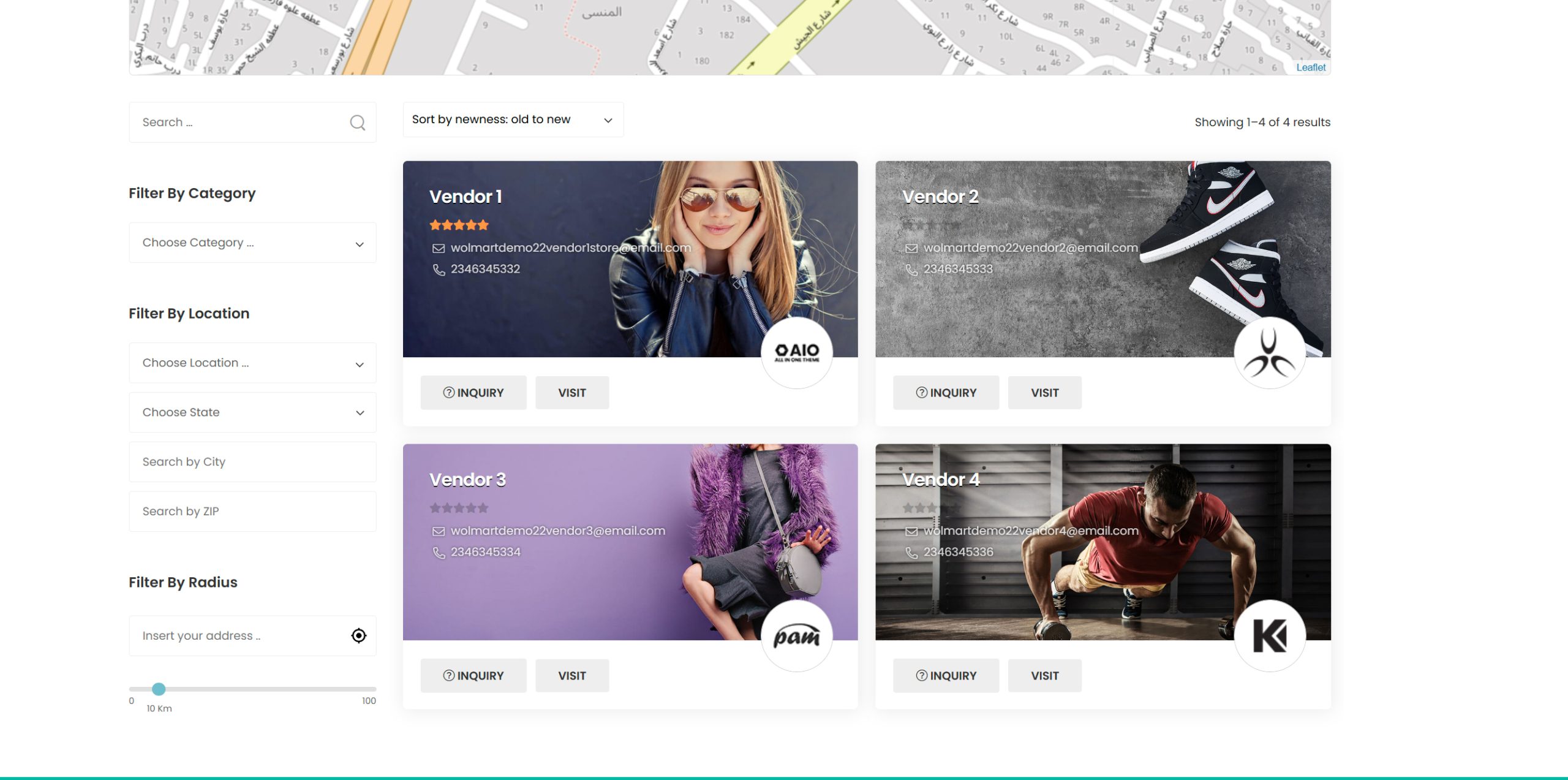
Layout is the same like befor. LOOK IMAGE AND YOU SE WHAT I MEAN. backround is blank noch image at vendor if you look to the vendor list
Attachments:
-
November 7, 2024 at 5:43 PM #236727Participant
vl image this must be at the vendor list page
-
November 7, 2024 at 6:09 PM #236728Keymaster
Hi @Mike Staub, Thank you for sharing the images.
It seems you’re referring to the demo vendor list page from the Wolmart theme (https://d-themes.com/wordpress/wolmart/demo-4/store-listing/), where the store list page includes a banner image. This specific layout and design are unique to the Wolmart theme, so if you’d like this look on your site, I’d recommend reaching out to the Wolmart theme team for assistance.
In contrast, our MultiVendorX plugin has its own vendor list page, displaying the vendor logo. You can view an example of our vendor list page here: https://cus.dualcube.com/mvx1/vendor-list/.
Since your site is currently using our MultiVendorX vendor list shortcode, it’s following our design. So for the Wolmart theme’s vendor list page design, please contact their team. And of course, if there’s anything further we can assist with, feel free to let us know.
-
November 7, 2024 at 7:00 PM #236730Participant
report abuse is still on the product page, alle plugin deactivate only yours
-
November 7, 2024 at 8:23 PM #236739Keymaster
Kindly check once by switching to a default theme such as twenty twenty four or storefront.
Also keep us posted about your findings. -
November 7, 2024 at 8:25 PM #236740Participant
why wolmart is a theme what is on your site
-
November 7, 2024 at 8:45 PM #236741Keymaster
Mike, we sincerely apologize for any inconvenience caused. It’s possible we may not fully understand what you’re trying to convey, so we kindly invite you to schedule a meeting with our team using this link: https://calendly.com/contact-hkdq/30min?month=2024-11. This will allow us to discuss your concerns in detail and provide the assistance you need.
Thank you for your patience!
-
November 8, 2024 at 10:55 PM #236770Participant
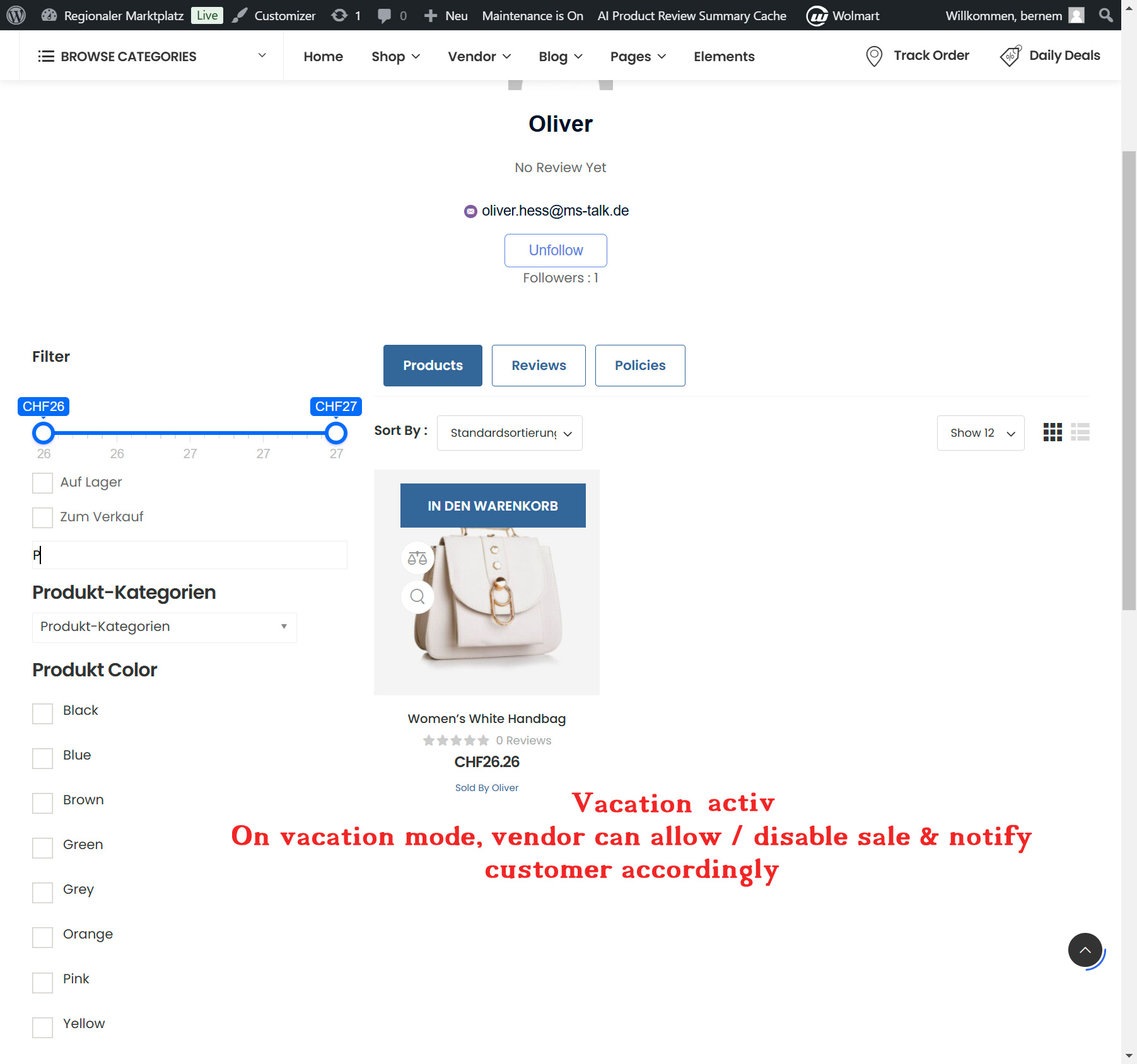
Hello, when the holiday module is on, the shopping basket button is no longer correct. And this misuse hint is still there and shows ‘Java script 0, whatever that means
Attachments:
-
November 9, 2024 at 10:45 AM #236777Keymaster
@Mike Staub, regarding the missing ‘Add to Cart’ option when the vacation module is enabled, please go to the Admin Dashboard > MultiVendorX > Vendors > select the vendor, click ‘Edit Vendor,’ then go to the ‘Vendor Vacation’ tab. Check if the ‘Would you like to avoid any purchase on Holidays?’ option is enabled (https://prnt.sc/QZOvphmKaA50). To display the ‘Add to Cart’ option on the store page, simply disable this setting.
For the assistance with the “Report abuse” button as requested earlier kindly schedule a meeting with our team using this link: https://calendly.com/contact-hkdq/30min?month=2024-11. This will allow us to discuss your concerns in detail and provide the assistance you need.
-
November 9, 2024 at 5:09 PM #236785Participant
Hello and thank you, but I don’t know if you understand me, it’s about the layout, when the vacation module is active, the ad to basket appears at the top and not at the bottom like normal, see the photo, please and thank you
-
November 9, 2024 at 5:20 PM #236787Participant
Please look to the image and see the Layout . Holiday module active, the first product is a vendor product and the laptop does not have the layout correct. When I deactivate the module both look the same, i.e. normal with a black background
Attachments:
-
November 9, 2024 at 5:34 PM #236789Keymaster
@Mike Staub, thank you for the correction. Could you please share a list of the issues you’re experiencing on your end? Additionally, if possible, please provide temporary admin access to your staging site so I can review these directly and assist you further.
Please also confirm whether I have permission to deactivate themes and plugins on your site to investigate the issues.
When sharing access, kindly mark your reply as private. Thank you!
-
November 9, 2024 at 6:20 PM #236790ParticipantThis reply has been marked as private.
-
November 9, 2024 at 6:25 PM #236791Keymaster
@Mike Staub, thank you for sharing the details and providing access information. Please allow us some time to review the issues you’ve mentioned on your end, and we’ll get back to you with our findings.
-
November 9, 2024 at 6:39 PM #236792Participant
OK THX
-
November 9, 2024 at 8:38 PM #236793Keymaster
Thank you for your understanding. We will keep you posted accordingly.
-
November 11, 2024 at 12:53 PM #236808Keymaster
Hello There, Thank you for your cooperation. Our responses to your queries are below:
1. Report Abuse Module: After testing with the default plugins and theme activated, we found no issues with the button on the product page. You can view the demonstration here: https://www.awesomescreenshot.com/video/33470433?key=7f3caff34efdcafeb2e127a36854e210. It appears the issue may stem from your theme, so we recommend reaching out to your theme provider for further assistance.
2. Vacation Module Issue: Could you please confirm if we have your permission to delete the existing MultiVendorX and MultiVendorX Pro plugins on your site and replace them with new plugin files for testing purposes?
-
November 11, 2024 at 1:27 PM #236809Participant
Hello and thank you the video is with a standard theme. According to your website, wolmart is compatible, so where should be the problem. Yes you can delete the plugin, how long do you need ?
Regards -
November 11, 2024 at 1:45 PM #236810Keymaster
@Mike Staub, Thank you for your quick response. The Wolmart theme’s compatibility with our plugin was confirmed by the theme’s developers, though we haven’t tested it ourselves. Since the issue seems to be caused by a conflict with the theme, we recommend reaching out to their support team. They’re best positioned to assist you, as they’ve implemented custom adjustments for compatibility, and we don’t have access to their code.
Regarding the Vacation module, please allow us some time to test it with new plugin files. We’ll update you as soon as we have more information.
Thank you for your patience!
-
November 11, 2024 at 1:50 PM #236811Participant
Ok but i have to work on the page
-
November 11, 2024 at 2:21 PM #236812Keymaster
@Mike Staub, Our team is currently investigating the “Add to Cart” appearance issue with the Vacation module. Please allow us some time, and we’ll update you as soon as we have more information.
Thank you for your patience!
-
November 12, 2024 at 12:34 PM #236859Participant
ello, how longe you need to fix the issue ? I have to work on the page, if you cant fix it please refund .
THX -
November 12, 2024 at 12:44 PM #236861Keymaster
@Mike Staub, Our team is debugging the issue on our end. So you can definately keep working on your site. As soon as we will have an update for you we will keep you posted.
Thanks for your understanding and cooperation so far.
-
November 13, 2024 at 1:51 PM #236874Participant
Hello any news about the refund , or the problems ?
-
November 13, 2024 at 2:14 PM #236875Keymaster
@Mike Staub, Thank you for your cooperation. We’ve applied a fix for the issue with the “Add to Cart” button in the vacation module and have implemented it on your site as well. The previous issue should now be resolved, and you can check this directly on your site.
However, we identified some additional issues, and our team is actively working on these. We aim to have a complete fix by the end of the day.
Thank you again for your patience.
-
November 13, 2024 at 4:44 PM #236880Participant
Hello, what have you changed, is this included in the plugin when I reinstall it, or do I have to ask every time? What other problems ? The one with the support button on the vendor page etc……I bdenke a refund is better .
Regards -
November 13, 2024 at 5:04 PM #236881Keymaster
@Mike Staub, No need to worry—we’ve already applied the fixed plugin on your site. This fix will also be included in our next official release, so when that version will be available, you can simply update the plugin without needing to apply any manual fixes.
Also currently, the setting for “Would you like to avoid any purchase on Holidays?” isn’t reflecting on frontend. However, our team is actively working on it, and we aim to have a fix ready by the end of the day. As soon as we will have the fix we will keep you posted accordingly.
Thank you once again for your understanding and cooperation.
-
November 13, 2024 at 5:09 PM #236882Participant
And the Get support button at the vendor page dosent work ?
-
November 13, 2024 at 5:38 PM #236889Keymaster
@Mike Staub, Thank you for informing us about the “Get Support” button. We’ve tested the flow on our end, and the button is functioning as expected. You can view our test here: https://www.awesomescreenshot.com/video/33565633?key=5b19601c13a917338f21a258486b74c1.
It seems that the issues you’re encountering may be due to a conflict with your theme. We kindly recommend performing a thorough test on your end to identify any further issues. Once you’ve compiled a list, please share it with us, and we’ll then share those with our team to assist you further in resolving them.
Thank you for your cooperation.
-
November 13, 2024 at 6:22 PM #236890Participant
Dosnt help me, if it works on your site. Again Wolmart is on your List .
-
November 13, 2024 at 6:42 PM #236892Keymaster
@Mike Staub, We’ve already implemented fixes for the issues related to our plugin, and these will be included in our next update, so you won’t experience these problems going forward.
However, the issues with the “Report Abuse” and “Get Support” buttons are due to conflicts with the Wolmart theme. We attempted to resolve these from our end, but since the issues originate from the theme itself, the necessary fixes will need to be made from theme authors.
That said, we do have a contact with the Wolmart theme team. If you can provide us with a list of the specific issues caused by this conflict, we’ll reach out to them on your behalf, and we’ll keep you updated on the progress.
Thank you for your understanding.
-
November 13, 2024 at 7:15 PM #236893Participant
Thank you. But I don’t understand that, on YOUR site it says Wolmart as compatible, alo but not. compatible means that everything works or ?
-
November 13, 2024 at 8:32 PM #236894Participant
For the Get support issue is loco Translate the problem
-
November 13, 2024 at 9:37 PM #236897Keymaster
There should not be any such issue with the loco translate plugin. However kindly provide us some time to check the same on our end and we will get back to you accordingly.
Thank you for your understanding. -
November 13, 2024 at 9:49 PM #236901Participant
Not the plugin , translation is the problem i think the permalinks
Sorr for my nervesTHX
-
November 14, 2024 at 11:47 AM #236924Keymaster
Hi @Mike Staub, With the Loco Translate plugin, we only translate the strings of our plugin. Could you please provide more details regarding the permalink issue you mentioned? This will help us understand the problem better and assist you accordingly.
Looking forward to hearing back from you with more details.
-
November 14, 2024 at 5:56 PM #236939Participant
Hello, it comes as I said 2 x abuse report and also 2 x sold by. the first I like .I do not want to say anything, but it looks like a conflict between Core and pro. I can no longer deny access now
thxAttachments:
-
November 14, 2024 at 6:04 PM #236941Participant
If i deactivat this point “Show product Seller” i see the first example “Sold by” but not at Product site and not at basket
-
November 14, 2024 at 6:52 PM #236945Participant
There is a conflict between the theme and the multivendorx plugin. For example, 2 x report abuse and also 2 x sold by etc. appear. The theme also has the function ‘Sold by’ and report abuse. I have written to the theme developer. you both need to do better
-
November 14, 2024 at 7:02 PM #236946Keymaster
Thank you for the update. Please keep us informed, and if the theme team needs any assistance from our side, we would be happy to help.
-
November 14, 2024 at 7:07 PM #236949Participant
OK. but i dont like to be a Tester 🙂
-
November 14, 2024 at 7:20 PM #236950Keymaster
Mike, Thank you for your response, and we completely understand your concern. Our goal is to ensure everything runs smoothly for you, and we’re committed to working closely with the theme team to resolve the conflict efficiently while minimizing any disruptions.
If you’d like, we can provide a temporary workaround to address the issue for now, but please note that a permanent fix would need to come from the theme author only.
Rest assured, we’ll do our best to address this swiftly. If there’s anything else we can assist you with in the meantime, please don’t hesitate to let us know!
-
November 15, 2024 at 3:10 PM #236968Participant
Hello,
is this ok now ?
In addition, the setting ‘Do you not want to make purchases on public holidays?’ is currently not displayed in the frontend. However, our team is actively working on this and we aim to have a solution ready by the end of the day. As soon as we have the solution, we will keep you informed. Thank you again for your understanding and co-operation.
-
November 15, 2024 at 3:21 PM #236970KeymasterThis reply has been marked as private.
-
November 15, 2024 at 10:27 PM #236979Participant
Oh men how i hate this.
Answer fom Theme Support:
“you are also using the Multivendor X Pro plugin. In this regard, I request you to contact plugin support once and ask them what they said. They are more specialized in their plugins and will guide you better in this regard.”
Please refund and answer to my refund request. I dont like to play Tennis , Plugin support hit and iwrite you you return to me and i write to Theme support .
No it is enough -
November 15, 2024 at 11:58 PM #236980Participant
Membership Produkt what it means this after the priche
Test Abo
Kategorie: Uncategorized
CHF 0.00 jede 1 tag
dont answer any more , Reund. A lot weast tine -
November 17, 2024 at 5:14 PM #237011Participant
Hello is this now your tactic not to answer, or what happens next?
AGAIN REFUND -
November 17, 2024 at 5:50 PM #237015Participant
First Refund request, no answer. 2, cant sent ” The form could not be submitted due to a security issue.
Funny
This is my second application for a refund. I didn’t receive a reply to the first one. I will switch on Paypal. I have lost time and nerves with the problems you have admitted. I will not wait any longer until you have resolved your problems with Wolmarkt.
In your letter you wrote that there are problems, sorry not my problem. -
November 17, 2024 at 7:30 PM #237017Keymaster
Hello There, The issue you’ve described is not directly caused by our plugin. Our investigation suggests it stems from a conflict between our plugin and your theme (Wolmart). To address this, we’ve already contacted the theme developers and requested their assistance in resolving the conflict.
Resolving third-party conflicts often requires collaboration between all parties, including input from the theme developers and users like you. We greatly appreciate your patience and understanding as we work through this.
To expedite the process, we kindly request your assistance in troubleshooting or providing any additional details about the issue. This will help us work towards a solution more efficiently.
Thank you for your support and cooperation.
-
November 17, 2024 at 9:56 PM #237019Participant
I will not support you in looking for the error. I am not your beta tester. I will give ratings and switch on paypal. you admit a bug and I as a paying customer should help to fix the bug ? Thanks for the mail and the proof.
-
November 17, 2024 at 10:02 PM #237020Participant
and again wolmart is on your list. that means for customer everything is working.
-
November 18, 2024 at 11:58 AM #237023Keymaster
@Mike Staub, I have informed the refund team.The team will get back to you accordingly.
-
November 18, 2024 at 12:46 PM #237026Participant
Aha, when they added the theme to their list, they TRUSTED THAT IT WAS COMPATIBLE AND I TRUSTED THAT THEIR LIST WAS RIGHT AT $300, but see there. Now they want me to help fix their mistakes. No thanks. I will take the appropriate steps. Thank you for the open mails in which you admit ‘THAT YOU TRUSTED THAT THEME WAS COMPATIBLE’ but did not check it.
-
November 18, 2024 at 6:16 PM #237040Keymaster
@Mike Staub, We completely understand your frustration regarding the issues caused by the theme. However, please note that these issues stem from a third-party theme. As mentioned on our third-party compatible themes list page, these themes are developed and maintained by external providers, and we do not have any involvement in their development. For any theme-related issues, the theme author should be contacted directly.
That said, we have already reached out to the theme team on your behalf, but unfortunately, we have not received any response from them. We genuinely want to collaborate with the theme team to resolve this issue for you, but their lack of communication is making it difficult.
Regarding the refund our refund team will get back to you accordingly.
Thank you.
-
November 19, 2024 at 5:36 PM #237087Participant
Have you see rebort abuse dosent work on wolmart or Standard Theme ?
Only a hint -
November 19, 2024 at 5:37 PM #237088Participant
and the modul looks diffrent then before. Headline fails
-
November 19, 2024 at 5:46 PM #237089Keymaster
Hello, We’ve reviewed the flow on our end, and the Report Abuse module is functioning as expected. You can view the demonstration in this video: https://www.awesomescreenshot.com/video/33768964?key=7e77c17e0aa8dd01346258e4b392732f.
You can also test this on our demo site:
Admin Dashboard: https://multivendordemo.com/mvx/wp-admin
Vendor Dashboard:https://multivendordemo.com/mvx/my-account/
Please check and let us know if you need further assistance. We’re here to help! -
November 19, 2024 at 6:09 PM #237090Participant
Why can’t I download the plugin? No API Keys etc. Ok is not so important, I want a refund anyway. Just want to check something, strange or ?????????
-
November 19, 2024 at 6:23 PM #237091Participant
i think you have a good reason that there is no download at the moment, don’t you 🙂
-
November 20, 2024 at 12:19 AM #237099Participant
Where is my download ?
-
November 20, 2024 at 11:14 AM #237103Keymaster
Kindly communicate with PayPal regarding this.
-
November 21, 2024 at 3:23 PM #237142Participant
-
November 21, 2024 at 6:15 PM #237146Keymaster
Hello Mike, Thank you for reaching out to us.
As the support team, we do not have control over refund processes. For any refund-related queries, we kindly request you to contact the refund team directly.
Regarding the issue you mentioned with our plugin, we’ve already addressed and resolved it in our latest official release. For the theme-related issues, our team has contacted the theme team via email. We recommend following up with the theme team directly for further assistance.
Since the issue related to our plugin has been resolved in the latest update, we will now proceed to close this thread.
Thank you.
-
-
AuthorPosts





- The topic ‘Widget’ is closed to new replies.
