





Tagged: Membership, product limit
- This topic has 21 replies, 2 voices, and was last updated 2 months, 2 weeks ago by
Sangita Support Squad.
-
AuthorPosts
-
-
January 5, 2026 at 7:06 PM #251145
Picflick
ParticipantHi,
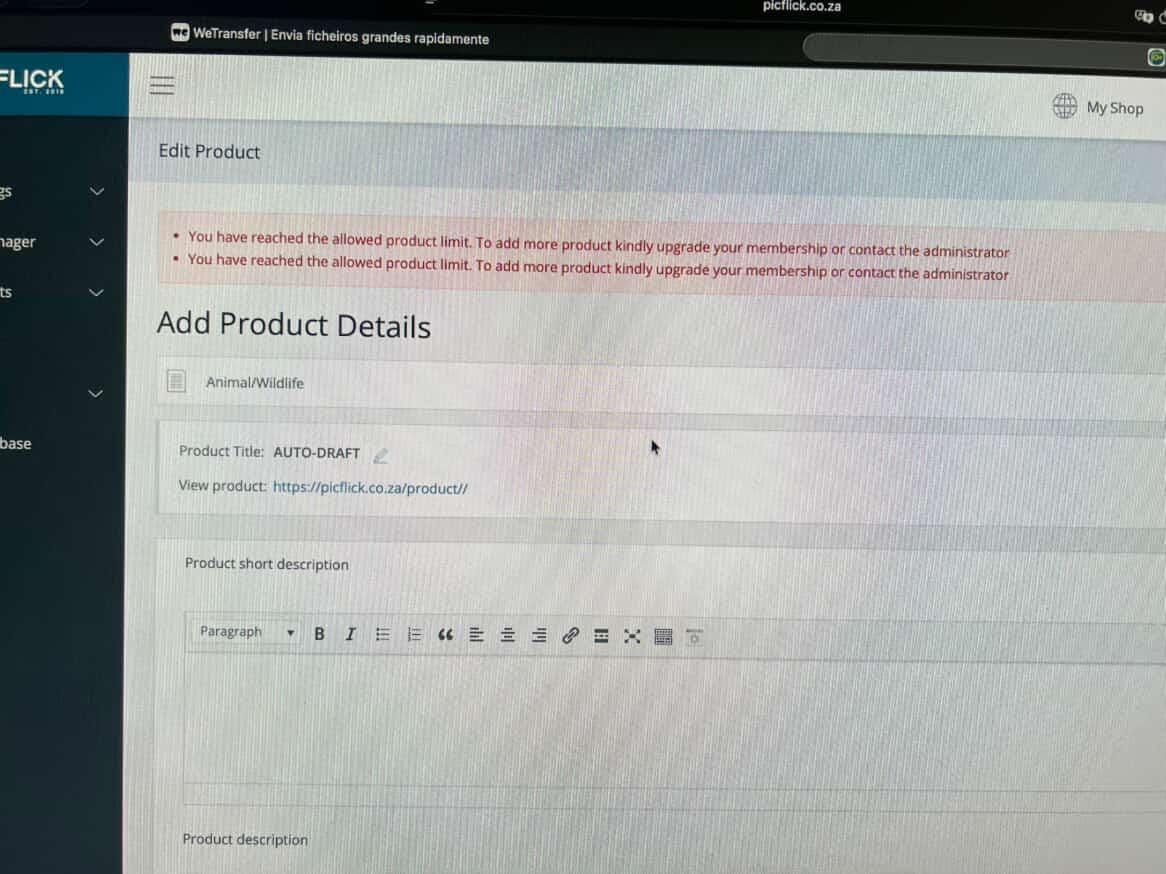
Once of my vendors have reported that they cannot upload more products as the dashboard is showing them an error that they have reached the product limit (see attached).
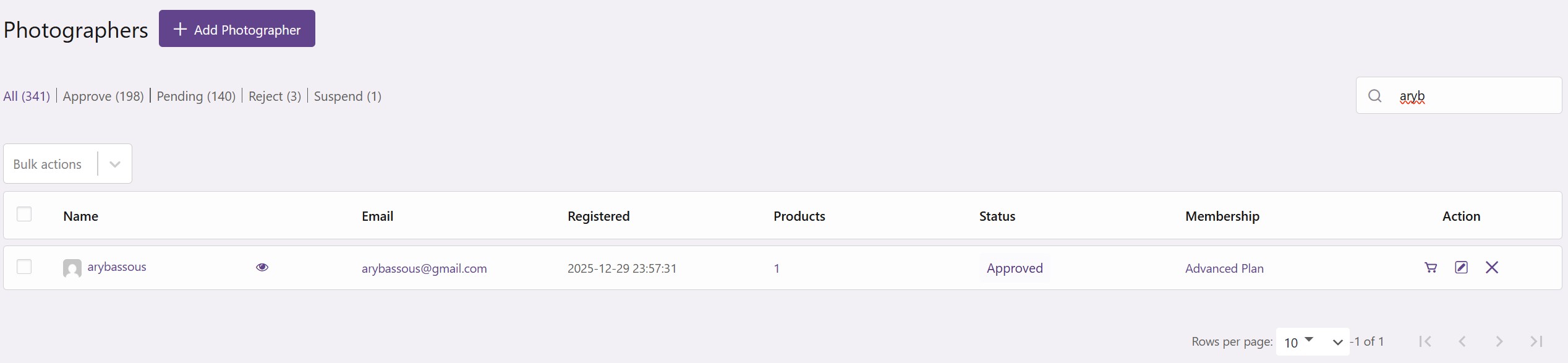
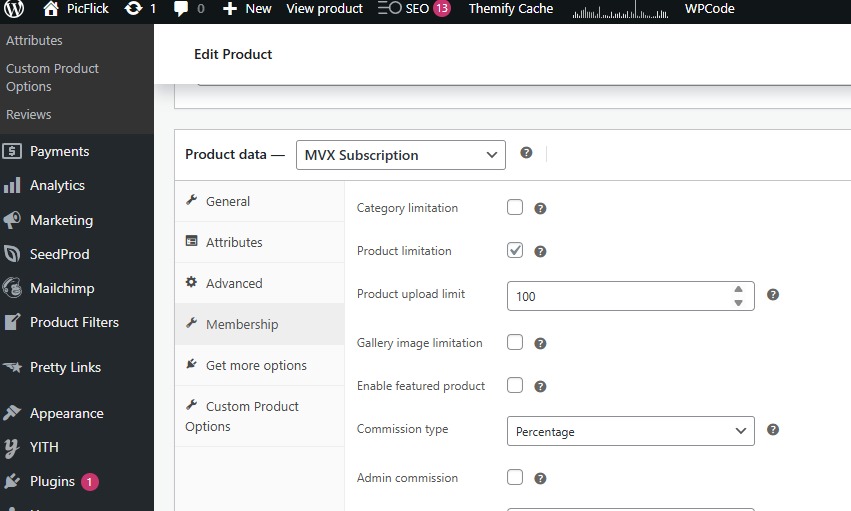
We have configured a limit of 100 product upload on this membership level, and checked that they are correctly assigned to this level. We also checked their current product upload count, and it is showing only 1. Please see attached 2 pictures
Please can you advise what possible issue could be causing this. I will share access to Staging environment in reply below.
Thanks -
January 5, 2026 at 7:07 PM #251149ParticipantThis reply has been marked as private.
-
January 5, 2026 at 8:04 PM #251150
Sangita Support Squad
KeymasterWe’re sorry to hear that you’ve experienced this issue. Kindly allow us some time to review the flow on our end, and we will get back to you accordingly.
-
January 5, 2026 at 9:48 PM #251154Participant
Hi, thanks for acknowledging.
Is there any workaround in the meantime?
Can I disable the limit for this specific vendor?
Can the vendor upload draft and admin publish it for them?
Please urgently advise – our paying vendors are requesting feedback.
Thanks -
January 5, 2026 at 10:24 PM #251155Keymaster
Hi there,
For now, you can upgrade the product limit by visiting the edit product page for the membership plan. This should resolve the issue the vendor is facing.In the meantime, we’re actively debugging the issue on your shared staging site. We will keep you posted as soon as we will have an update.
We truly appreciate your cooperation and understanding.
-
January 6, 2026 at 1:12 AM #251158Participant
As per my previous post image (Membership-config.jpeg) – the product limit has been set to 100 and my vendors cannot upload greater than 1.
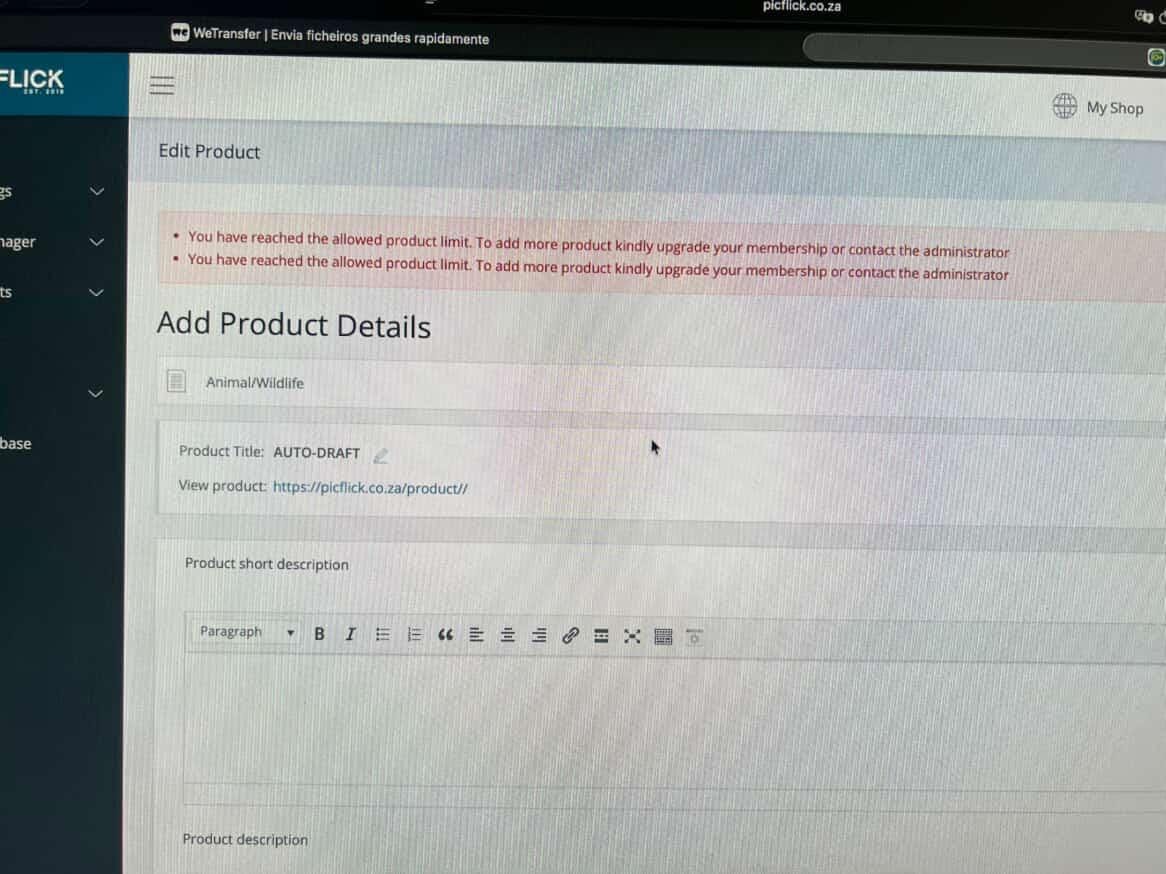
Thanks for actively debugging. I just want to add that I tested the product limit on another membership plan and it also behaved the same where the vendor was only able to upload 1 when the product limit was set to 3. The attached image shows when they uploaded 1 and then when they tried to upload 2.
Please urgently share feedback when possible. Thank you.Attachments:
-
January 6, 2026 at 11:09 AM #251162Keymaster
Hello There,
We have checked the product limitation flow on our end, and the limitation settings are working as expected. However, it does seem unusual that the same setting is not working on your site.
Since this functionality was working correctly earlier and the issue appears to have started recently, it would be helpful if you could let us know about any recent changes made on your end (such as plugin updates, new plugins, theme changes, or customizations). This will help us better understand the possible cause of the issue.
Additionally, please confirm whether we have your permission to temporarily deactivate plugins and switch the theme on your site to check if the issue persists. If the issue still remains after this step, we may need to further reset the database to rule out any potential database-related inconsistencies, as the feature is functioning correctly on our end.
We look forward to your response and will be happy to assist you further.
-
January 6, 2026 at 11:11 AM #251164Participant
Thanks for checking. It is concerning indeed.
No updates that would materially impact the product upload feature.
You have permission to temporarily deactivate plugins and switch themes to test.
Please let me know feedback. I’d be interested to know if it requires resetting the DB.
Thanks -
January 6, 2026 at 4:50 PM #251166Keymaster
Hello there,
We have tested the product limitation flow for membership plans on your site. We created a new membership plan, assigned it to a test vendor, and confirmed that the product limitation worked as expected. We also updated the product limitation for one of your existing plans and assigned it to a vendor, and in this case as well, the limitation was functioning correctly.
As you mentioned that a vendor has access to a membership plan where the product limitation is set to 3, but is receiving a limit exhausted message after adding only 1 product, we would like to clarify one point. When the vendor initially subscribed to this plan, was the product limitation already set to 3, or was the limitation updated after the subscription was completed?
Additionally, could you please let us know whether this issue is occurring only with specific membership plan, or if it is happening globally across all plans?
We also request you to try one more scenario for confirmation. Kindly assign a different membership plan to the same vendor once, and then reassign the original plan again. After doing so, please check whether the same limit exhausted message still appears. Since the issue is not occurring consistently on our end, this step will help us better understand the behavior.
We look forward to your update and will be happy to assist you further.
-
January 6, 2026 at 6:55 PM #251169Participant
Hi,
Thank you again for spending considerable time testing. Appreciate your cooperation to resolving it. I have responded to each of your paragraphs below.
We have tested the product limitation flow for membership plans on your site. We created a new membership plan, assigned it to a test vendor, and confirmed that the product limitation worked as expected. We also updated the product limitation for one of your existing plans and assigned it to a vendor, and in this case as well, the limitation was functioning correctly.
>> Thank you for testing. I appreciate you checking the functionality through a clean test, however, this relates to NEW membership plans created and unfortunately something fundamentally wrong with EXISTING plans. I recognize the need to perform this test though. I trust you agree that it is not viable to recreate all my membership plans (unless there is no impact to my existing vendors).
As you mentioned that a vendor has access to a membership plan where the product limitation is set to 3, but is receiving a limit exhausted message after adding only 1 product, we would like to clarify one point. When the vendor initially subscribed to this plan, was the product limitation already set to 3, or was the limitation updated after the subscription was completed?
>> I can confirm that the product limitation was already set. No change to the limitation was done after they subscribed
Additionally, could you please let us know whether this issue is occurring only with specific membership plan, or if it is happening globally across all plans?
>> It is occurring for all plans. As you saw, we tested with another membership plan ‘ambassador’.
We also request you to try one more scenario for confirmation. Kindly assign a different membership plan to the same vendor once, and then reassign the original plan again. After doing so, please check whether the same limit exhausted message still appears. Since the issue is not occurring consistently on our end, this step will help us better understand the behavior.
>> I tried this and it seems to function properly. I assigned a test vendor to ‘test plan’ and then back to ‘ambassador’ and the limit worked correctly whereby it allowed me to upload more products and correctly stated the number of products left to upload. Now the problem is that I cant use this method because my membership packs are all recurring, and your functionality doesnt allow to assign to a recurring back. So I am interested to hear what your solution is.
Thanks again!
-
January 6, 2026 at 7:48 PM #251170Keymaster
Hi There,
Thank you for the confirmation and for sharing all the details.
We understand the scenario related to the recurring plans. We will proceed with further testing on your site and keep you updated accordingly.
We truly appreciate your cooperation while we investigate this further.
-
January 7, 2026 at 5:18 PM #251177Keymaster
Hello There,
We have carried out additional checks on your site; however, we’re still unable to consistently reproduce the product limitation issue. Since we haven’t been able to identify a clear trigger point, it becomes challenging to propose a precise fix at this stage.
As a temporary and preventive measure-to ensure your users do not encounter issues related to exhausted product limits-we kindly suggest removing the product limitation from the affected plans for now. This should help avoid any disruption to your vendors’ experience.
In the meantime, we will continue testing on your staging site to identify a consistent trigger point, and we will keep you updated on any findings accordingly.
Thank you for your understanding and cooperation.
-
January 23, 2026 at 12:42 AM #251303Participant
Hi.
Thanks for performing the additional checks. Have you perhaps found anything additional in your tests -
January 24, 2026 at 4:24 PM #251308Keymaster
Hi there,
Thank you for your continued support and patience. As shared earlier, after conducting multiple tests, we were unfortunately unable to identify the exact trigger point for the issue you are experiencing. Additionally, this issue has not been reported by other users, which makes it more challenging for us to reproduce and analyze the root cause at this stage.
That said, we would also like to share that in our upcoming revamped version, we are completely restructuring the membership module. With this new architecture, we will manage capability-related settings in a more structured and efficient manner. Our development team is currently fully focused on completing this revamped version at the earliest and delivering a more future-ready solution to support the growth of your marketplace.
We truly appreciate your understanding, cooperation, and continued trust, and we remain committed to assisting you in every possible way.
-
January 25, 2026 at 2:30 PM #251314Participant
Yes but you specifically said you would continue to do testing so I am following up on that. Did you?
Also, you’ve been informing us of this update for a lengthy time… is there any committed release date? -
January 25, 2026 at 7:57 PM #251315Keymaster
Hi there,
Thank you for your continued support and cooperation.
As discussed, we have conducted testing both on your site and within our internal testing environment. At this stage, we have not been able to identify the exact trigger point of the issue. Without being able to pinpoint the root cause, providing a precise solution remains challenging.
Regarding the revamped version, we are aiming for a release by the end of this month. That said, as with any development process, there is a possibility that unforeseen challenges may arise, which could result in minor delays. We truly appreciate your understanding and patience in this regard.
Rest assured, our team is doing everything possible to deliver the revamped version at the earliest. We’re excited for users to explore the new features, benefit from enhanced existing functionality, and take their marketplaces to the next level of growth.
Thank you once again for your patience, understanding, and continued support.
-
April 10, 2026 at 12:42 AM #251707Participant
Hi,
I’d like to report that another user has experienced this issue – they uploaded 1 product and then when they tried to upload another, it stated that they have hit their limit.
This is now the 2nd instance of my users experiencing this issue which is significantly hindering our business.
Please can you urgently advise. -
April 10, 2026 at 10:20 AM #251714Keymaster
Hello,
We’re sorry to hear that you’re facing this issue again.
Please don’t worry – kindly allow us up to one week to share the revamped version with you. We’re confident that this update will resolve the issue and prevent it from occurring again on your end.
We truly appreciate your patience and continued cooperation throughout this process. If you have any questions in the meantime, please feel free to reach out.
-
April 21, 2026 at 12:22 AM #252050Participant
Hi,
I am following up on this issue please. Since you have launched the new version – can you please assist attending to our issue.
As you mentioned, the new version introduces significant changes and will take us a while to migrate effectively and safely. Whilst we proceed with that, our users are still being impacted with this issue and it is affecting our business. We would appreciate your attention to resolve.
Thanks,
PicFlick -
April 21, 2026 at 7:48 PM #252092Keymaster
Hi there,
Thank you for getting back to us.
We’re glad to inform you that the issue you were experiencing with the membership product limit has been addressed. We have conducted extensive testing on our end and are confident that you should no longer encounter this issue moving forward.
We are releasing MultiVendorX Pro 2.0.0 today. Once the release is complete, you will be able to download the latest version of the plugin from here: https://multivendorx.com/my-account/api-downloads/
Once it is available, we recommend testing it on a staging site along with the latest version of the MultiVendorX free plugin to ensure everything is working properly before deploying it to your live site.
If you have any further queries or need assistance, please feel free to let us know.
-
April 25, 2026 at 12:26 PM #252249Participant
Hi,
Thanks for confirming that MVX Pro V2.0 will be resolving this issue.
Are there any release notes for this version? When I click on “View version 2.0.0 details” on the plugin list page, it shows that it is not found – https://prnt.sc/mDumULTWFME6
As you suggested, I need to comprehensively test that this updated version functions correctly, however I have no way of knowing what the delta’s are that it contains and evidently which areas to test.
Regards,
-
April 25, 2026 at 6:00 PM #252261Keymaster
Hi there,
Thank you for reaching out. You can review the detailed updates and changes in the changelog here:
https://multivendorx.com/multivendorx-pro-changelog/.It appears that an older page is currently linked on the frontend. No need to worry—I’ve informed the team, and they will update it accordingly.
-
-
AuthorPosts

- You must be logged in to reply to this topic.
