Forum Replies Created
-
AuthorPosts
-
willalaw
ParticipantAfter re-checking, I found that the reason users couldn’t upgrade correctly before was because the recurring subscriptions settings were not set up properly.
Could you please confirm if your site currently offers only a single free plan for vendors?
>>No. The site offers one free plan and one paid plan.
Originally, I intended to use the membership plan functionality to restrict free and paid users to different file upload formats and sizes.
However, I found that the module doesn’t have this feature. I would like to ask if you could provide custom code to solve this issue or if we need to wait for the functionality to be added later.By the way, I would like to ask how the “Hide product after grace” feature works, as the documentation on your site does not explain this functionality.
https://multivendorx.com/docs/knowledgebase/marketplace-memberhsip/My reference to automatic plan assignment was intended to allow users to use the free membership plan without having to go through the process of selecting a membership plan and paying. After all, not every user would be willing to become a paid member as soon as they register. Moreover, expecting users to choose and “pay” for a free plan is also counterintuitive.
ParticipantThis reply has been marked as private.ParticipantOkay, I checked the registration flow as a member.
I figured out that if the user registers through WooCommerce or any other method first, they can’t become a vendor unless the admin manually changes their user role. However, they can still purchase membership plans regardless of their user role.
Also, it is weird that users need to select and purchase a free plan. It would be better if they were assigned the free plan by default. I would greatly appreciate your help with some custom code.Additional problems,
1. Can the Vendor Registration process allow users with different roles (e.g. customer) to upgrade to vendor?
2. Non-vendor users can still purchase membership plans, but since they are not vendors, they cannot receive any benefits. Is this a bug?ParticipantActually, I can’t see that video. Could you please reupload it? Thanks.
My site are having two plan, but there’s only one is free.ParticipantNo. I am looking for solution to automatically assign the free membership plan to all registered vendors.
ParticipantNow I have another problem with membership. How to automatically apply free membership plans to anyone who registers on the website, so they don’t need to join the plan manually?
ParticipantFor reference, I figured out that a mvx module called gutenberg blocks can do what I said before. I don’t understand why they don’t mention it at all.
Attachments:
ParticipantOh, never mind, I found it.
However, placing it in the sidebar, header, or footer doesn’t quite meet my requirements.
I think providing other methods like shortcodes or block would be better for designing pages flexibly.ParticipantI can’t find the widget “MVX: Vendors List” in the page editor, already checked the Preference for Block in More Options but it don’t have what you mentioned.
ParticipantCould you share the code for the issue related to the page redirection again? I lost that data when updating the plugin.
Also, is there any update about the progress of the appointment module?ParticipantMany thanks! It correctly skips the process of selecting a category right now.
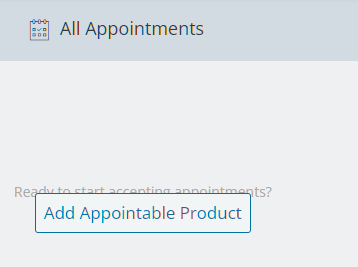
However, the HTML overlapping problems seem to be the same. The button clearly covers most of the text.
When you go through the “Add Appointable Product” option, the default product type is not set to an appointable product. If it is set to correct product type could achieve better user experience.ParticipantThis reply has been marked as private.ParticipantSorry, I think you misunderstood. I previously mentioned that it’s the page you are directed to after entering the “add appointments” section from the “appointments” tab, not the page from “product manager” where you add a product.
ParticipantThis reply has been marked as private.Participantumm…I didn’t enable the CPG option either.
-
AuthorPosts