Claim your freedom to choose the perfect partner for your multi-vendor journey.

FREEDOM25

Celebrate the festive season by giving your marketplace a powerful lift!

FESTIVE20

5.0.x
Multi-store. Franchise. Facilitator. AI tools.
Everything your marketplace needs - now in one platform.
Power your marketplace dreams with unbeatable Black Friday deals!

MVXBLACK30

Supercharge your marketplace vision with unstoppable Cyber Monday deals!

MVXCYBER30

Holiday cheer, bigger savings
Take 25% off-because your marketplace deserves a gift too.

happyholiday

-
DAYS
-
HOURS
-
MINUTES
-
SECONDS
20% Off Is Temporary. The Benefits Aren't.

HAPPY20

Join the MultiVendorX Facebook Community

Contact, share, and grow with thousands of MultiVendorX users around the world.

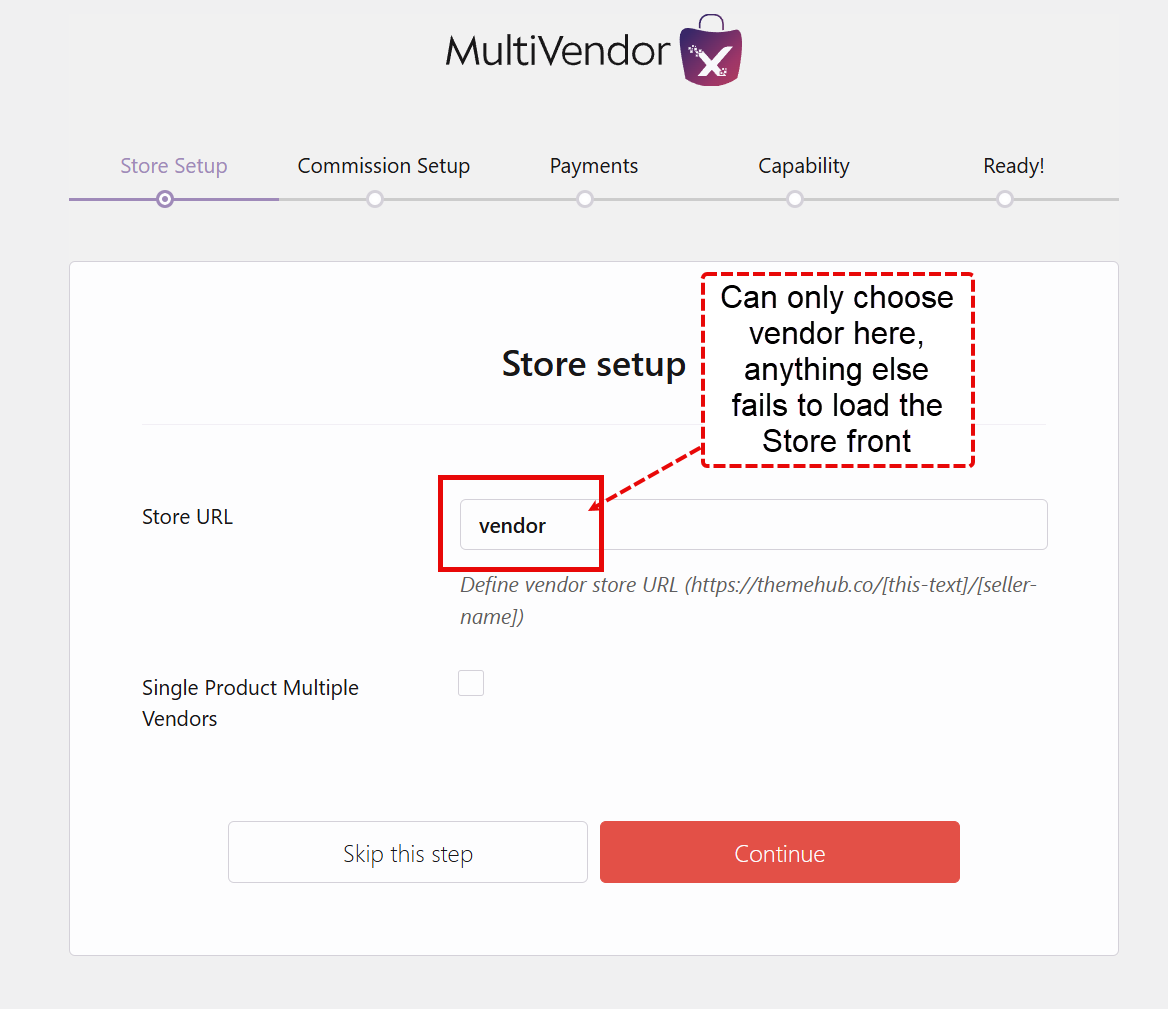
Bug in choosing Store URL – cannot choose custom name

Resolved
Viewing 4 reply threads
  • Author
    Posts
    • #239387
      dgtise
      Participant

      I have used the set up wizard to set what the store url should be for all my vendors, in my case I was wanting to use the word ‘author’ instead of ‘vendor’. However, the word ‘author’ broke the url, i.e: https://mydomain.com/author/storename/. I had to rerun the wizard to set it back to the default: https://mydomain.com/vendor/storename/, and this worked.

      Can you confirm whether this is a bug?

      Attachments:
    • #239399

      Hi @dgtise, Thank you for bringing this to our attention. We were able to recreate the issue on our end and have informed our development team. A fix will be implemented soon and we will keep you posted about it accordingly.

      In the meantime, you can track the progress of this issue here: https://github.com/multivendorx/MultiVendorX/issues/906.

      Please let us know if you need any further assistance.

    • #239474

      @dgtise, Our team has further investigated the mentioned issue and confirmed that the issue stems from a WordPress limitation. Since “author” is a predefined user role in WordPress, using it as the vendor store slug conflicts with the platform’s built-in author archives, which causes the URL to break.

      To resolve this, we recommend using an alternative term for the store slug. The default “vendor” works correctly as it does not interfere with WordPress’s core functionality.

      If you need any further assistance or alternative suggestions, feel free to reach out—we’re happy to help!

    • #239682
      dgtise
      Participant

      Ah, yes I did not think of that! I will try that, please close the ticket

    • #239685

      Thank you for the update. Let us know if you need any further assistance in future.

Viewing 4 reply threads
  • The topic ‘Bug in choosing Store URL – cannot choose custom name’ is closed to new replies.
Shopping Cart
Launch Your Marketplace
in Days, Not Month
Get expert guidance to build, scale, and grow your MultiVendorX marketplace
Book Free Strategy Call
Trusted by 10000+ marketplace Owners
Scroll to Top