




Tagged: Coupon, vendor membership
- This topic has 25 replies, 2 voices, and was last updated 6 months, 3 weeks ago by
Picflick.
-
AuthorPosts
-
-
November 10, 2025 at 9:39 PM #250352
Picflick
ParticipantHi,
This topic is a follow up for: https://multivendorx.com/support-forum/topic/vendor-registration-page-bug/
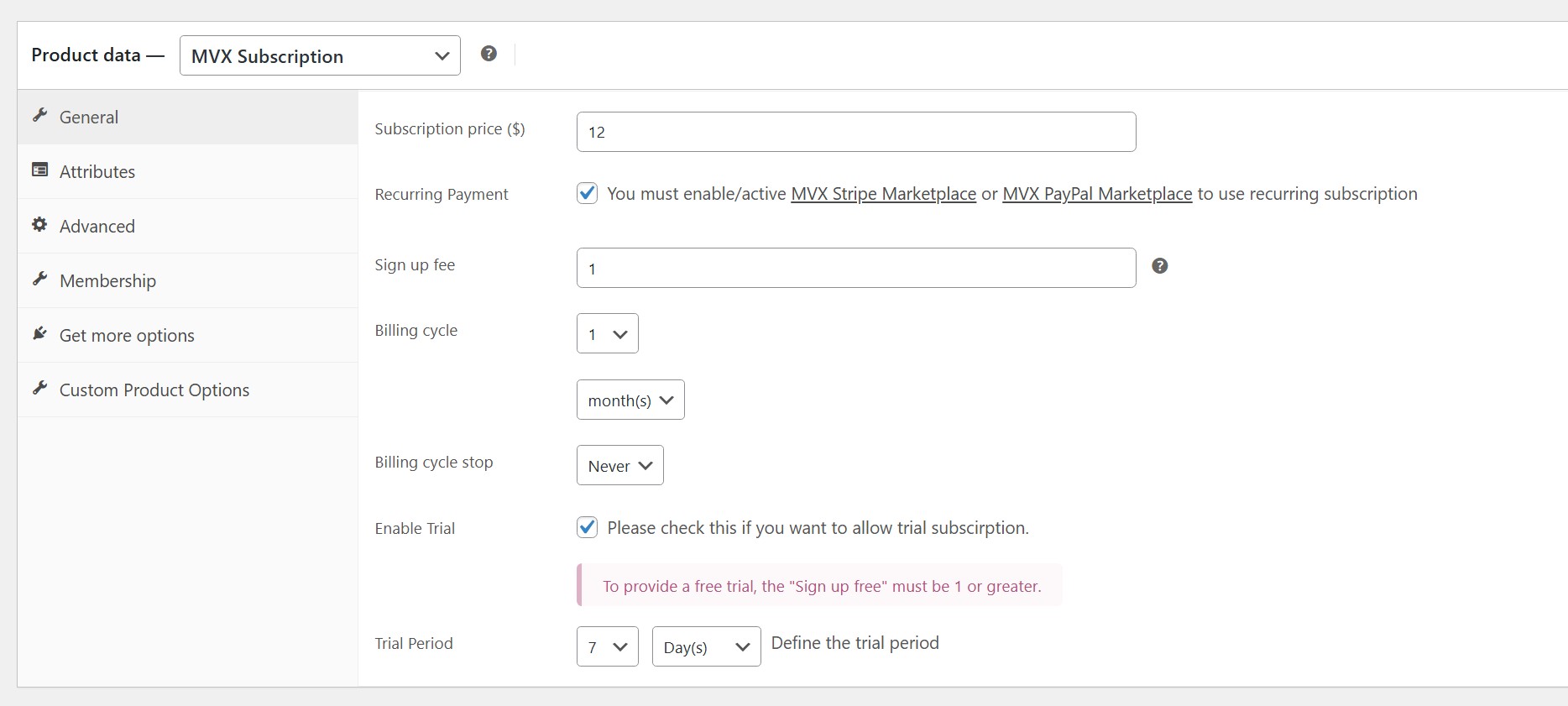
We want our vendors to be able to input a coupon code on the checkout page when subscribing to vendor membership plans.Our membership plans are configured with a base recurring fee, 7-day trial period, and $1 sign-up fee.
As per the topic mentioned above, we understand that it is not possible to apply the coupon to the sign-up fee and it will be applied to the recurring membership fee after the trial period is complete (i.e. on day 7). I want to confirm if this is still the case please.When I attempted the checkout, the following error appeared on the top of the page:
[MVX PayPal Marketplace] $meta_key Error:WP_Error Object ( [errors] => Array ( [mvx_paypal_request_error] => Array ( [0] => Array ( [name] => RESOURCE_NOT_FOUND [message] => The specified resource does not exist. [debug_id] => 450cf5658f505 [details] => Array ( [0] => Array ( [issue] => INVALID_RESOURCE_ID [description] => Invalid product id ) ) [links] => Array ( [0] => Array ( [href] => https://developer.paypal.com/docs/api/v1/billing/subscriptions#RESOURCE_NOT_FOUND [rel] => information_link [method] => GET ) ) ) ) ) [error_data] => Array ( [mvx_paypal_request_error] => Array ( [paypal_debug_id] => 450cf5658f505 ) ) [additional_data:protected] => Array ( ) )Please can you advise the issue?
Thanks,
PicFlickAttachments:
-
November 10, 2025 at 10:03 PM #250355
Sangita Support Squad
KeymasterThank you for reaching out to us.
Regarding your query about vendor registration and membership plans, we’ve already shared a response in this thread: https://multivendorx.com/support-forum/topic/clarification-needed-admin-created-vendor-membership-subscriptions/. Kindly check.
As for the PayPal Marketplace error, could you please provide us with access to a staging site (along with FTP )where the issue can be replicated? This will help us investigate the problem more effectively and provide you with the appropriate assistance.
Also while sharing the access don’t forget to mark your reply as private.
We will look forward to hearing back from you.
-
November 10, 2025 at 11:30 PM #250357ParticipantThis reply has been marked as private.
-
November 11, 2025 at 10:09 AM #250358KeymasterThis reply has been marked as private.
-
November 11, 2025 at 10:39 AM #250360Participant
Apologies – please try again. Thank you.
-
November 11, 2025 at 1:24 PM #250362Keymaster
Hello there,
Thank you for the update. However, it appears that the assigned user role does not have admin privileges, which is preventing us from accessing the admin dashboard. Please refer to this screenshot for reference: https://www.awesomescreenshot.com/image/57361541?key=f64f6b2af6f369173cefd895368d4824.
Kindly update the user role to Administrator so we can proceed with troubleshooting the issue.
We look forward to hearing back from you.
-
November 11, 2025 at 1:30 PM #250364Participant
Apologies Sangita – I have ensured to apply administrator priviledges. Thank you
-
November 11, 2025 at 2:05 PM #250365Keymaster
Hi there, Thank you for the update. We’re now able to log in successfully on your site.
To proceed with troubleshooting, could you please confirm if we have your permission to deactivate plugins and the active theme temporarily? Additionally, may we add our PayPal sandbox credentials for testing purposes?
We’ll wait for your confirmation before proceeding.
-
November 11, 2025 at 2:34 PM #250367Participant
Yes you can proceed with both.
It will be interesting to see what the issue/conflict is as it was working perfectly last week.
Thanks, PicFlick -
November 11, 2025 at 6:37 PM #250371Keymaster
Hello there,
Thank you for your confirmation.
Please allow us some time to look into the issue on your site. Since everything appears to be working correctly on our end, we’ll need to investigate further on your setup to identify the cause. We’ll keep you updated on our findings accordingly.
-
November 11, 2025 at 8:19 PM #250373Participant
Thank you
-
November 12, 2025 at 1:55 PM #250374Keymaster
Hello There, Thank you for your cooperation.
After testing the flow on your site, we found the reason behind the issue. According to PayPal’s new integration process, whenever you create a subscription plan on your website(https://www.awesomescreenshot.com/image/57382481?key=8db58b4e6c25ebe7ddc93757955d6cae), PayPal automatically creates a matching plan in your PayPal account(https://www.awesomescreenshot.com/image/57382397?key=d6074b80e7862d79a640dc86abb3635b).
However, since your current subscription plans were created before this update, they aren’t connected to your PayPal account under the new system. So when someone tries to purchase a plan using PayPal Marketplace, PayPal can’t find a matching plan on their end – which causes the “Invalid Product ID” error.
To get everything working smoothly again, here’s what you’ll need to do:
— Create New Subscription Plans
After setting up your PayPal Marketplace, simply recreate your existing subscription plans.
The newly created plans will automatically sync with your PayPal account under the new setup, so PayPal will recognize them correctly during checkout.
— Hide the Old Plans
To avoid confusion for your users, you can hide the old plans from your site.
Just go to each plan’s Edit Product page in your WordPress admin and change its catalog visibility to Hidden(https://www.awesomescreenshot.com/image/57382321?key=6338e51caf0bc4aa6cf685d049e18775).
Once you recreate the plans, your customers should be able to subscribe using PayPal Marketplace without any errors.
Please let us know if you have any other questions or need any additional assistance from our side.
-
November 12, 2025 at 10:33 PM #250387Participant
Hi,
Thanks for investigating and I appreciate you identifying the issue.
This seems odd to me as this would infer that all users of MVX now need to completely redo their subscriptions?
Secondly, I double-checked on my staging website and I see that the product ID of the subscription product (https://ibb.co/PGc2cY5H) is the same as the subscription configured on PayPal (https://ibb.co/V0h6D8Km). So it looks to me as if they are still connected, yet I am experiencing this error.
Please advise.
Thanks -
November 12, 2025 at 10:41 PM #250389Keymaster
Thanks for your message and for double-checking those details.
This is indeed quite strange — when we configured our sandbox credentials on your staging site, we encountered the error during checkout as the existing plans were not connected with the provided PayPal account. However, when we created a new test plan and tested the registration flow on your end, the process completed successfully as the new test plan was correctly reflected under the subscription plan in the PayPal account.
That being said, we understand your concern regarding the existing subscriptions, and we’re looking into this further. Please allow us a bit more time to investigate the root cause, and we’ll provide you with an update as soon as possible.
Thank you for all your understanding and cooperation. -
November 13, 2025 at 10:53 AM #250392Keymaster
Hello there,
We’ve looked into this further, and it’s quite unusual – if the plans are created in your PayPal account, you shouldn’t be seeing the “Invalid product ID” error at checkout.
Here’s what you can do:
On your staging site, please add the sandbox details under which the plans were created. If you still encounter the same error, kindly share your PayPal sandbox details with us so we can investigate why the issue is occurring despite the plans being correctly set up in your PayPal account.While sharing the access details, please make sure to keep your post private.
-
November 13, 2025 at 9:23 PM #250396Participant
Hi.
Thanks. I have re-added my PayPal Sandbox credentials to my staging website. Unfortunately I am unable to share the credentials directly with you, however they are set up within my staging website. Please assist with prioritising and investigating further.
Secondly, I would like to revisit my other query – regarding applying coupon/discounts to the recurring amount of a subscription. This didnt work for me when I tested. Please see attached images:
1. The current setup of my subscription product on wpadmin backend – $12 subscription price, $1 set up fee, 7-day trial period.
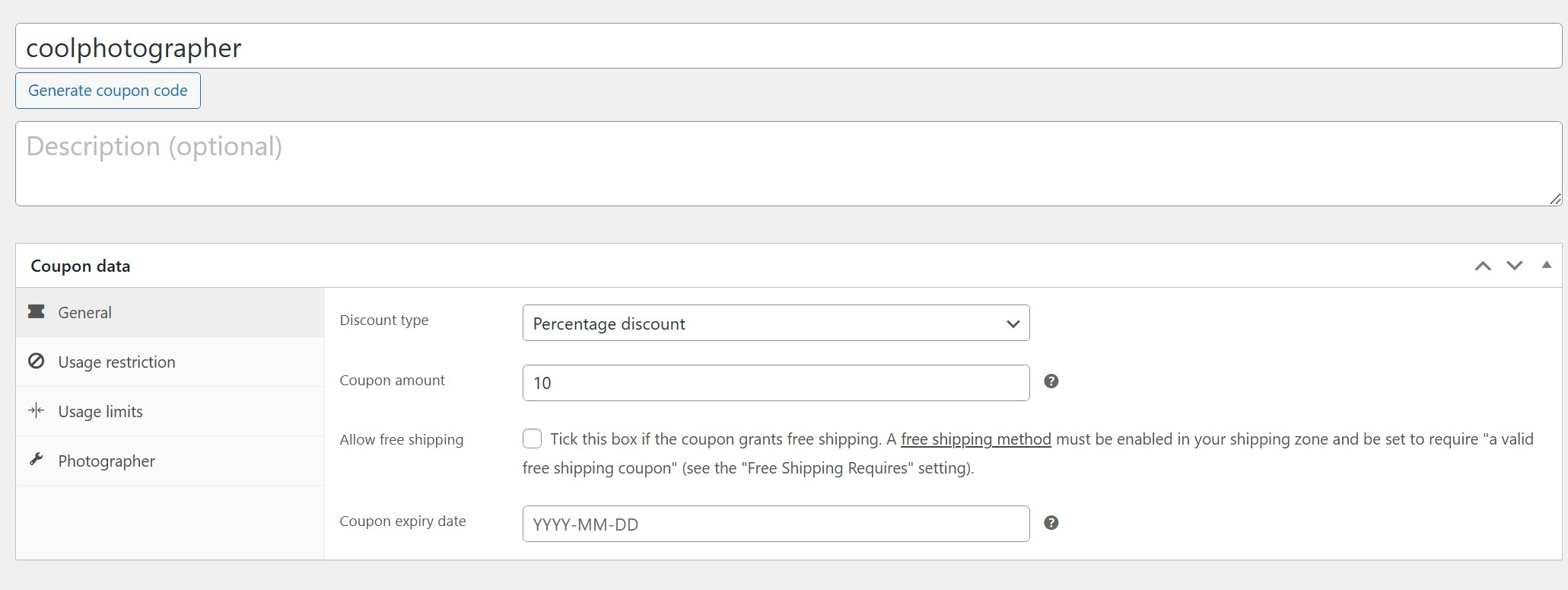
2. The current config of a coupon I set up on wpadmin backend – 10% discount.
3. The resulting MVX checkout page after I successfully applied the coupon. The amounts showing here are not the most user friendly.
4. The details from PayPal of the recurring payment that is about to be subscribed to. This is the most important thing which is incorrect – You will see that the 10% discount to the recurring amount has not been applied – it should be $10.8?
Please advise if I am doing something wrong. As I mentioned, I want the discount/coupon to be applied to the recurring fee, which you previous confirmed is possible.Thanks, PicFlick.
-
November 13, 2025 at 9:39 PM #250402Keymaster
Hi there, Thanks for getting back to us with the details. Kindly provide us some time to check both the issues and we will get back to you accordingly.
Thank you again for your continued support. -
November 14, 2025 at 10:26 AM #250409Participant
Good day.
Kindly following up if you have an update for us please – it is urgent.
Thanks for your attention and support.
PicFlick -
November 14, 2025 at 11:08 AM #250411Keymaster
Hello There,
Thank you for your continued cooperation and for re-adding your PayPal Sandbox credentials to your staging site. We truly appreciate your effort.
We have reviewed the flow once again, and based on our tests—both on our setup and on your site—the issue you are facing should not occur if the subscription plans are correctly added to your PayPal account. Since everything appears to be set up properly, the “invalid product id” error is quite unexpected.
To investigate this further, we will need access to your PayPal Sandbox account. Without checking the configuration directly, it becomes extremely difficult to identify why this error is occurring on your end. We completely understand that you are not able to share the credentials directly; however, without access, our ability to debug the problem becomes very limited. If you can provide temporary access in any secure way you prefer, it will help us resolve the issue much faster.
Regarding your query about the coupon and recurring subscription amount:
As mentioned earlier (https://multivendorx.com/support-forum/topic/clarification-needed-admin-created-vendor-membership-subscriptions/
), coupons apply only to the initial subscription fee. In your case, since you have a free trial enabled, the initial charge becomes $0. Therefore, the applied coupon amount also becomes $0. This is the default flow, and it is functioning as expected. Now if you would like to make any changes in this flow you will have to add your own custom code.We genuinely want to help you get the PayPal issue resolved as quickly as possible. If you could share temporary Sandbox access, it would make it much easier and faster for us to debug.
Please let us know how you would like to proceed, and we will be more than happy to assist you further.
Thank you for your understanding and patience.
-
November 14, 2025 at 11:37 AM #250413Participant
Thanks for sharing feedback.
I will revert with sharing PayPal Sandbox details in a secure manner
Regarding the coupon codes applied to membership products – you stated above that it only applies to the initial subscription fee whereas in this article (https://multivendorx.com/support-forum/topic/clarification-needed-admin-created-vendor-membership-subscriptions/) you stated the discount is applied to the recurring fee. and in this article (https://multivendorx.com/support-forum/topic/vendor-registration-page-bug/), you stated coupon code will be applied to the plan’s subscription price only. The coupon discount will not be applied to the sign up fee .
So which one is it? initial sign-up fee or recurring subscription fee?Are you saying that it is impossible to apply a coupon to a subscription package with a trial period?!
Regards,
PicFlick -
November 14, 2025 at 11:48 AM #250415Keymaster
Hello There,
I’m sorry for any confusion caused earlier. Let me clarify how the membership subscription fee and coupon calculations work:
Currently, the coupon is applied only to the initial subscription amount.
For example, if a user subscribes to a membership plan priced at $100 with a $5 signup fee and a 10% coupon, the calculation will be:
— Initial plan price: 100
— Coupon applied (10% of 100): 10
— Price after discount: 100 – 10 = 90
— Signup fee: 5
Total amount the user pays initially: $95
However, if you enable a free trial, the initial subscription fee becomes $0.
Since the coupon applies only to the initial amount, a 10% coupon on $0 still results in $0 discount.
So in this case, the user will only pay the $5 signup fee.I hope this explanation helps clear things up.
Regarding the PayPal issue, we look forward to hearing back from you so we can assist further.
-
November 14, 2025 at 2:04 PM #250420Participant
When you say ‘initial subscription amount’ – is this payment iteration #1?
Please advise what will occur for payment iteration #2 under the membership plan (using your example above).And with regards to a free trial period, you have basically confirmed that it is not possible to use a coupon code. Only the sign up fee is charged. Is this correct?
-
November 14, 2025 at 2:14 PM #250421Keymaster
Hello There,
Thank you for your questions – let me clarify both points for you.
1. About the “initial subscription amount”
Yes, when we say initial subscription amount, we are referring to the first payment iteration, meaning the subscription fee for the first billing cycle.
The coupon applies only to this initial subscription amount, not to the recurring payments.For payment iteration #2 and onward, the subscription will renew at the regular recurring price, with no coupon discount applied.
2. Regarding coupons with a free trial
Your understanding is correct.
If a free trial is enabled, the initial subscription amount becomes $0. Since the coupon applies only to the initial amount, a discount on $0 still results in $0.In this case:
Coupon discount = $0
User is charged only the signup fee.
No coupon is applied during the trial or future recurring payments.
I hope this helps clear things up. If you have more questions or need further clarification, feel free to let us know – we’re here to help.
-
November 19, 2025 at 10:16 PM #250466Participant
Thank you very much — this certainly clarifies things.
Regarding the PayPal issue (PayPal subscriptions not synchronizing with MVX subscription plans): I re-created all the subscription plans and updated our website. Although it took considerable time, it was a guaranteed fix and the effort required was clear. While we appreciate your willingness to assist, we unfortunately cannot share our PayPal credentials (even Sandbox), and we needed to ensure our website remained operational.
In the meantime, were you able to identify what might have caused the issue? Have any of your other customers experienced something similar? I will reopen this ticket should the problem occur again.
Thanks,
PicFlick -
November 19, 2025 at 10:28 PM #250468Keymaster
Thank you for the update — we’re happy to hear that everything is now working properly on your end.
As mentioned in our earlier message, the issue occurred because the subscription plans were not connected with your PayPal account, which prevented the PayPal subscriptions from synchronizing correctly with the MVX subscription plans. Re-creating the plans ensured that everything was linked properly again.
Regarding the root cause, we have not seen this issue frequently among other customers, but we will continue to monitor it. If the problem reoccurs at any point, please feel free to reopen the ticket and we’ll be glad to assist further.
If you need any additional help from our side, please do let us know.
-
November 19, 2025 at 10:37 PM #250473Participant
Thanks. Noted.
-
-
AuthorPosts



- The topic ‘Coupon applied to vendor membership plans’ is closed to new replies.
