





Tagged: Booking, Vendor Dashboard
- This topic has 2 replies, 2 voices, and was last updated 1 year, 7 months ago by
Sangita Support Squad.
-
AuthorPosts
-
-
September 3, 2024 at 4:18 PM #234972
Arturo Alvarez
ParticipantDear MultivendorX Support Team,
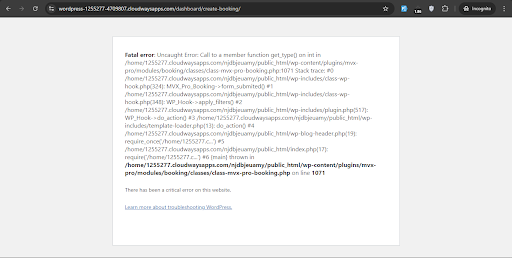
I am experiencing two fatal errors related to the booking functionality on this page:
Create Booking From Vendor Dashboard
Screenshot of Page
https://www.screenpresso.com/cloud/T9ovf/?__r=1.f9dc72f3be98e576c5d7611f3b85cfaf1. Error When Creating a New Booking Order
When I try to create a new corresponding order for a booking, I encounter the following error:Fatal error: Uncaught Error: Call to a member function get_date_created() on array in /wp-content/plugins/dc-woocommerce-multi-vendor/classes/class-mvx-order.php:495
error screenshot https://www.screenpresso.com/cloud/xAnIc/2. Error When Assigning a Booking to an Existing Order
When I attempt to assign a booking to an existing order by providing the order ID, this error occurs:Fatal error: Uncaught Error: Call to a member function get_type() on int in /wp-content/plugins/mvx-pro/modules/booking/classes/class-mvx-pro-booking.php:1071
Error Screenshot https://www.screenpresso.com/cloud/jqoke/Troubleshooting Steps Taken:
– I have ensured that all related plugins, including WooCommerce, MVX Pro, and the free version of MVX, are updated to their latest versions.
– I have disabled all other plugins to identify possible conflicts, but the errors persist.Could you please assist in resolving these issues?
I appreciate your support. I look forward to your guidance.
Attachments:
-
September 3, 2024 at 4:28 PM #234978
Sangita Support Squad
KeymasterHello Arturo Alvarez, Thank you for reaching out to us regarding MultiVendorX Pro. Upon checking our records, it appears that your subscription for MultiVendorX Pro is currently not active.
As much as we’d like to assist you immediately, our support policy is designed to ensure that we provide dedicated assistance to our active subscribers. This allows us to maintain the quality of service for all our valued customers.
We kindly invite you to renew your subscription plan for MultiVendorX Pro. Once your subscription is active again, we would be more than happy to assist you with any issues you’re experiencing with the current version of MultiVendorX Pro.
If you have any questions about the renewal process or our subscription plans, please don’t hesitate to ask.We appreciate your understanding and look forward to the opportunity to support you again soon.
-
November 4, 2024 at 12:19 PM #236591Keymaster
It’s been a while since we last heard from you, so we’re assuming your issue has been resolved. We’ll go ahead and close this thread. If you need assistance or encounter any issues in the future, please feel free to create a new support ticket.
-
-
AuthorPosts


- The topic ‘Errors When Creating a Booking Order From Vendor Dashboard’ is closed to new replies.
