





Tagged: marketplace_stores
- This topic has 22 replies, 2 voices, and was last updated 2 weeks ago by
Sangita Support Squad.
-
AuthorPosts
-
-
May 12, 2026 at 2:52 AM #252645
donald_punk
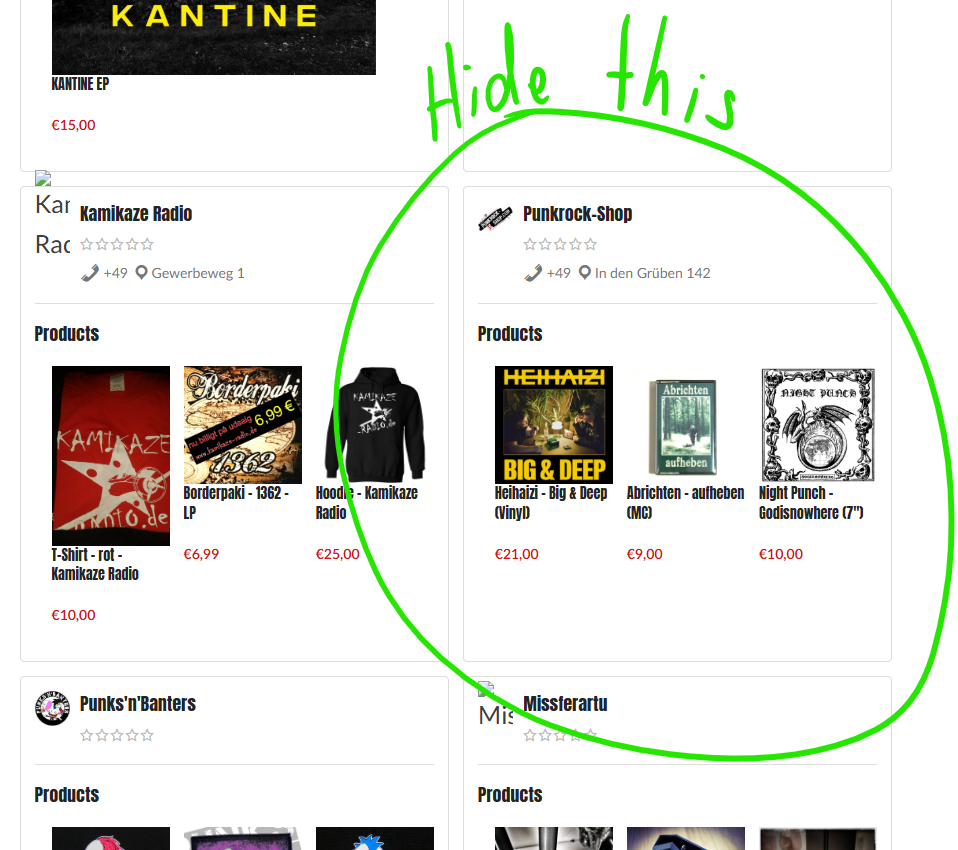
ParticipantHi, in the past I had a “Vendor Listing” and in this listing all the stores were hidden, which don’t have any products. The code was like this and doesn’t work after your updqate anymore. Could you please help and fix this? Thank you!
/** ** Hide zero product vendor on wcmp vendor list page **/ add_filter('mvx_vendor_list_get_mvx_vendors_args', 'hide_zero_product_vendor_on_vendor_list_page' , 10 , 4 ); function hide_zero_product_vendor_on_vendor_list_page ( $query, $order_by, $request, $atts ) { $vendor = get_mvx_vendors(); $vendor_ids = wp_list_pluck($vendor , 'id'); foreach ($vendor_ids as $key => $value) { $vendor = get_mvx_vendor($value); $vendor_products = $vendor->get_products(); if (empty($vendor_products)){ $get_vendor[] = $value; } elseif ($vendor_ids[1] === 3){ $get_vendor[] = $vendor_ids[1]; } } $query['exclude'] = $get_vendor; return $query; } -
May 12, 2026 at 4:58 PM #252666
Sangita Support Squad
KeymasterHi There,
Thank you for getting in touch with us and sharing the details of your concern.
With the release of MultiVendorX 5.0.0, we introduced significant updates to the plugin’s coding architecture. As part of these changes, several hooks and filters used in previous versions have been updated or restructured. Due to this, earlier customizations created for older versions may no longer function exactly as they did before.
However, there is no need to worry. We are glad to inform you that we have already incorporated this functionality into the [marketplace_store] shortcode. This enhancement will be included in our upcoming plugin release.
Once the new version is released and updated on your site, you will be able to hide stores/vendors that do not have any products from appearing on the Store List page.
In the meantime, if you need any further assistance or guidance from our end, please feel free to let us know. We are always here to assist you.
Thank you for your patience and understanding.
-
May 12, 2026 at 5:54 PM #252669Participant
I am happy to hear that, but as long as this doesn’t work, I can’t update my shop to version 5.
Since I have MultivendorX (around 2019) it was possible with a little help of you to hide these stores and also hide the main store (vendor_id = 3) in the listing. This is a little bit important for me because I have a main store (vendor 3) and the marketplace (everything else except the vendor – this at the moment also doesn’t work with the new version)
Is there a possibility to get this running again?
-
May 12, 2026 at 7:09 PM #252676Keymaster
Hi There,
Thank you for your quick response.
We completely understand how important this functionality is for your marketplace setup. Please do not worry – our team will be releasing an update that includes the required parameter enhancement for the Marketplace Stores shortcode.
Once the update is released, we will also guide you on how to configure it properly to achieve your required flow. After applying the updated shortcode parameter, you will be able to get your required flow on your end.
In the meantime, if you have any further questions or need any additional assistance from our end, please feel free to let us know. We are always here to assist you.
Thank you for your patience and understanding.
-
May 12, 2026 at 8:11 PM #252679Participant
Thank you for your reply and the information. I will wait and I am looking forward to the update.
-
May 12, 2026 at 8:26 PM #252682Keymaster
Thank you for your understanding. We will keep you posted as soon as the update goes live.
-
May 13, 2026 at 10:56 AM #252691Keymaster
Hi There,
We are glad to inform you that we have already released an update that adds support for hiding stores with no products using a shortcode parameter.
To achieve the required flow on your end, you can simply use the following shortcode:
[marketplace_stores hide_empty=”true”]
This will ensure that stores without any products are hidden from the marketplace store listing.
If you have any further queries or need any additional assistance from our end, please do let us know. We will be happy to assist you.
-
May 13, 2026 at 4:44 PM #252702Participant
Thank you, that’s great!
Today I am busy, setting up a staging. There I will update the plugin, try translating and try this shortcode – can I also hide some vendors by ID there?.
—
Could you maybe help me, how I could exclude one shop from the marketplace categories like I did it in the past with your old version? -> https://punkrock-shop.com/shop/
I try to explain, what I need:
Under the “Marktplatz” menu item, my vendor “Punkrock-Shop” is excluded. I was able to separate and integrate it via the WPBakery Editor Settings, under “Punkrock-Shop” where all of the other vendors are excluded.To be honest: I also want to switch from WPBakery to Gutenberg (because of speed issues). Maybe you could give me also an option for the gutenberg editor, if there is a better way than to make an entry in the functions.php
-
May 13, 2026 at 6:01 PM #252710Keymaster
Hi There,
Thank you for getting back to us.
Please take your time to set up the staging site and test the updated plugin, translations, and shortcode functionality on your end.
Regarding your query about hiding vendors by ID, could you please share a few more details about the exact flow you would like to achieve on the shop page? We reviewed the shared shop page link, and currently products from multiple vendors are appearing there. To guide you with the most suitable solution, we would like to better understand how you want the vendor/store exclusion to work.
Regarding Gutenberg support, we are glad to inform you that we have already added Gutenberg block support for: Store List display, Storefront and shop-related sections
So you can confidently move forward with Gutenberg for improved performance and better speed optimization compared to WPBakery.
Once you share more details regarding the exclusion-related flow, we will be happy to guide you further with the best possible approach.
-
May 13, 2026 at 7:31 PM #252751Participant
Hi, thank you for the reply and I will be excited to check out the Gutenberg Features!
I have one vendor/store called “Punkrock-Shop” and this vendor/store has his own menue item “Punkrock-Shop”. All of the other vendors are under the menue item “Marktplatz” or “Marketplace”.
I want to show, that there is a bigger main shop, which i administrate with my own products and on the other side there is a marketplace where you can buy at a lot of other vendors/stores. In the marketplace the products of the main shop are hidden.
Does this help a little bit to understand how I would like to set up the Shop/Marketplace?
-
May 13, 2026 at 9:16 PM #252752Keymaster
Hi there,
Thank you for getting back to us and explaining the flow.
As you mentioned that this was implemented in the earlier version through customization, could you please let us know which hook filters from our plugin were used? This will help us provide you with the updated hook filter accordingly.
We look forward to your update.
-
May 24, 2026 at 8:22 PM #253620Participant
Hi Sangita,
finally I managed to get to the point of working closer on the setting up of the new plugin version on a staging.I was asking you, how I could separate one vendor to the rest of the marketplace.
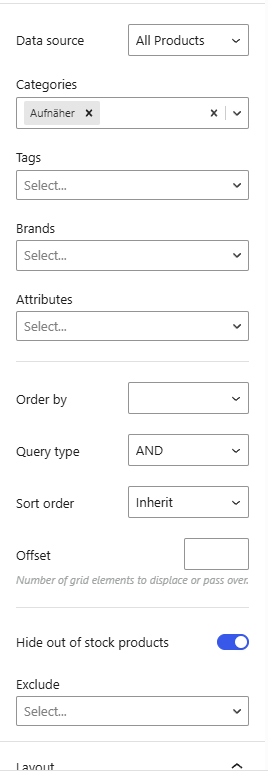
It would help me a lot, If I would have in the settings of Gutenberg an Option of “Query Type = AND” “Vendor = ID(s)” Include/Exclude
Same would be for the shortcut of [marketplace_stores] for me it would be enough to say exclude_shop=”ID” to hide my mainshop in the list.
Maybe you could helpe me with that.
In the past I had following code in the functions.php to exclude the shop from the listing: Focus on the elseif
/**
** Hide zero product vendor on wcmp vendor list page
**/
add_filter('mvx_vendor_list_get_mvx_vendors_args', 'hide_zero_product_vendor_on_vendor_list_page' , 10 , 4 );
function hide_zero_product_vendor_on_vendor_list_page ( $query, $order_by, $request, $atts ) {
   $vendor = get_mvx_vendors();
   $vendor_ids = wp_list_pluck($vendor , 'id');
   foreach ($vendor_ids as $key => $value) {
      $vendor = get_mvx_vendor($value);
      $vendor_products = $vendor->get_products();
      if (empty($vendor_products)){
          $get_vendor[] = $value;
       } elseif ($vendor_ids[1] === 3){
          $get_vendor[] = $vendor_ids[1];
      }
   }
   $query['exclude'] = $get_vendor;
   return $query;
}
And for excluding products of the shop from the marketplace (to show it only in the menue “Punkrock-Shop”):
/** * Exclude products from a particular category on the shop page */ add_action( 'woocommerce_product_query', 'prefix_custom_pre_get_posts_query' ); /** * Hide Product Cateories from targetted pages in WooCommerce * @link https://gist.github.com/stuartduff/bd149e81d80291a16d4d3968e68eb9f8#file-wc-exclude-product-category-from-shop-page-php * */ function prefix_custom_pre_get_posts_query( $q ) { if( is_shop() || is_product_category( array( 'musik', 'cds', 'mcs-kassetten', 'vinyl', 'klamotten', 'tshirts', 'girlies', 'pullis', 'sonstige-bekleidung', 'lesbares', 'comics', 'aufnaeher', 'buttons', 'sonstiges', 'haarfarben', 'schmuck', 'taschen' ) ) ) { // set conditions here if(!is_search()){ $tax_query = (array) $q->get( 'tax_query' ); $tax_query[] = array( 'taxonomy' => 'dc_vendor_shop', 'field' => 'slug', 'terms' => array( 'punkrock-shop' ), // Don't display products from punkrock-shop on the shop page. 'operator' => 'NOT IN' ); $q->set( 'tax_query', $tax_query ); }} } -
May 24, 2026 at 8:49 PM #253623Keymaster
Hi there,
Thank you for getting back to us.
As shared earlier, with the latest version, you will no longer need to add any custom code to exclude stores without products from the store list page. You can simply use the shortcode in the following format:
[marketplace_stores hide_empty=”true”]Regarding your query about the other customizations, please allow us some time to check with our team. We will get back to you with an update accordingly.
-
May 25, 2026 at 1:24 PM #253659Participant
Hi Sangita, thank you for the tip again and I really like the new shortcut feature hide_empty=”true” but now I would additionally like to hide the store with the ID 25 in this listing. Would this be possible?
And thank you, that you and your team check the other customizations.
-
May 25, 2026 at 5:34 PM #253673Keymaster
Hi There,
Thank you for getting back to us.
We are glad to hear that the “hide empty” parameter support on the store list page was helpful for you.
Regarding the addition of a parameter to pass the store ID for hiding stores from the store list page,we have logged this request in our github and we will add the support in our upcoming update accordingly. In the meantime you can keep track of the progress of the same from here https://github.com/multivendorx/multivendorx/issues/1931.
For excluding cretain store products from appearing on the WooCommerce shop page, you can make use of the following filter on your end:
return apply_filters( ‘multivendorx_get_excluded_products’, false, $product_id, $store_id );
You can customize the logic accordingly to hide specific store products from the WooCommerce shop page based on your requirements.
If you need any further assistance from our end, please feel free to let us know. We are always happy to assist you.
-
June 2, 2026 at 7:39 PM #254250Participant
Hi, today I took the time to extend Gutenberg for the Woodmart-Theme with the wanted MultivendorX feature as a mu-plugin (mentioned in comment #252702 May 13, 2026 at 4:44 PM).
In the Woodmart Products Block I can now include or exclude products of specific Stores.
Like this I can control much better, what do show on e.g. the landingpage. It’s written with A.I. so feel free to improve this code or maybe include it in some way.<?php /** * Plugin Name: PRS Woodmart MVX Store Filter * Description: Fügt dem Woodmart Gutenberg Products Block Include/Exclude Filter für MultiVendorX Store-IDs hinzu. * Version: 1.0.0 */ if (!defined('ABSPATH')) { exit; } add_filter('register_block_type_args', function ($args, $block_name) { if ($block_name !== 'wd/products') { return $args; } if (empty($args['attributes']) || !is_array($args['attributes'])) { $args['attributes'] = []; } $args['attributes']['mvxStoreFilterMode'] = [ 'type' => 'string', 'default' => '', ]; $args['attributes']['mvxStoreIds'] = [ 'type' => 'string', 'default' => '', ]; return $args; }, 10, 2); add_action('enqueue_block_editor_assets', function () { wp_register_script( 'prs-woodmart-mvx-products-block', false, ['wp-hooks', 'wp-compose', 'wp-element', 'wp-components', 'wp-block-editor', 'wp-i18n'], '1.0.0', true ); wp_enqueue_script('prs-woodmart-mvx-products-block'); wp_add_inline_script('prs-woodmart-mvx-products-block', <<<'JS' (function(wp) { const { addFilter } = wp.hooks; const { createHigherOrderComponent } = wp.compose; const { Fragment } = wp.element; const { InspectorControls } = wp.blockEditor; const { PanelBody, SelectControl, TextControl } = wp.components; addFilter('blocks.registerBlockType', 'prs/mvx-store-attrs', function(settings, name) { if (name !== 'wd/products') return settings; settings.attributes = Object.assign({}, settings.attributes, { mvxStoreFilterMode: { type: 'string', default: '' }, mvxStoreIds: { type: 'string', default: '' } }); return settings; }); const withMVXStoreControls = createHigherOrderComponent(function(BlockEdit) { return function(props) { if (props.name !== 'wd/products') { return wp.element.createElement(BlockEdit, props); } const attrs = props.attributes; return wp.element.createElement( Fragment, {}, wp.element.createElement(BlockEdit, props), wp.element.createElement( InspectorControls, {}, wp.element.createElement( PanelBody, { title: 'MultiVendorX Store Filter', initialOpen: false }, wp.element.createElement(SelectControl, { label: 'Store-Filter', value: attrs.mvxStoreFilterMode || '', options: [ { label: 'No filter', value: '' }, { label: 'Show only these stores', value: 'include' }, { label: 'Exclude these stores', value: 'exclude' } ], onChange: function(value) { props.setAttributes({ mvxStoreFilterMode: value }); } }), wp.element.createElement(TextControl, { label: 'Store-IDs', help: 'More IDs separate with comma, e.g. 25,41,64', value: attrs.mvxStoreIds || '', onChange: function(value) { props.setAttributes({ mvxStoreIds: value }); } }) ) ) ); }; }, 'withMVXStoreControls'); addFilter('editor.BlockEdit', 'prs/mvx-store-controls', withMVXStoreControls); })(window.wp); JS); }); add_filter('pre_render_block', function ($pre_render, $parsed_block) { if (($parsed_block['blockName'] ?? '') !== 'wd/products') { return $pre_render; } $attrs = $parsed_block['attrs'] ?? []; $mode = $attrs['mvxStoreFilterMode'] ?? ''; $ids = $attrs['mvxStoreIds'] ?? ''; if (!in_array($mode, ['include', 'exclude'], true) || empty($ids)) { return $pre_render; } $ids = array_filter(array_map('absint', preg_split('/[,\s]+/', $ids))); if (!$ids) { return $pre_render; } $GLOBALS['prs_wd_mvx_store_filter'][] = [ 'mode' => $mode, 'ids' => $ids, ]; return $pre_render; }, 10, 2); add_filter('woodmart_product_element_query_args', function ($args) { if (empty($GLOBALS['prs_wd_mvx_store_filter'])) { return $args; } $filter = end($GLOBALS['prs_wd_mvx_store_filter']); if (empty($args['meta_query']) || !is_array($args['meta_query'])) { $args['meta_query'] = []; } if ($filter['mode'] === 'include') { $args['meta_query'][] = [ 'key' => 'multivendorx_store_id', 'value' => $filter['ids'], 'compare' => 'IN', 'type' => 'NUMERIC', ]; } if ($filter['mode'] === 'exclude') { $args['meta_query'][] = [ 'relation' => 'OR', [ 'key' => 'multivendorx_store_id', 'compare' => 'NOT EXISTS', ], [ 'key' => 'multivendorx_store_id', 'value' => $filter['ids'], 'compare' => 'NOT IN', 'type' => 'NUMERIC', ], ]; } return $args; }, 20); add_filter('render_block', function ($content, $parsed_block) { if (($parsed_block['blockName'] ?? '') === 'wd/products') { if (!empty($GLOBALS['prs_wd_mvx_store_filter'])) { array_pop($GLOBALS['prs_wd_mvx_store_filter']); } } return $content; }, 10, 2); -
June 3, 2026 at 12:23 PM #254279Keymaster
Hi there,
Thank you for getting back to us and for taking the time to develop and share this solution. We truly appreciate your effort and willingness to contribute to the MultiVendorX ecosystem.
If you’d like to contribute this enhancement, please feel free to submit it as a pull request through our GitHub repository:
https://github.com/multivendorx/MultiVendorX
Once submitted, our development team will review the implementation and evaluate how it may fit within the plugin’s roadmap and architecture.
Thank you again for sharing your work with us. Contributions and feedback from community members like you are always appreciated.
In the meantime, if you need any further assistance from our side, please let us know. We will be happy to help.
-
June 4, 2026 at 2:53 PM #254356Keymaster
Hi there,
We are pleased to inform you that MultiVendorX 5.0.7 has been released, which includes the new exclude_ids parameter for the Store List shortcode. This allows you to exclude specific stores from appearing on the store listing page.
After updating to the latest version of MultiVendorX, you can use the following shortcode:
[marketplace_stores exclude_ids=”1,5,10″]
Simply replace the IDs with the vendor/store IDs you would like to exclude.
Please check this on your end and let us know if you need any further assistance. We’ll be happy to help.
-
June 23, 2026 at 8:52 PM #255048ParticipantThis reply has been marked as private.
-
June 23, 2026 at 8:55 PM #255049ParticipantThis reply has been marked as private.
-
June 23, 2026 at 8:57 PM #255050ParticipantThis reply has been marked as private.
-
June 23, 2026 at 9:10 PM #255054Keymaster
Hi there,
Thank you for getting back to us and for sharing the details.
Kindly allow us some time to review the information thoroughly. We will get back to you with an update accordingly.
Thank you for your patience and understanding.
-
June 24, 2026 at 11:10 AM #255063Keymaster
Hi there,
We reviewed the information you provided, and the mismatch you’re experiencing between the vendor stores and the total number of vendors after the upgrade is quite unusual. Since we have not been able to reproduce the issue on our end, we would like to investigate it further to identify the root cause.
Could you please share the following with us?
* Your staging site URL
* Temporary WordPress admin access
* Temporary FTP accessWith this information, our team will be able to examine the issue directly on your site and assist you more effectively.
Also, when sharing the access details, please make sure to mark your reply as **private** so that your credentials remain secure.
We look forward to hearing back from you.
-
-
AuthorPosts
- You must be logged in to reply to this topic.
