





- This topic has 22 replies, 5 voices, and was last updated 11 months, 2 weeks ago by
Anushka Sinha.
-
AuthorPosts
-
-
March 2, 2025 at 8:58 PM #239599
Luca
ParticipantHi!
I activated 2 payment modules in MultivendorX
– Stripe Connect
– Stripe Marketplace (Real time split)It is enough to activate these and there is no need to activate any other Stripe module or others in WooCommerce (Payments Tab)
> Is that right?In fact I had already done many payment tests (with only the MultivendorX modules) but today strangely the payment method disappeared from the checkout page.
The only operation I did is the update of MultivendorX + MVX Pro… 🤔
How can I restore?Thank you very much!
Attachments:
-
March 3, 2025 at 4:46 PM #239621
Nicolas DREYFUS
ParticipantI have the same problem. Waiting for an answer or a fix….
Attachments:
-
March 3, 2025 at 5:22 PM #239627
Sangita Support Squad
KeymasterHello there, Sorry to hear that you’re experiencing this issue. Our team is currently investigating it, and we will keep you updated as soon as we have an update.
-
March 4, 2025 at 7:26 AM #239646Participant
Only this:
“I activated 2 payment modules in MultivendorX
– Stripe Connect
– Stripe Marketplace (Real time split)It is enough to activate these or I need to install also “Payment Plugin for Stripe” and activate it in WooCommerce? (Payments Tab)
(Same for Paypal or others…)
Thanks for replyAttachments:
-
March 4, 2025 at 10:30 AM #239648KeymasterThis reply has been marked as private.
-
March 4, 2025 at 10:38 AM #239652Keymaster
@Nicolas DREYFUS, We’ve implemented a fix for the issue where the Stripe Marketplace option was not appearing at checkout. Please share your email with us, and we’ll send you the updated plugin so you can apply the fix and verify it on your end.
-
March 4, 2025 at 2:47 PM #239656ParticipantThis reply has been marked as private.
-
March 4, 2025 at 3:10 PM #239657Keymaster
@Nicolas DREYFUS, We have provided access. Please check and let us know if you need any further assistance.
-
March 4, 2025 at 3:45 PM #239659ParticipantThis reply has been marked as private.
-
March 4, 2025 at 4:19 PM #239661Keymaster
Glad to hear that! We will include the same fix in our next update.
-
March 5, 2025 at 9:42 AM #239702Keymaster
@Luca, We have shared the access with you. Please check now. You can download the fixed plugin and add it to your staging site first. Once everything works as expected, you can apply it to your live site.
Regarding the update, we aim to release it with the fixes as soon as possible. However, no worries—we will keep you posted accordingly once the update is released.
-
March 12, 2025 at 7:35 PM #239906
MUAY TAX ADVISORS SL
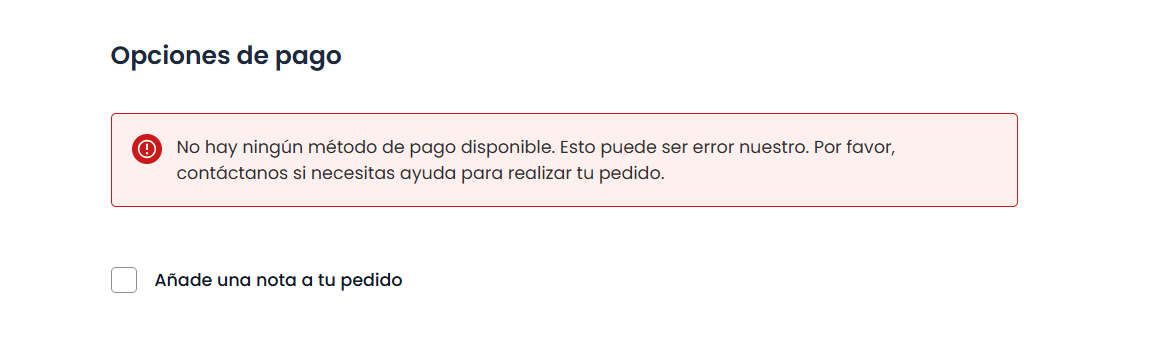
ParticipantI’m not sure if I misconfigured something, but with the latest version of MultiVendorX Pro, I’m experiencing the same issue. The payment gateway is not appearing. I assume I may have set something up incorrectly.
Attachments:
-
March 12, 2025 at 10:12 PM #239909Keymaster
Hello,
Sorry to hear that you’re experiencing an issue. Please update both the MultiVendorX and MultiVendorX Pro plugins to the latest version and check if the problem persists.
If the issue continues, kindly create a staging site that mirrors your live site and share the staging site URL, along with temporary admin and FTP access. This will allow us to investigate further and assist you accordingly.
Also while sharing the access details don’t forget to mark your reply as private.
-
March 14, 2025 at 8:01 PM #239950Participant
Hi, sorry, What is the correct way to update MVX Pro?
I can delete the whole plugin then install the new one?
Thanks!I apologize if the question is so basic, but I didn’t find anything in the documentation
-
March 15, 2025 at 8:20 AM #239952Keymaster
Hi there, We’ve included the fix in our latest update. You can download the newest version here: https://multivendorx.com/pricing/.
To update the plugin, you can either update it directly from the Plugins section of your website or manually install the new version by deleting the old one and uploading the latest file.
Let us know if you need any further assistance!
-
March 21, 2025 at 4:11 PM #240102ParticipantThis reply has been marked as private.
-
March 21, 2025 at 4:43 PM #240104Keymaster
@MUAY TAX ADVISORS SL, Sorry to hear that you’re experiencing this issue. The endless loading problem appears to be caused by a database error on your end.
We recommend resetting your site’s database (you can use a plugin like WP Reset) and then reinstalling the necessary plugins. After resetting, please check if the issue persists.
Let us know your findings, and we’ll be happy to assist further.
-
March 21, 2025 at 7:19 PM #240107ParticipantThis reply has been marked as private.
-
March 21, 2025 at 8:29 PM #240109Keymaster
I’m glad to hear that your previous issue has been resolved. Regarding the payment, please allow us some time to review it, and we will get back to you as soon as possible.
-
March 22, 2025 at 10:22 AM #240115Keymaster
Hello @MUAY TAX ADVISORS SL, The payment option was not appearing on your checkout because the WooCommerce checkout was block-based. We have switched to the classic checkout, and the payment option should now be available.
Please check on your end and let us know if you need any further assistance.
-
July 5, 2025 at 10:42 AM #248240
Anushka Sinha
ModeratorHi,
We assume that the query has been resolved. We’ll be closing this thread now.If you need any assistance in the future or encounter any issues, feel free to create a new support thread. We’re happy to help!
-
-
AuthorPosts


- The topic ‘Payment method disappeared (after plugin update?)’ is closed to new replies.
