





Tagged: 5.0
- This topic has 133 replies, 4 voices, and was last updated 10 hours ago by
Sangita Support Squad.
-
AuthorPosts
-
-
April 18, 2026 at 12:19 AM #251894
l.gan
ParticipantHello, thank you for your support.
The site has become very, very slow.
1. Previously, the frontend loaded in 0.9 seconds (which we calculated was slow), but now it’s about 10-11 seconds. Even Google Page Speed can’t measure the speed.
We also see a repeating error in the logs, which seems to happen every time any page is closed.PHP Fatal error: Uncaught Error: Call to a member function get_total() on false in /public_html/wp-content/plugins/dc-woocommerce-multi-vendor/classes/Migration/MVX.php:898\nStack trace:\n#0 /public_html/wp-content/plugins/dc-woocommerce-multi-vendor/classes/Migration/MVX.php(123): MultiVendorX\\Migration\\MVX->migrate_commissions()\n#1 /public_html/wp-content/plugins/dc-woocommerce-multi-vendor/classes/Migration/Cron.php(62): MultiVendorX\\Migration\\MVX->run_migration_cron()\n#2 [internal function]: MultiVendorX\\Migration\\Cron->run_table_migration_cron()\n#3 /public_html/wp-includes/class-wp-hook.php(341): call_user_func_array(Array, Array)\n#4 /public_html/wp-includes/class-wp-hook.php(365): WP_Hook->apply_filters('', Array)\n#5 /public_html/wp-includes/plugin.php(570): WP_Hook->do_action(Array)\n#6 /public_html/wp-cron.php(191): do_action_ref_array('mvx_full_migrat...', Array)\n#7 {main}\n thrown in /public_html/wp-content/plugins/dc-woocommerce-multi-vendor/classes/Migration/MVX.php on line 898What we tried:
Disabled all plugins except Woo and Multivendorx.
Switched to the “Storesront” theme.The site speed is still slow.
2. Question about the Loco Translate plugin: We also noticed that our custom translation isn’t loading. It’s there – it’s synced with the new version of the plugin, but our language isn’t being applied.
-
April 18, 2026 at 8:07 AM #251896
Sangita Support Squad
KeymasterHi there,
I’m sorry to hear that you encountered an issue with the upgrade. To help us investigate and resolve this as quickly as possible, could you please share access to a staging site (a replica of your live site), along with the FTP details?
For security purposes, kindly ensure that you mark your reply as private when sharing these credentials.
We look forward to receiving the details and assisting you further.
-
April 18, 2026 at 7:25 PM #251929Participant
It looks like we’re having trouble migrating from the old plugin to the new one. Order status:
All orders (there are 236 in the system) have been canceled.
Example:
cancelled #16546 – for a deleted store
cancelled #16545 – for a deleted store
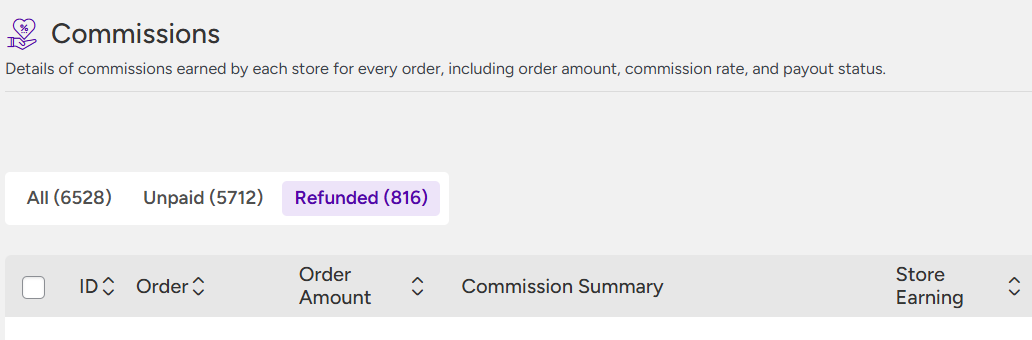
However, the number of commissions is 6592. We checked the system, and multiple commissions are being generated for a single order.
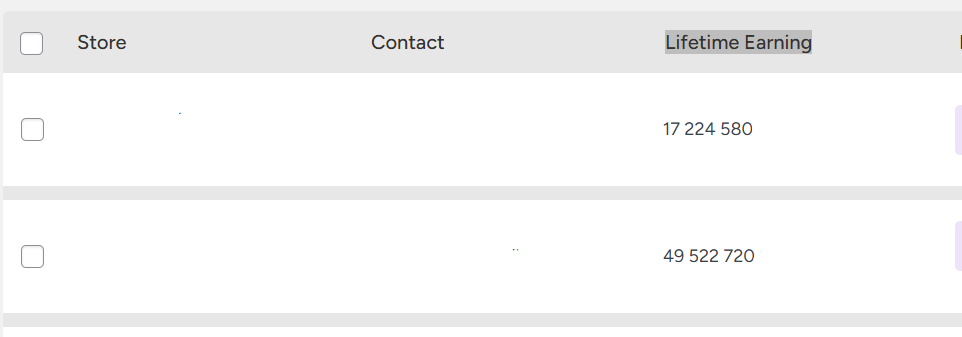
Lifetime Earning is significantly inflated.All products have had their assigned vendors automatically removed.
Something clearly went wrong, and we’ve performed a full rollback.
Unfortunately, we are currently unable to provide access to the website.Attachments:
-
April 18, 2026 at 11:01 PM #251932
NerdySupportExpert Moumita
KeymasterHi @l.gan,
We’re sorry to hear that you’re facing this issue.
We tested the migration on our end but were unable to reproduce the error. Since the issue seems specific to your setup, we’ll need to replicate your environment to properly identify the root cause.
It would be very helpful if you could share a database dump of your site, preferably from before the upgrade. Alternatively, access to a staging site along with its database backup would allow us to run the migration and investigate the issue more closely.
We understand that you may want to use a rollback version for now. However, we strongly recommend moving to MultiVendorX 5.0, as it introduces a major structural upgrade built on a modern React-based framework. All future updates and improvements will be based on this version.
To ensure your site transitions smoothly to 5.0, it’s important for us to understand why this issue is occurring specifically in your case.
For context, 1000+ sites are already using this version successfully, with only a few isolated issues reported. Your support in sharing the required data will help us resolve this faster and ensure a stable experience.
Looking forward to your response.
-
April 20, 2026 at 10:06 PM #252041ParticipantThis reply has been marked as private.
-
April 20, 2026 at 10:17 PM #252046ParticipantThis reply has been marked as private.
-
April 20, 2026 at 10:40 PM #252047Keymaster
Our team already worked on this and loaded the minimum no of resources possible and that too page wise as and where required, Will release that update tomorrow.
-
April 21, 2026 at 4:22 PM #252062Keymaster
Hi there, We have released an update (MultiVendorX 5.0.1). Kindly update the plugin to the latest version on your end and verify if everything is working as expected.
If you have any further questions or need any assistance, please feel free to let us know—we’ll be happy to help.
-
April 22, 2026 at 12:26 AM #252095ParticipantThis reply has been marked as private.
-
April 22, 2026 at 7:11 PM #252194Keymaster
Hello there,
Thank you for getting back to us and sharing your queries in detail. Please find our responses inline below:
1. Issue: Error with WooCommerce emails
(Go to WooCommerce → Settings → Emails to view the error)>> We have shared this issue with our development team, and they are currently investigating it. As soon as a fix will be added we will share the fx with you accordingly.
2. Issue: Translations (especially Russian) not working with Loco Translate
>> As MultiVendorX 5.0.0 is a major revamp, we’ve made significant improvements to the plugin’s structure, which also involved updating existing text strings and introducing new ones.
Because of these changes, some of the translations created in older versions may not automatically apply in the new version—this happens when the original strings have been modified or replaced.
To retain as much of your existing work as possible, you can export your previous translation files and import them into the updated version. Any unchanged (matching) strings will continue to display your translations. However, for newly added or modified strings, translations will need to be added again.
We understand that you’ve already invested time in translating the plugin, and these changes were necessary to improve functionality and ensure a more robust and future-ready system.
If you have any further questions, please feel free to let us know—we’re always here to assist you.
-
April 22, 2026 at 9:56 PM #252196Participant
Thank you very much for your quick response and prompt review.
Translation: the file isn’t old; it’s a new installation of WordPress, WooCommerce, and MultivendorX (with the new version) on a new database and a clean WordPress installation.
I mean that MultivendorX was already installed with version 5.0.
-
April 22, 2026 at 10:34 PM #252197Keymaster
Thank you for your response.
We will review the translation flow on our end and get back to you as soon as possible.
Thank you again for your understanding and continued support.
-
April 23, 2026 at 5:37 PM #252208KeymasterThis reply has been marked as private.
-
April 24, 2026 at 5:07 AM #252221ParticipantThis reply has been marked as private.
-
April 24, 2026 at 5:19 PM #252232Keymaster
Hi @l.gan, We’ve thoroughly checked this issue, and we can confirm that it is not coming from our plugin.
From our investigation, the error appears to be caused by Cyr to Lat plugin.
Similar issues have also been reported here: https://wordpress.org/support/topic/the-rest-api-encountered-an-unexpected-result-15/
We recommend reaching out to the Cyr to Lat plugin author for further assistance, as they would be better equipped to investigate and resolve this conflict.
Please feel free to reach out if you need any help from our side.
-
April 24, 2026 at 6:54 PM #252235Participant
Thank you for the information, I’ll contact the plugin developers or the hosting provider for assistance.
4. Question:
If the plugin is installed on an older version (prior to 5.0), it triggers a wave of CRON tasks to initiate the migration.If the plugin is installed on a clean version of WordPress without previously installed WordPress MultivendorX, the migration process shouldn’t occur.
In one of my cases, there is an installation on a clean WordPress (another site – not the one you have access to) and I encountered a situation where there are over 13,000 “errors” in the logs.
For example:
1. WordPress database error Table '*.wp_mvx_products_map' doesn't exist for query SELECT product_map_id, product_id, created FROM wp_mvx_products_map ORDER BY product_map_id, ID LIMIT 100 OFFSET 0 made by do_action_ref_array('mvx_full_migration'), WP_Hook->do_action, WP_Hook->apply_filters, call_user_func_array, MultiVendorX\Migration\Cron->run_table_migration_cron, MultiVendorX\Migration\MVX->run_migration_cron, MultiVendorX\Migration\MVX->migrate_other_tables

2. WordPress database error Table '*.wp_mvx_vendor_ledger' doesn't exist for query SELECT * FROM wp_mvx_vendor_ledger LIMIT 100 OFFSET 0 made by do_action_ref_array('mvx_full_migration'), WP_Hook->do_action, WP_Hook->apply_filters, call_user_func_array, MultiVendorX\Migration\Cron->run_table_migration_cron, MultiVendorX\Migration\MVX->run_migration_cron, MultiVendorX\Migration\MVX->migrate_ledger

3. WordPress database error Table '*.wp_mvx_shipping_zone_methods' doesn't exist for query SELECT * FROM wp_mvx_shipping_zone_methods LIMIT 100 OFFSET 0 made by do_action_ref_array('mvx_full_migration'), WP_Hook->do_action, WP_Hook->apply_filters, call_user_func_array, MultiVendorX\Migration\Cron->run_table_migration_cron, MultiVendorX\Migration\MVX->run_migration_cron, MultiVendorX\Migration\MVX->migrate_other_tables

4. WordPress database error Table '*.wp_mvx_visitors_stats' doesn't exist for query SELECT * FROM wp_mvx_visitors_stats LIMIT 100 OFFSET 0 made by do_action_ref_array('mvx_full_migration'), WP_Hook->do_action, WP_Hook->apply_filters, call_user_func_array, MultiVendorX\Migration\Cron->run_table_migration_cron, MultiVendorX\Migration\MVX->run_migration_cron, MultiVendorX\Migration\MVX->migrate_other_tables

5. WordPress database error Table '*.wp_mvx_cust_questions' doesn't exist for query SELECT * FROM wp_mvx_cust_questions LIMIT 100 OFFSET 0 made by do_action_ref_array('mvx_full_migration'), WP_Hook->do_action, WP_Hook->apply_filters, call_user_func_array, MultiVendorX\Migration\Cron->run_table_migration_cron, MultiVendorX\Migration\MVX->run_migration_cron, MultiVendorX\Migration\MVX->migrate_other_tables
As far as I understand, I can simply manually delete them from the CRON tasks, but could you please provide an exact list of CRON tasks for migration that I can safely delete?
As I currently see it, this task is exactly:
mvx_full_migration
mvx_migrate_other_tables
mvx_migrate_ledger
Thank you.
-
April 24, 2026 at 7:07 PM #252238Keymaster
Hi there,
Thank you for bringing this to our attention and for sharing the detailed information.
We have shared these details with our development team for further review. They will investigate the root cause and work on implementing the necessary fixes. Once the improvements are included in an upcoming update, we will make sure to keep you informed.
You can also keep track of the same from here https://github.com/multivendorx/multivendorx/issues/1719.
In the meantime if you have any additional details or observations, please feel free to share them with us.
-
April 25, 2026 at 11:07 PM #252265ParticipantThis reply has been marked as private.
-
April 26, 2026 at 4:56 AM #252268ParticipantThis reply has been marked as private.
-
April 26, 2026 at 12:40 PM #252273Keymaster
I’ve shared this with the development team. I’ll update you as soon as I hear back from them.
Thank you for your understanding and continued support. -
April 27, 2026 at 3:57 PM #252314KeymasterThis reply has been marked as private.
-
April 28, 2026 at 5:43 PM #252391ParticipantThis reply has been marked as private.
-
April 28, 2026 at 6:19 PM #252392Keymaster
Hi @l.gan,
Thank you for sharing the details from your hosting provider.
To clarify, MultiVendorX does not require Composer in a production environment at all. The plugin is designed to work out of the box after installation and activation in WordPress.
Composer is only used during development—for tasks like coding standards, testing, and build processes—and all of those dependencies are listed under require-dev. These are not needed for running the plugin on a live site.
So for your setup:
You do not need Composer installed on your server
You do not need to configure any Composer path
You do not need to run composer install
No command-line access is requiredThe only runtime requirement for MultiVendorX is:
PHP version 8.0 or higher
Because of this, there is no Composer path to provide or configure for the plugin to function.
If you are encountering an issue related to Composer or PHP versions, it may be coming from the server environment or another plugin, rather than MultiVendorX itself.
Please let us know if you need help identifying the exact cause—we’d be happy to assist further.
-
April 28, 2026 at 7:50 PM #252395ParticipantThis reply has been marked as private.
-
April 28, 2026 at 9:36 PM #252396Keymaster
Hello there,
Thank you for your response.
As mentioned earlier, MultiVendorX does not require Composer in a production environment, and the only runtime requirement is PHP version 8.0 or higher.
Now as you have mentioned PHP issue, could you please share more details about the specific error or behavior you’re experiencing? This will help us understand the issue better and assist you more effectively.
We look forward to your reply.
-
April 30, 2026 at 7:43 PM #252442ParticipantThis reply has been marked as private.
-
May 1, 2026 at 3:09 PM #252447KeymasterThis reply has been marked as private.
-
May 8, 2026 at 12:34 AM #252582ParticipantThis reply has been marked as private.
-
May 8, 2026 at 10:09 AM #252584Keymaster
Hello There,
Thank you for getting back to us. We are sorry to hear that you are still experiencing issues with the translation.
To help us investigate this more accurately, could you please share the specific strings or texts that are not getting translated on your end? This will allow us to review the issue accordingly and assist you further in the best possible way.
We look forward to your response.
-
May 8, 2026 at 11:17 PM #252597Keymaster
Hi There,
Thank you for getting back to us, and we are sorry to hear that you are still experiencing issues with the translations.
Regarding the notices, we have already shared the details with our development team, and they will review them accordingly.
As for the translation issue, we checked from our end and found that the changes are getting reflected properly. Kindly refer to the screenshots below for reference:
https://www.awesomescreenshot.com/image/60347677?key=0d13863e98b1262025e345beddfb7ed6
https://www.awesomescreenshot.com/image/60347683?key=7e2ba44c79812173916b28678b0e60adTherefore, we would kindly request you to make sure that the site language has been changed accordingly so that the translations can reflect properly on your site.
If there is anything else we can assist you with, please do let us know. We are always happy to help.
-
May 9, 2026 at 6:04 PM #252606Keymaster
Hi there,
Thank you for the update. This does seem a bit unusual.
We attempted to log in to the shared site to investigate the issue further, but unfortunately we were unable to access it. We are currently seeing a white page during login, as shown in the screenshot below:
https://www.awesomescreenshot.com/image/60358143?key=672b6288a72bd5e1b22c159b0d222d6aCould you please check this on your end and let us know once the issue has been resolved and the site is accessible again? We’ll then proceed with the investigation accordingly.
Thank you!
-
May 9, 2026 at 10:13 PM #252610Keymaster
Thank you for the update. Kindly provide us some time to check and we will get back to you accordingly.
-
May 10, 2026 at 6:05 PM #252620Keymaster
Hello there,
Just to keep you posted, we have checked the translation issue on your shared site and found that the translations added in other languages are getting reflected accordingly. However, the issue seems to be occurring specifically for the Russian language.
Please do not worry, as we are currently looking into this matter with our development team, and we will keep you updated accordingly with further findings.
Thank you for your patience and cooperation.
-
May 11, 2026 at 5:25 PM #252636Keymaster
Hello There,
Our team has further investigated the issue, and we found that the translations added for other languages on your site are getting reflected correctly. To debug the issue further, we also tested the Russian translations on our own test environment, and in our case, the translations were displayed properly as well.
Kindly refer to the following video for reference:
https://www.awesomescreenshot.com/video/52418525?key=450c2173bc7cff8d00fa719780902b5aAt the moment, this situation appears quite unusual because the issue seems to be occurring only for the Russian language on your site, while the other language translations are working as expected. If the issue had been reproducible for all languages or on our test environment as well, it would have been easier for us to identify the exact root cause.
With that being said, could you please let us know if we may reset your site for testing purposes to check whether there might be any database-level corruption or inconsistencies causing the issue on your end?
We truly appreciate your cooperation and look forward to your response.
-
May 12, 2026 at 5:42 PM #252668Participant
Hello,
“Could you let us know if we can reload your site for testing purposes to check for any corruption or inconsistencies at the database level causing the issue on your end?” – Of course, you can take any necessary steps to fix the problem.
Just please let us know what needs to be done/or not done, as the issue affects multiple sites. (Two with a new WordPress installation, one a store, but we rolled back.)
-
May 12, 2026 at 6:16 PM #252672Keymaster
Hello There,
Thank you for getting back to us.
We would like to clarify that, by “reset,” we mean performing a complete reset of the shared site. This process will remove and reset all existing site data, including the database tables and related configurations.
As this action is irreversible, we would kindly request your final confirmation before we proceed with resetting the site on your end.
We look forward to hearing back from you with your confirmation.
-
May 12, 2026 at 7:23 PM #252678Participant
Yes, go ahead and reset it.
-
May 12, 2026 at 8:24 PM #252680KeymasterThis reply has been marked as private.
-
May 13, 2026 at 11:22 AM #252693Keymaster
Hi There,
We went ahead and reset your site. After that, we added the translation for the string “Questions about this product,” and it is now displaying correctly on the site.
Kindly check the screenshots below for reference:
https://prnt.sc/k-DXGIwop_E0
https://prnt.sc/Riu8siJzC-OnBased on our findings, it appears there may previously have been an issue related to database corruption, which was likely preventing the translations from being reflected properly.
We would kindly request you to check the translations on your end again and let us know if everything is working correctly now.
If you have any further queries or need any additional assistance from our end, please do let us know. We will be happy to assist you further.
-
-
-
-
-
May 12, 2026 at 1:27 PM #252648
donald_punk
ParticipantHi, I’m experiencing the same translation issues described here. I’m also using Loco Translate and trying to translate everything into German. I deleted my old translation files and started fresh with new ones, but the dashboard still isn’t being translated.
-
May 12, 2026 at 2:48 PM #252659Keymaster
Hi There,
We are extremely sorry to hear that you are experiencing a similar issue with the translations on your end.
To help us better understand and investigate the matter, could you please share more details about the specific strings or text that are not getting translated correctly? If possible, screenshots or examples of the affected areas would also be very helpful for our investigation.
Once we have these details, our team will look into the issue carefully and assist you further with the appropriate solution.
We look forward to hearing back from you.
-
May 12, 2026 at 3:23 PM #252661Participant
Hi, sadly I couldn’t translate anything from the dashboard. I started with “Good morning”, I tried “Admin Announcements” and “Latest Reviews”.
Because of many issues, I had to roll back with a backup with the MVX version 4.
I will try to set up a staging during the day and send you the login.
-
May 12, 2026 at 5:59 PM #252670Keymaster
Hi There,
Thank you for sharing the details with us.
Our team is currently investigating the translation issue and we will keep you posted with updates as soon as we have more information from our development team.
Regarding the other issues you mentioned, could you please specify the exact problems you encountered apart from the translations? This will help us investigate them properly and assist you with the appropriate fixes and guidance.
We look forward to hearing back from you so that we can assist you further accordingly.
-
May 13, 2026 at 11:26 AM #252695Keymaster
Hi There,
We are glad to inform you that we have added a fix for the translation issues you were experiencing in the latest MultiVendorX update.
Kindly update the MultiVendorX plugin on your end to the latest version, MultiVendorX 5.0.5, and then check the functionality accordingly.
If you need any further assistance from our end or face any issues after updating, please do let us know. We are always here to assist you.
-
-
May 13, 2026 at 6:11 PM #252714Keymaster
Hello,
Thank you so much for your kind words and feedback. We are really glad to hear that everything is working properly now and that the translations are reflecting correctly in version 5.0.5.
It was our pleasure to assist you, and we truly appreciate your patience and cooperation throughout the process.
If you have any further queries or need any assistance in the future, please do not hesitate to reach out. We will always be happy to help.
-
May 13, 2026 at 9:46 PM #252754Participant
Hello, could you please check this for yourself: Website appearance:
Strings are not translated or strings are missing for translation./store/shop-name/reviews/ – “No policy found” – missing from the translation file.
_____
/store/shop-name/reviews/
5 Star
Reviews
4 Star
3 Star
2 Star
1 Star
Ratings
– Rating information (please see photo). Translation strings are in the file, they are translated, but the translation is not applied.
____
Seller registration page:
Account
Store info
Tell us about your store.
This information will be reviewed by our team before your store goes live. Please fill it out accurately.
Continue to Store Details
– Translation strings are in the file, they are translated, but the translation is not applied.
**
Step 2 of 2
Click to upload or drag and drop
Please enter a valid email address.
is required– missing from the translation file
Attachments:
-
-
May 13, 2026 at 10:18 PM #252757Keymaster
Thank you for sharing the information. Kindly allow us some time to review this on our end. We will get back to you with an update accordingly.
-
May 13, 2026 at 10:35 PM #252759Participant
Sorry, could you please check the flow again?
“Other” – in the abuse report – is in the translation file, but it’s not translated.
—-
1. Redirect from the vendor login page to the Dashboard.
Multivendor before 5.0 – there was an automatic redirect.Please help:
As far as I understand, the page with the shortcode [marketplace_store] is the Dashboard login page for already registered vendors?After logging in via [marketplace_store], should there be a redirect to the Vendor Dashboard page with the shortcode [marketplace_dashboard]?
Behavior after 5.0: Currently, there is no redirect. After logging in via [marketplace_store], the vendor remains on this page – it simply becomes empty (but with the site header, footer, etc.).
To access the Dashboard, the vendor needs to find the [marketplace_dashboard] page themselves, and only then will they be able to access their dashboard.
Can you please verify and confirm that this is the expected behavior?
___
2. Should an already authorized vendor via [marketplace_store], when going to the page with the [marketplace_registration] shortcode, see the option to re-submit the registration form?
Expected behavior: maybe a message like “You’re already registered!”
The user is currently viewing (photos 2 and 3).
___3. Should there be a button to access the dashboard from site.com/my-account/? (as was the case before)
-
-
May 14, 2026 at 11:21 AM #252766Keymaster
Hi There,
Thank you for sharing your queries in detail. Our replies are inline with your questions below:
1. Translation issue
>> We have already logged this issue on our GitHub repository, and our development team will work on a fix accordingly. As soon as the fix is implemented, we will keep you posted with further updates.
In the meantime, you can track the progress of the issue here:
https://github.com/multivendorx/multivendorx/issues/18482. Redirect from the vendor login page to the Dashboard
>> Currently, the shortcode for the store dashboard is: [marketplace_dashboard]
So, you need to use this shortcode for the store dashboard page.
We checked the flow on our end, and upon logging in, the vendor is redirected to their store dashboard accordingly. Kindly check the video here:
https://www.awesomescreenshot.com/video/52534180?key=99a78e352f97cabd6bdea3d6cb6d6082.Also, it seems there is a typo mistake in the admin dashboard settings description related to the Store Dashboard page shortcode. Not to worry – we will update this accordingly so users are not confused in the future.
3. Should an already authorized vendor via [marketplace_store], when going to the page with the [marketplace_registration] shortcode, see the option to re-submit the registration form?
>> With MultiVendorX 5.0.0, we introduced the concept of multi-stores. This means a single store owner can now register and manage multiple stores under the same account. From the dashboard, they can switch between different stores accordingly.
If you do not want your store owners to have multiple stores, then customisation would be required on your end to restrict this behaviour.
4. Should there be a button to access the dashboard from site.com/my-account/?
>> We checked this on our end, and the button for accessing the dashboard page is appearing correctly on the WooCommerce My Account page. Kindly check the screenshot here:https://www.awesomescreenshot.com/image/60462014?key=c53f207a6951759f65328db71cf3a15a.
Could you please check carefully once again on your end?
If you have any further queries or need any additional assistance, please do let us know. We will be happy to assist you further.
-
May 14, 2026 at 5:03 PM #252782Keymaster
Hello There,
Thank you for getting back to us. We are glad to hear that the other queries have been resolved on your end.
Regarding the button issue, as per the default flow, we have already added the “Go to Dashboard” button on the My Account page for redirecting users to the Store Dashboard, and this functionality is working correctly from our end.
It appears that, within the theme settings, the redirect URL for the profile widget has been configured to point to the admin dashboard instead. Because of this configuration, you are experiencing the current redirection behaviour.
We would kindly recommend reaching out to the theme support team and sharing these details with them so they can assist you with modifying the redirect flow accordingly. Alternatively, if needed, you may also add your own custom modification to refine the redirection behaviour of the theme’s widget.
If you need any further assistance from our end, please do let us know. We are always happy to assist you.
-
May 14, 2026 at 7:16 PM #252786Participant
Thanks for your message.
Regarding the button issue, as per the default flow, we have already added the “Go to Dashboard” button on the My Account page for redirecting users to the Store Dashboard, and this functionality is working correctly from our end. It appears that, within the theme settings, the redirect URL for the profile widget has been configured to point to the admin dashboard instead. Because of this configuration, you are experiencing the current redirection behaviour.The redirect to the Account page from the Bloxy theme widget doesn’t work only for the “Store Owner” role, which is created by the MultivendorX plugin. This role is what redirects to the admin control panel page.
For other roles not created by the MultivendorX plugin, there are no issues with the theme widget or redirecting to the WP-Admin control panel page.
This is a conflict between the theme and MultivendorX.
-
May 14, 2026 at 7:38 PM #252792Participant
Sangita, sorry, we retested based on your recommendations – indeed, there is no problem.
In the Blocksy theme header settings, you need to select redirection to the WooCommerce user account, not the user’s account.
Sorry, it was our oversight.
We confirm that everything is fine.
-
-
May 14, 2026 at 7:58 PM #252793Keymaster
Thank you for the update. We’re glad to hear that everything is working well on your end.
Please let us know if you need any further assistance from our side. We are always happy to help.
-
May 15, 2026 at 10:40 AM #252800KeymasterThis reply has been marked as private.
-
May 17, 2026 at 1:41 AM #252837Participant
Hello
Yes, please give me a little time and I’ll share the access with you.
But I have a new question:
Is it possible to add attributes to a “Simple Product Type” from the vendor dashboard?
I don’t have an attributes tab – is this a new feature or limitation?
-
-
May 17, 2026 at 1:54 AM #252838Participant
To add to the question, the “Attributes” tab is also missing from your test site. The ability to add attributes is only available for variable product types—I checked this on your site: multivendordemo.com/multivendorx/store-dashboard
Is this how it should be?
If so, is this a critical change? Why didn’t you warn me about it in the release? -
May 17, 2026 at 11:17 AM #252839Keymaster
Hi There, Thanks for getting back to us.
As per the updated flow, the Product Attributes tab is now displayed only for “Variable Products.” This is because attributes are primarily used to create and manage product variations such as size, color, material, etc.
For other product types, variations are not must needed, so the Attributes section remains hidden by default. This helps keep the product management interface cleaner, simpler, and easier to manage for vendors.
If you would like to make the Attributes option available for other product types as well, then customisation will be required, as this is not included in the default functionality. For customisation guidance, you can refer to our documentation here – https://multivendorx.com/docs/code-snippet/add-custom-menu-to-vendor-dashboard/.
If you have any further queries, please do let us know.
-
May 17, 2026 at 3:10 PM #252843Participant
Hello, thank you for your reply. This is a complete disaster.
How will filters work then when a user searches for their clothing color? This solution means that when using filter plugins, the user won’t see some products because they won’t be displayed at all—they simply won’t have the attributes required for filtering.
The product also won’t appear in product selections (attribute archives). Could you please raise the issue of returning the attribute tab for Simple Products, or share the code (ready-made) for opening the attribute tab for Simple Products? I mean provide a setting for those who need it.
-
-
May 17, 2026 at 6:44 PM #252845Keymaster
Hi there,
We totally understand your concern, and we have already forwarded it to our development team regarding this matter.
Also, regarding the custom code, we are afraid that currently we do not have any ready-made code available for this specific requirement. However, for assistance with the customization, you can refer to our documentation here:https://multivendorx.com/docs/code-snippet/add-custom-menu-to-store-dashboard/.
If you need any further assistance from our end, please do let us know. We will be happy to assist you accordingly.
-
May 20, 2026 at 3:23 AM #253084Participant
Hello, please tell me if there is any information on enabling the attributes tab for a simple product type?
-
May 20, 2026 at 9:56 AM #253085Keymaster
Hi there,
We are glad to inform you that our team has already added support for the Attribute tab for Simple Product types, and this enhancement will be included in our upcoming MultiVendorX update.
Once the update goes live, we will surely keep you posted.
In the meantime, if you need any further assistance from our end, please do let us know.
-
May 20, 2026 at 11:53 PM #253205ParticipantThis reply has been marked as private.
-
May 21, 2026 at 4:24 PM #253294Keymaster
Thank you for sharing the issue details along with the site credentials.
Could you please confirm if we may temporarily deactivate the theme and plugins for troubleshooting purposes while checking the issues?
Also, we are glad to inform you that we have already released an updated version of with the addition of the Attribute tab for all product types, along with fixes for the translation issues mentioned by you. Kindly update the plugin to the latest version on your end and check the functionality once again.
We look forward to hearing back from you with your confirmation.
-
May 21, 2026 at 4:36 PM #253300Participant
Thank you very much Sangita! Of course you can turn on/off whatever you need.
-
May 21, 2026 at 4:43 PM #253307Participant
Also, could you please hide or delete the message with my details (message #253185) above? For some reason, it was published without being hidden 🙂
-
-
May 21, 2026 at 4:55 PM #253316Keymaster
Hi there,
Thank you for your confirmation. We will now proceed with checking the issue on your end.
Also, regarding your earlier reply, it has already been marked as private, so there is no need to worry.
We will get back to you with an update shortly.
-
May 22, 2026 at 10:23 AM #253373Keymaster
Hi There,
We have further investigated the flow mentioned by you and were able to replicate the issue on our end. Accordingly, we have logged the issue in our GitHub repository, and our development team will work on the required fixes.
Once the issue is resolved, we will surely keep you updated.
In the meantime, you can track the progress of the issue here: https://github.com/multivendorx/multivendorx/issues/1918.
If you need any further assistance from our end in the meantime, please do let us know. We are always here to assist you.
-
May 23, 2026 at 5:46 PM #253594ParticipantThis reply has been marked as private.
-
May 23, 2026 at 6:20 PM #253603ParticipantThis reply has been marked as private.
-
May 23, 2026 at 6:25 PM #253605Keymaster
Hello There,
Thank you for getting back to us and for sharing the detailed explanation regarding the issues.
Regarding the issue you are facing with the third-party filtering plugin, I have already forwarded the details, including the video and the behavior you described, to our development team for further review. Once I receive an update from them regarding the compatibility flow or possible cause, I will surely keep you posted.
Regarding your queries about the attribute workflow, the behavior where newly added values get saved under the global WooCommerce attribute taxonomy is currently based on the default WooCommerce attribute handling flow, and we have implemented the same behavior for vendors within MultiVendorX.
As for the updated attribute selection flow in MultiVendorX 5.0.0, since the entire UI and architecture of the plugin have been redesigned, some workflows have also been modified accordingly. At present, when an attribute is selected, all available terms are loaded by default, and vendors can remove the unwanted ones using the delete option provided.
If your vendors need assistance understanding the updated workflow, you can simply share proper guidance or tutorials with them accordingly. Additionally, if needed, we can also help by providing proper documentation or a knowledgebase guide explaining the new flows in MultiVendorX 5.0.0. Please feel free to let us know, and we will surely assist you accordingly.
Hope this helps clarify the current behavior.
In the meantime, if you need any further assistance from our end please do let us know.
-
May 27, 2026 at 4:36 PM #253896Keymaster
We have already logged this issue on our GitHub, and our team will work on adding the necessary fixes accordingly.
You can track the progress of the issue from here:
https://github.com/multivendorx/multivendorx/issues/1953Also, could you please let us know where you are seeing the details mentioned in reply #253594?
-
May 27, 2026 at 8:44 PM #253965Participant
Also, could you please tell me where you see the information mentioned in answer #253594?
This error can be seen if you’re using the filtering WooCommerce AJAX Products Filter plugin on the vendor’s page, but the PRO version—that is, the version with the “Pretty URLs” module. When enabled and filtered, the vendor’s page returns a 404 page.
This module transforms URLs:
from
/store/store-name/?filters/filter_conditions
to
/store/store-name/filters/filter_conditions
-
-
-
May 27, 2026 at 10:09 PM #253966Keymaster
Thank you for the details.
Let me share this with the team, and we will get back to you accordingly. -
May 28, 2026 at 10:09 AM #253764ParticipantThis reply has been marked as private.
-
May 28, 2026 at 10:38 AM #253972Keymaster
Hi there,
Thank you for sharing the detailed findings along with the information from the WooCommerce AJAX Products Filter plugin documentation.
Based on the details you shared, it appears that the filtering issue is occurring because the third-party filtering plugin is not recognizing the MultiVendorX store page as a standard WooCommerce product archive page. As mentioned in their own diagnostic tool and documentation, the plugin relies on WooCommerce hooks, native product loops, or supported shortcodes/blocks to identify products server-side for AJAX filtering.
Since the filtering functionality is entirely handled by the third-party plugin, the required compatibility implementation would need to be added from their end so that their plugin can properly recognize and process the MultiVendorX store pages.
Therefore, we would kindly request you to reach out to the plugin’s support team and ask them to add compatibility support for the MultiVendorX store/shop pages within their filtering logic.
That said, if their team requires any technical information regarding the structure of the store shopfront page, hooks used, or any assistance from our end to help with the compatibility implementation, please feel free to let us know. We will be happy to assist with the required information wherever possible.
-
May 31, 2026 at 1:07 PM #254166Keymaster
Hi there,
Thank you for sharing the details. We will review and test the mentioned flow on our end and get back to you with an update accordingly.
-
June 1, 2026 at 12:05 PM #254178Keymaster
Hi There,
Thank you for reporting the breadcrumb issue.
We have investigated the issue and have logged it in our GitHub repository for further review and resolution. Our development team will work on fixing it in an upcoming update.
You can track the progress of this issue here:
https://github.com/multivendorx/MultiVendorX/issues/1981
We appreciate your patience and understanding while we work on this improvement.
In the meantime, if you need any further assistance or have any additional questions, please feel free to let us know. We are always happy to help.
-
June 2, 2026 at 7:07 PM #254244Participant
Thank you so much.
Could you please look into this issue further?
1. Open PageSpeed Insights.
2. Check the product page for the assigned vendor.
3. Open the “Open Performance Map” section in PageSpeed Insights.You’ll see two issues:
1. The product page loads /wp-content/plugins/dc-woocommerce-multi-vendor/assets/js/vendors.js?ver=5.0.6, which is 844.2 KiB (76%) in size, making up 76% of the page. This slows down the product page load time.
There are also other files that are slightly smaller: /wp-includes/js/dist/blocks.min.js?ver=ef38e42500165bfda301
55.1 KiB
/wp-includes/js/dist/vendor/react-dom.min.js?ver=18.3.1.1
41.9 KiB
/wp-includes/js/jquery/jquery.min.js?ver=3.7.1Should they all load when the user opens the product page?
2. When you’re in the Lighthouse Treemap, switch to “Unused Bytes.”
Unused bytes
/wp-content/plugins/dc-woocommerce-multi-vendor/assets/js/vendors.js?ver=5.0.6
842.6 KiB
/wp-includes/js/dist/vendor/react-dom.min.js?ver=18.3.1.1
36.4 KiB
/wp-includes/js/dist/blocks.min.js?ver=ef38e42500165bfda301
34.1 KiB
/wp-includes/js/dist/rich-text.min.js?ver=16449e6108f48327f368
12.0 KiBIn a test environment with the Blocksy, WooCommerce, and Multivendorx themes active, out of 1.1 MB, unused files make up 1 MB, which consists almost entirely of Multivendorx scripts.
Is this how it should be?
Thanks.Attachments:
-
-
June 2, 2026 at 7:37 PM #254248Keymaster
Hello there,
Thank you for reaching out and sharing the detailed analysis.
On the product page, the MultiVendorX scripts are primarily used to load and manage vendor-related data such as store information, geo-location, and other associated storefront functionalities. This is why the scripts are being enqueued on the product page.
Regarding the performance observations, I will share these details with our development team for review if further optimization is possible.
-
June 6, 2026 at 4:58 PM #254481ParticipantThis reply has been marked as private.
-
June 6, 2026 at 7:47 PM #254482Keymaster
Hi there,
Thank you for getting in touch with us.
Our replies are inline with your queries below:
1. After the last update, some translations (header, review tabs) were missing from the vendor store page. This includes the “Seller Registration” page. We also noticed that translation strings for the vendor dashboard are completely missing.
>> We have checked the translations with the latest version on our end and were unable to reproduce the issue. Kindly review the video below for reference:
https://www.awesomescreenshot.com/video/53327199?key=020365b1cd61366e8afababfecacf3ce
Could you please share a staging site running the latest version where you are experiencing this issue? This will allow us to investigate further and assist you accordingly.
2. Go to My Account → Orders → Open an order → Click the “Request a Refund” button. There’s no button to close the modal window.
>> Thank you for reporting this. We have already informed our development team about the issue, and the required modification will be added in the upcoming update.
3. Go to Plugin Settings → User Capabilities → The option to select settings for the Store Owner is missing.
>> We have checked this on our end and the settings are displaying correctly. Please refer to the screenshot below:
https://www.awesomescreenshot.com/image/60991613?key=9756017c021f1a6b4202c0658d51db47
Could you please share a screenshot or screen recording of the section from your end? This will help us better understand the issue and assist you further.
We look forward to hearing from you.
-
June 6, 2026 at 9:06 PM #254489Participant
1. Please give me a little time, and I’ll get back to you with an answer.
3. Your screenshot shows the problem: the checkboxes are visibly inactive. They’re not clickable. It’s as if they’ve been disabled.
That is, in the free version, they have the same activation status as the PRO version. They’re inactive, as if they were a PRO version feature.
-
-
June 6, 2026 at 9:36 PM #254490Keymaster
Hi there,
Thank you for your prompt response.
Regarding the translation issue, we look forward to hearing back from you once you have more information to share.
We also appreciate you bringing the capability checkbox selection under the User Capabilities section to our attention. We will review this and include an appropriate fix in the upcoming update.
Additionally, we’d like to keep you informed that the Store Owner capabilities listed under User Capabilities are synchronized with the Store Permissions settings. This means that once the store permissions are configured, the corresponding capabilities will be automatically assigned to the Store Owner role.
In the meantime, if there is anything else we can assist you with, please don’t hesitate to let us know. We’re always happy to help.
-
June 9, 2026 at 2:25 PM #254685Participant
Hi,
we’ve checked ourselves again – everything is fine with the translations now. Everything is available.Thank you.
-
June 9, 2026 at 3:11 PM #254686Keymaster
Hi There,
Thank you for confirming and for checking again.
We’re glad to know that the translations are now working fine at your end and everything is available.
If you need any further assistance from our side, please feel free to let us know. We’re always here to help.
-
June 17, 2026 at 3:31 PM #254925Participant
Hi.
Thanks for the update.But there are still some issues:
1. The vendor store page loading speed is significantly slower visually – it takes longer to load.
2. The 404 error in the breadcrumbs has disappeared, but the breadcrumbs still display “Home / Store Template” (i.e., the template name). If I remove the title in the Store Template in Gutenberg, only “Home /” remains.
It should be: “Home / Store Name”
3. When using the Blocksy theme, some menus on the Store Template page are replaced with the store name.
with links.
For example:
Before the update: The link in the menu was originally called: Privacy Policy and it led to the privacy policy.After the update: The link still leads to the privacy policy, but the link title becomes “NIKE” (i.e., the seller’s name).
4. When using the “Store Banner” block, there are errors on the page in the Console:
/wp-json/multivendorx/v1/follow-stores/3?user_id=0&store_id=3:1 Failed to load resource: the server responded with a status of 401 ()
pafier/:1 Uncaught (in promise) AxiosError: Request failed with status code 401
at i (vendors.js?ver=5.0.8:1:2237117)
at XMLHttpRequest.B (vendors.js?ver=5.0.8:1:2209140)
/wp-json/multivendorx/v1/review?store_id=3:1 Failed to load resource: the server responded with a status of 404()
view.js?ver=90cd45b75a60c2287ce7:1 Failed to fetch rating AxiosError: Request failed with status code 404
at i (vendors.js?ver=5.0.8:1:2237117)
at XMLHttpRequest.B (vendors.js?ver=5.0.8:1:2209140)
(anonymous) @ view.js?ver=90cd45b75a60c2287ce7:1
/wp-json/multivendorx/v1/reviews/3?storeId=3:1 Failed to load resource: the server responded with a status of 401 ()
view.js?ver=90cd45b75a60c2287ce7:1 Failed to fetch rating AxiosError: Request failed with status code 401
at i (vendors.js?ver=5.0.8:1:2237117)
at XMLHttpRequest.B (vendors.js?ver=5.0.8:1:2209140)
(anonymous) @ view.js?ver=90cd45b75a60c2287ce7:15. We also noticed that the add-to-favorites buttons for one of the most popular plugins, YITH WooCommerce Wishlist (which has 400,000+ installations), aren’t working on the page. The hearts, which display perfectly everywhere, disappear completely on the vendor’s store page.
Are there any issues loading AJAX on the vendor’s page? Are there any blocking scripts?
This is the second plugin that uses AJAX and that we’ve encountered. “Problems”
The first plugin is a completely non-functional filter for the WooCommerce AJAX Products Filter plugin.
We’ve now noticed that the YITH WooCommerce Wishlist plugin also doesn’t work on the vendor store page.This means the problem is definitely with the vendor store page. Please raise these issues with the developers. It’s obvious that two popular plugins can’t both be broken and not work.
-
June 17, 2026 at 3:55 PM #254926Keymaster
Hi there,
The console errors and breadcrumb-related issue have already been resolved in the latest MultiVendorX version 5.0.8. Please make sure that you’re using this version on your site, as these issues should no longer be present after updating.
Regarding the issue you’re experiencing with your third-party plugin on the store pages, we’d like to clarify how the latest architecture works.
For custom MultiVendorX pages – such as the Store Frontend and Store List pages etc.- we no longer rely on WooCommerce’s endpoints. These pages are built using MultiVendorX’s own architecture and routing system.
Because of this architectural difference, third-party plugins that are designed specifically for WooCommerce endpoints may not work as expected on these custom MultiVendorX pages. If you would like those third-party functionalities to work on our custom pages as well, some level of custom development or integration will likely be required to make them compatible with the MultiVendorX implementation.
We hope this clarifies the behavior.
-
June 17, 2026 at 4:15 PM #254931Participant
Thanks for the quick response.
Yes, we’re using and testing MultiVendorX 5.0.8 (as well as the latest versions of WordPress, WooCommerce, and the Bloxy theme).
Regarding the updated architecture, how do we filter products on the store’s product page? So, the user won’t even be able to select the desired category?
-
June 17, 2026 at 5:51 PM #254932Keymaster
Hi Igan,
This is quite surprising, as we’ve tested the latest version on our end and have not been able to reproduce the issue.
The store breadcrumbs are displaying correctly on the store frontend page, as shown in the screenshot below:
https://www.awesomescreenshot.com/image/61247983?key=629fbccaf1d6845431c11a4f9d8c22d8Additionally, we are not seeing any console errors during our testing.
Since you’re still experiencing these issues, could you please share access to a staging site where the problem can be reproduced? This will allow us to investigate the behavior directly and assist you more effectively. When sharing the credentials, please remember to mark your reply as private to keep the information secure.
Regarding the product category filtering, you can achieve this by adding the MultiVendorX Store Category widget to the MultiVendorX Store Sidebar. Once the widget is added, a product category filter will automatically appear on the vendor’s store page, allowing customers to filter products by category.
If you have any further questions or need additional assistance, please let us know. We’ll be happy to help.
-
June 17, 2026 at 6:51 PM #254935ParticipantThis reply has been marked as private.
-
June 17, 2026 at 7:42 PM #254937Keymaster
Hi there,
Thank you for sharing the access details with us.
However, we’re currently unable to access the site using the URL you provided. Could you please verify the link and share the correct URL or updated access details with us?
We look forward to hearing back from you so that we can continue our investigation.
-
June 17, 2026 at 9:05 PM #254940Participant
Please check your spam
-
June 17, 2026 at 10:07 PM #254939ParticipantThis reply has been marked as private.
-
June 17, 2026 at 10:11 PM #254942Keymaster
Thank you for sharing the details. Kindly allow us some time to review everything thoroughly. We will investigate the matter and get back to you with an update accordingly.
-
June 18, 2026 at 4:55 PM #254964Keymaster
Hi there,
Thank you for sharing the detailed information.
Regarding the Product Categories widget, this is the expected behavior. When a user clicks on a product category widget, they are redirected to the page displaying the products belonging to that category.
As for the other issues you’ve mentioned, such as the loading time, menu behavior, and breadcrumb display, could you please test your site using a default WordPress theme like Twenty Twenty-Five or Storefront and check whether the same issues persist?
We will look forward to your update.
-
June 19, 2026 at 2:14 AM #254972ParticipantThis reply has been marked as private.
-
June 19, 2026 at 2:21 AM #254973ParticipantThis reply has been marked as private.
-
June 19, 2026 at 10:48 AM #254982Keymaster
Hi there,
Sorry for any confusion.
When we refer to the Product Category Widget, we mean the widget available under the MultiVendorX Store Sidebar section. You can refer to this screenshot for reference:
https://www.awesomescreenshot.com/image/61295648?key=9549272d8cf7637f2d5d202fa604723fOnce you add this widget on your end, the product categories will be displayed in the store sidebar as shown here:
https://www.awesomescreenshot.com/image/61295664?key=56bcc5d0adb350624a5c1d585df758f7If anything is still unclear or if you have any further questions, please let us know. We’d be happy to assist you further.
-
June 24, 2026 at 8:56 PM #255078Participant
Hello,
Is there any information regarding the issues mentioned in posts #254972 and #254939? -
June 24, 2026 at 9:28 PM #255079Keymaster
Hi there,
Thank you for getting back to us.
Regarding the Product Category widget, we have already addressed this in our previous reply.
As for the issues with the menu and breadcrumbs, we have already reported them to our development team. They are currently working on a fix, which will be included in an upcoming update. We will keep you informed of any progress and share updates as soon as they become available.
Additionally, we were unable to reproduce the console error on our end. Could you please let us know on which page(s) and under what circumstances you are encountering this error? Any additional details or screenshots would be greatly appreciated and will help us investigate the issue further.
We look forward to hearing from you
-
June 25, 2026 at 10:02 AM #255081Participant
Console errors are also occurring on the vendor’s store page. While using your block. Please note the message https://multivendorx.com/support-forum/topic/problem-after-upgrading-to-5-0/#post-254939. You also have:
1. A video with the Blocksy theme
1.3. The store page loads significantly slower than all other pages on the site. This is even noticeable visually – please, this is very important, pages shouldn’t take so long to load!
1.4. Console errors: If you use the “Store Quick Info” block in the store header, you’ll get console errors.
/wp-json/multivendor…review?store_id=1:1
Failed to load resource: the server responded with a status of 404 ()
view.js?ver=90cd45b…:1 Failed to fetch rating AxiosError: Request failed with status code 404
at i (vendors.js?ver=5.0.8:1:2237117)
at XMLHttpRequest.B (vendors.js?ver=5.0.8:1:2209140)
(anonymous) @ view.js?ver=90cd45b…:1Video: https:// drive.google.com/file/d/1bQMt1yHmjgNCH-Yvs2BWB7du8Xpr-2sz/view?usp=sharing
2. A video while using the theme Twenty Twenty-Five theme
https:// multivendorx.com/support-forum/topic/problem-after-upgrading-to-5-0/#post-254972i.e., two themes are giving the same errors, so the issue isn’t with the themes.
Also, please note that you have access to a test environment where (as shown in the video) console errors are present, as well as other issues (including a slow loading speed of the vendor’s store page).
-
June 25, 2026 at 10:54 AM #255090Keymaster
Hi there,
Thank you for getting back to us and for sharing the details.
We have reviewed the information you provided. Regarding the store page loading issue, I have already shared it with our development team for their review.
As for the console errors, we have logged the issue in our GitHub repository, and our team will work on implementing a fix. Once the fix is available, we will keep you updated. In the meantime, you can also track the progress of the issue here: https://github.com/multivendorx/multivendorx/issues/2072.
Regarding the issue mentioned in point #2, it appears that the video link is currently inaccessible on our end. Could you please share an updated or accessible video link so that we can review the issue and assist you further?
We look forward to your update.
-
June 29, 2026 at 6:37 PM #255164ParticipantThis reply has been marked as private.
-
June 29, 2026 at 7:37 PM #255167Keymaster
Thank you for sharing the details. Please allow us some time to review the information. We will investigate the matter and get back to you with an update as soon as possible.
-
July 1, 2026 at 3:50 PM #255185Keymaster
Hi there,
Sorry for the delay in getting back to you.
Regarding the translation issue, we have already logged it on our GitHub (https://github.com/multivendorx/multivendorx/issues/2106) for the development team’s review. They will investigate the issue and include the necessary fixes in our upcoming updates.
As for the store review flow, we have tested it thoroughly on our end and observed that as soon as a customer submits a review, it appears under the Customers tab in the MultiVendorX admin dashboard (https://www.awesomescreenshot.com/image/61577738?key=2878367e4b71b09089cd4bae6fa6688d). Only the marketplace administrator has the ability to approve or reject reviews, while the store owner can reply to the reviews from their store dashboard.
Based on our testing, this workflow is functioning as expected. We would kindly request you to review the flow once again on your end and let us know if you continue to experience any issues. If possible, please share the exact steps to reproduce the issue or any screenshots/screen recordings, as they will help us investigate further.
You can also refer to our documentation for more details on the review system:
https://multivendorx.com/docs/knowledgebase/multivendorx-review/If you have any further questions or need any additional assistance, please don’t hesitate to let us know. We’re always here to help.
-
July 1, 2026 at 7:27 PM #255192Keymaster
Hi there,
Thank you for sharing the details.
Could you please provide us with temporary access to a staging site, along with FTP access, where the issue can be reproduced? This will allow us to investigate the issue directly and assist you more effectively in identifying and resolving the problem.
When sharing the access details, kindly ensure that your reply is marked as private for security purposes.
We look forward to hearing back from you.
-
July 2, 2026 at 10:03 AM #255194Participant
Unfortunately, it’s not possible to provide a test site.
We tried:
1. Resetting “Permalinks” – but that didn’t help.
2. https://site/wp-json/ is available. The JSON structure is visible.
3. Plugins and all custom code are disabled. The theme has been switched to the “Storefront” theme.What other steps can we take to uncover additional information?
Could this error be related to the previously known and reported console errors – https://github.com/multivendorx/multivendorx/issues/2072? -
July 2, 2026 at 11:04 AM #255200Keymaster
Hi there,
Thank you for getting back to us.
We have reviewed the store review flow once again on our test site, and it appears to be working as expected. When a customer submits a store review (https://www.awesomescreenshot.com/image/61601557?key=8ec6bcc9868d5a1056201af89818203b), it is successfully listed under the Store Reviews section in the admin dashboard (https://www.awesomescreenshot.com/image/61601591?key=7de2bbbf144909897ed88760f978016f), where it awaits the administrator’s moderation.
Since we have not been able to reproduce the issue on our end, it is unfortunately difficult for us to determine the exact cause or provide an accurate solution at this stage.
That said, we have logged the console errors and log details you shared and forwarded them to our development team. They will review the information carefully and make any necessary improvements or modifications where applicable.
In the meantime, if you could provide us with a site where the issue can be consistently reproduced, it would greatly help our investigation. Having access to a reproducible environment will allow us to identify the root cause more effectively and assist you with a resolution as quickly as possible.
We appreciate your patience and look forward to your response.
-
July 3, 2026 at 9:27 PM #255263ParticipantThis reply has been marked as private.
-
July 3, 2026 at 9:47 PM #255264Keymaster
Hi there,
Thank you for sharing the access details.
Unfortunately, we were unable to log in using the credentials provided. Could you please verify them and share the correct login details with us so that we can proceed with the investigation?
We look forward to your update.
-
July 3, 2026 at 11:16 PM #255270Keymaster
Hello,
Thank you for sharing the updated details. We are now able to log in to your site and proceed with our investigation.
Kindly allow us some time to thoroughly review the issue. We will get back to you with an update as soon as we have more information.
Thank you for your patience and understanding.
-
July 6, 2026 at 11:32 AM #255286Keymaster
Hi there,
Thank you for your patience while we investigated the issue.
After further testing, we were unable to reproduce the issue on our end. However, while reviewing your site, we noticed an error that appears to be related to the problem you’re experiencing.
We have logged this issue on our GitHub repository so that our development team can investigate it further and implement a fix if required. You can track the progress of the issue here:
https://github.com/multivendorx/MultiVendorX/issues/2155
We’ll keep you updated as soon as we have any progress or once a fix has been implemented.
Thank you again for your continued support, patience, and cooperation. Please feel free to reach out if you have any questions or need any further assistance in the meantime.
-
July 6, 2026 at 9:06 PM #255317ParticipantThis reply has been marked as private.
-
July 6, 2026 at 9:20 PM #255318Keymaster
Thank you for getting back to us, and we’re sorry to hear that you’re experiencing these issues on your end.
Kindly allow us some time to thoroughly review the reported concerns. We will investigate them and get back to you with an update as soon as possible.
Thank you for your patience and understanding.
-
July 7, 2026 at 4:08 PM #255328Keymaster
Hi there,
Thank you for your cooperation.
We reviewed the console error you reported and have forwarded it to our development team for further investigation. They will review the issue and implement a fix accordingly. We will keep you updated as soon as the fix is available.
Regarding your second point about the Logo section, the logo uploaded by the admin from the MultiVendorX Admin Dashboard will be displayed. For a better understanding of how this works, please refer to this video:
https://www.awesomescreenshot.com/video/54326846?key=bf00c2e0aa4b793b270c1e39c47bb74cAs for the Product Compliance section shown here:
https://www.awesomescreenshot.com/image/61715405?key=972ec89961671e8796867cee9c1ed58cThis feature is part of MultiVendorX Pro. Once MultiVendorX Pro is installed and activated, you can configure the Product Compliance settings from the admin dashboard. As the marketplace admin, you can define compliance guidelines such as:
– All product listings must follow the platform’s content guidelines and avoid prohibited categories.
– Branded or regulated products must include authenticity certificates.
– Optional safety certifications may be uploaded for regulated items.These compliance fields will then be available on the store owner’s Edit Product page in their store dashboard.
Please note that in the free version of MultiVendorX, only the Report Product Abuse feature is available.
If you have any further questions or need any additional assistance, please don’t hesitate to let us know. We’ll be happy to help.
-
July 7, 2026 at 4:46 PM #255331ParticipantThis reply has been marked as private.
-
July 7, 2026 at 6:08 PM #255333Keymaster
Hello,
You’re very welcome.
We’re glad we could clarify your questions. Thank you for pointing out your observation regarding the Product Compliance settings appearing in the free version as well. We appreciate your feedback, and we’ll review it internally to see if any improvements can be made to avoid confusion.
If you have any questions in the future or need any assistance, please don’t hesitate to reach out. We’ll always be happy to help.
Have a great day!
-
July 7, 2026 at 7:00 PM #255335KeymasterThis reply has been marked as private.
-
July 8, 2026 at 5:39 PM #255350Participant
Hello,
We’re trying to display a courier selection (from the plugin Local Delivery Drivers for WooCommerce) for an order. However, we’re having trouble correctly inserting the courier selection card into the order. Could you please help us with this? Thank you.
The problem is that this card doesn’t appear immediately (like your plugin blocks, for example), but only after the user refreshes the page.
Here’s the code: (AI generated)
add_action( 'wp_footer', 'mvx_insert_test_card_into_right_column' );
function mvx_insert_test_card_into_right_column() {
    if ( strpos( $_SERVER['REQUEST_URI'], '/dashboard/orders/view/' ) === false ) {
        return;
    }
    ?>
    <script type="text/javascript">
        (function($) {
            function insertCard() {
                var column = $('.column.grid-4, .column[data-cols="4"], .card-wrapper[data-cols="4"]').first();
                if (column.length === 0) {
                    column = $('.column:has([data-cols="4"])');
                }
                if (column.length === 0) return false;
                if ($('#mvx-test-card').length) return true;

                var html =
<div id=”mvx-test-card” class=”card-content”>
<div class=”card-header”>
<div class=”left”>
<div class=”title”>Тестовая карточка</div>
</div>
</div>
<div class=”card-body”>
<p>Тест</p>
</div>
</div>
`;
column.append(html);
return true;
}if (insertCard()) return;
var observer = new MutationObserver(function() {
if (insertCard()) {
observer.disconnect();
clearInterval(interval);
}
});
observer.observe(document.body, { childList: true, subtree: true });var attempts = 0;
var interval = setInterval(function() {
attempts++;
if (insertCard()) {
clearInterval(interval);
observer.disconnect();
} else if (attempts >= 30) {
clearInterval(interval);
observer.disconnect();
}
}, 500);setTimeout(function() {
if (!insertCard()) {
insertCard();
}
}, 5000);})(jQuery);
</script>
<?php
}` -
July 8, 2026 at 5:56 PM #255351Keymaster
Hi,
This behavior with the translation is quite unusual, as we have tested the translations on our end and they are being translated and displayed correctly.
For your reference, please see the screenshots below, which demonstrate the translations working as expected:
https://www.awesomescreenshot.com/image/61748124?key=2288d8e645845121fcc947e6fee9c69d
https://www.awesomescreenshot.com/image/61748164?key=c7e9f83be2ab18b1f6f53e1b7cd39161
Since the translation works fine on our end, we would kindly request that you reset the staging site’s database and test the behavior again. It is possible that there is some database inconsistency or corruption in the staging environment that is preventing the translations from being reflected correctly.
We look forward to hearing the results after you have tested it again.
Regarding your question about the third-party integration, it is difficult for us to review custom code and fully understand your implementation. Could you please provide details about what you are trying to achieve and where you would like to add the integration? Based on your requirements, we will be happy to check whether there are any suitable hooks or filters available that can help you achieve the desired functionality.
Alternatively, if you require assistance with developing a custom workflow or implementation, you may reach out to our custom development team. They will be happy to discuss your requirements and assist you with the total custom development.
-
-
AuthorPosts



- You must be logged in to reply to this topic.
