






- This topic has 61 replies, 3 voices, and was last updated 7 months, 2 weeks ago by
Sangita Support Squad.
-
AuthorPosts
-
-
January 5, 2025 at 4:57 PM #238184
zedmandesign
ParticipantHi,
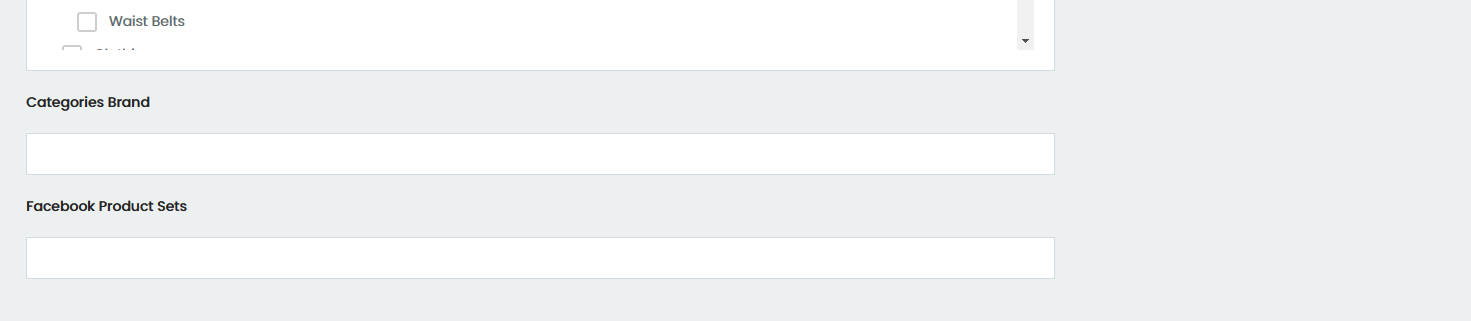
Could you please let me know how to remove both ‘categories brand and facebook product sets’ from showing on the add or edit products screens?
Attachments:
-
January 6, 2025 at 11:12 AM #238192
Sangita Support Squad
Keymaster@zedmandesign, We’ve checked on our end, and it seems the sections you mentioned are not part of the default setup. Could you please let us know how you’ve added those sections? This will help us better understand your setup and provide more effective assistance.
-
January 8, 2025 at 6:12 PM #238249ParticipantThis reply has been marked as private.
-
January 8, 2025 at 6:21 PM #238251Keymaster
Hi @zedmandesign, Thank you for getting back to us and sharing the detailed information.
Regarding the errors you’ve highlighted, it seems they are originating from the third-party plugin, YayMail Addon for MultiVendorX. As these issues are related to their implementation, we kindly recommend reaching out to the plugin’s support team for assistance. They will be better equipped to address these concerns, as the necessary fixes would need to be implemented on their end.
To streamline the process, you could also email their team and keep us in the loop. If they require any input or assistance from our side during the troubleshooting, we will be happy to support them to ensure a resolution.
Let us know if there’s anything else we can help you with!
-
February 28, 2025 at 3:06 PM #239516ParticipantThis reply has been marked as private.
-
February 28, 2025 at 4:18 PM #239517Keymaster
@zedmandesign, sorry to hear you’re experiencing issues. We kindly request you to set up a staging site (a replica of your site where the issue can be recreated) using a plugin like WP Staging.
Please share the staging site URL, along with temporary admin and FTP access, so we can debug the issue and assist you in resolving it.
While sharing the access don’t forget to mark your reply as private.
-
March 13, 2025 at 3:08 AM #239911ParticipantThis reply has been marked as private.
-
March 13, 2025 at 11:29 AM #239920Keymaster
@zedmandesign, Thanks for getting back to us! Could you confirm if you made the changes directly in the plugin file? If so, please note that any updates will override those changes.
To prevent this, we recommend adding custom CSS to your theme’s style.css file instead. This way, your modifications will remain intact even after plugin updates.
Let us know if you need further assistance!
-
March 13, 2025 at 5:49 PM #239931ParticipantThis reply has been marked as private.
-
March 13, 2025 at 5:57 PM #239932Keymaster
@zedmandesign, Thanks for reaching out! We currently don’t have a ready-made custom code for this. However, I’ll share your query with our dev team, and as soon as I hear back from them, I’ll update you accordingly.
Let me know if you need anything else in the meantime!
-
May 30, 2025 at 11:48 PM #241303ParticipantThis reply has been marked as private.
-
May 31, 2025 at 11:23 AM #241320Keymaster
Hi @zedmandesign, Thank you for getting back to us.
When a customer applies to become a wholesale customer, their pending application should appear under the “Word Board” submenu in the admin panel. However, upon reviewing the flow, we noticed that this section is currently not showing due to an issue.
Our development team has been informed, and they will look into it and provide a fix shortly.
We’ll keep you updated as soon as the fix is implemented.
Thanks again for your patience!
-
May 31, 2025 at 6:31 PM #241322ParticipantThis reply has been marked as private.
-
May 31, 2025 at 7:01 PM #241323Keymaster
Hi there, We’ll keep you updated as soon as the fix for the wholesale customer issue is implemented. Regarding the new order email, please allow us some time to review the process on our end and we’ll keep you informed accordingly.
-
June 2, 2025 at 10:11 AM #241342Keymaster
Hi @zedmandesign, We’ve reviewed the new vendor order flow on our end, and the emails are being triggered correctly to vendors for orders (https://tinyurl.com/2ctb48ql), including those with their products (https://tinyurl.com/2bmrrl3w).
We recommend installing a plugin like Email Log on your site to monitor the email flow. Please check the process again, and if the issue still persists, feel free to reach out.
We look forward to your response.
-
June 4, 2025 at 3:33 AM #241364ParticipantThis reply has been marked as private.
-
June 4, 2025 at 10:10 AM #241365Keymaster
@zedmandesign, we’re sorry to hear that you’re still experiencing issues with the vendor new order emails. To help us investigate this further, could you please share access to a staging site where the issue is replicated? This will allow our team to look into it more effectively and provide a suitable fix.
Kindly ensure your reply is marked as private when sharing the access details.
-
June 4, 2025 at 1:31 PM #241372KeymasterThis reply has been marked as private.
-
July 9, 2025 at 3:46 AM #248356ParticipantThis reply has been marked as private.
-
-
June 6, 2025 at 4:02 PM #241404ParticipantThis reply has been marked as private.
-
June 6, 2025 at 4:43 PM #241406Keymaster
Hello there, Thank you for sharing the staging site access.
We tested the flow by placing a new order for vendor products, and the order emails are being triggered correctly for the vendors. You can view the results here: https://tinyurl.com/23847sr2.
Kindly check the same on your end and let us know if you need any further assistance.
-
June 6, 2025 at 10:44 PM #241411ParticipantThis reply has been marked as private.
-
June 8, 2025 at 6:55 PM #241439Keymaster
@zedmandesign, thanks for sharing the details. Could you please confirm whether you’re using the Stripe Marketplace module or the WooCommerce Stripe payment option for handling payments? Also, if possible, please share a video demonstrating the slow speed issue so we can investigate and assist you more effectively.
-
June 8, 2025 at 7:47 PM #241444ParticipantThis reply has been marked as private.
-
June 9, 2025 at 1:16 PM #241451
Anushka Sinha
ModeratorHi @zedmandesign,
Thank you for your cooperation.
I’ve reviewed the flow on our end, and everything appears to be functioning correctly. You can view the recorded flow here: https://app.screencastify.com/watch/0NWdSjyNrATLKDthcmgn
To further investigate the issue on your end, I am proceeding with deactivating the theme and necessary plugins on the staging site you provided and if needed can we reset your site?
Looking forward to your confirmation. -
June 9, 2025 at 4:27 PM #241456Moderator
Hi @zedmandesign,
Thank you for your patience.
I would like to inform you that email notifications are triggered for orders with the status either ‘Completed’ or ‘Processing’.
Now, on your site, I placed a test order (Order Number: 265025) using Cash on Delivery, and in this case, emails were successfully sent to both the admin and vendor, with the order status correctly set to ‘Processing’. Here is the screenshot from your site : https://snipboard.io/rNTz58.jpg
However, the issue with Stripe appears to be related to its configuration of WooCommerce Stripe plugin. I recommend reaching out to the Stripe Support Team with the issue details. They will be able to review the logs associated with your Stripe account and identify the cause of the error.
If you need any further assistance from our side, please don’t hesitate to reach out. -
June 12, 2025 at 3:55 PM #241504ParticipantThis reply has been marked as private.
-
June 12, 2025 at 5:00 PM #241506Moderator
Hi @zedmandesign,
Thank you again for your continued patience.
As mentioned earlier, our plugin is set up to send email notifications for orders with the status Processing or Completed.
Since the issue you’re experiencing with Stripe is due to its configuration within the WooCommerce Stripe plugin. We recommend reaching out to the Stripe Support Team to resolve the issue first.
In the meantime, if you’d like to ensure that vendors receive emails even when the order status is set to On Hold, you can add the following code snippet to the functions.php file of your currently active theme:
function restrict_vendor_new_order_mail($recipient, $order) {

$order_status = $order == NULL ? "cancelled": $order->get_status();

//In new order,vendor will receive only 'processing' mail no other mail will send to vendor.

if ($order_status == 'failed' || $order_status == 'cancelled' || $order_status == 'pending' && !$order_status == 'processing') {

return;

} else {

return $recipient;

}

}

add_filter('woocommerce_email_recipient_vendor_new_order', 'restrict_vendor_new_order_mail', 1, 2);
If you need any further assistance from our end, please don’t hesitate to reach out. We’re always here to help! -
June 13, 2025 at 3:03 PM #241517ParticipantThis reply has been marked as private.
-
June 13, 2025 at 6:20 PM #241526Moderator
Hi @zedmandesign,
Thank you for your patience!
We completely understand your concern.After reviewing the flow, we are confident that the issue is being caused by the WooCommerce Stripe plugin, which appears to be interfering with the expected functionality.
We’re more than happy to assist you to the extent possible from our end. Therefore we will try to debug the issue
To move forward with debugging, could you please share temporary FTP access with us?Just make sure to mark your reply as private while sharing the information.
Looking forward towards your response.
-
June 13, 2025 at 8:16 PM #241533ParticipantThis reply has been marked as private.
-
June 14, 2025 at 9:33 AM #241536Keymaster
@zedmandesign, Thank you for sharing the access details. We need the FTP host details as well. Kindly share that with us so that we can connect with your FTP and try to debug the issue.
-
June 15, 2025 at 9:09 PM #241573ParticipantThis reply has been marked as private.
-
June 15, 2025 at 10:06 PM #241574Keymaster
Thank you for sharing the access. Please provide us some time to check and we will get back to you accordingly.
-
June 16, 2025 at 11:08 AM #241576Keymaster
Hello, We attempted to connect to the FTP server using the access credentials you provided. While the initial connection was successful, we encountered an issue during the directory listing stage. Below is the detailed log:
Status: Connecting to 212.227.14.7:21…
Status: Connection established, waiting for welcome message…
Status: Initializing TLS…
Status: TLS connection established.
Status: Logged in
Status: Retrieving directory listing…
Command: PWD
Response: 257 “/” is the current directory
Command: TYPE I
Response: 200 Type set to I
Command: PASV
Response: 227 Entering Passive Mode (212,227,14,7,219,43).
Command: MLSD
Error: Connection timed out after 20 seconds of inactivity
Error: Failed to retrieve directory listingIt appears the server is timing out while attempting to retrieve the directory listing. We kindly request you to check this with your server/hosting team and let us know once it’s resolved so we can proceed further.
Looking forward to your update.
-
June 16, 2025 at 4:16 PM #241583ParticipantThis reply has been marked as private.
-
June 16, 2025 at 5:39 PM #241584Keymaster
Hi @zedmandesign, Thanks for checking and sharing the updated credentials. We’re now able to connect to your FTP successfully.
Please give us a little time to look into things, and we’ll keep you posted on what we find.
Also, could you let us know if you’ve received any update from the Stripe team on your end?
-
June 18, 2025 at 6:51 PM #242292Keymaster
Hello There, Thank you for your continued support.
Please add the following code to the functions.php file of your active theme and check –
add_action( 'woocommerce_order_status_on-hold', 'send_email_on_hold_order', 10, 2 );function send_email_on_hold_order( $order_id, $order ) {
if( !$order_id ) return;
// Collect all suborder.
if( !$order->get_parent_id() && $order->get_meta( 'has_mvx_sub_order', true ) ) {
$vendor_orders = get_mvx_suborders( $order_id );
foreach ( $vendor_orders as $vendor_order ) {
$email_admin = WC()->mailer()->emails['WC_Email_Vendor_New_Order'];
$email_admin->trigger( $vendor_order->get_id() );
}
}
}
Let us know if you need any further assistance from our end.
-
June 18, 2025 at 9:03 PM #246421ParticipantThis reply has been marked as private.
-
June 18, 2025 at 9:55 PM #246422Keymaster
Hi there,
Thank you for getting back to us. We look forward to hearing how the provided code works on your end.Regarding the loading issue, can we check the issue on your provided site by temporarily deactivating plugins and themes?
-
June 18, 2025 at 10:00 PM #246425ParticipantThis reply has been marked as private.
-
June 19, 2025 at 5:55 PM #246771Keymaster
Hello there, Thank you for your confirmation.
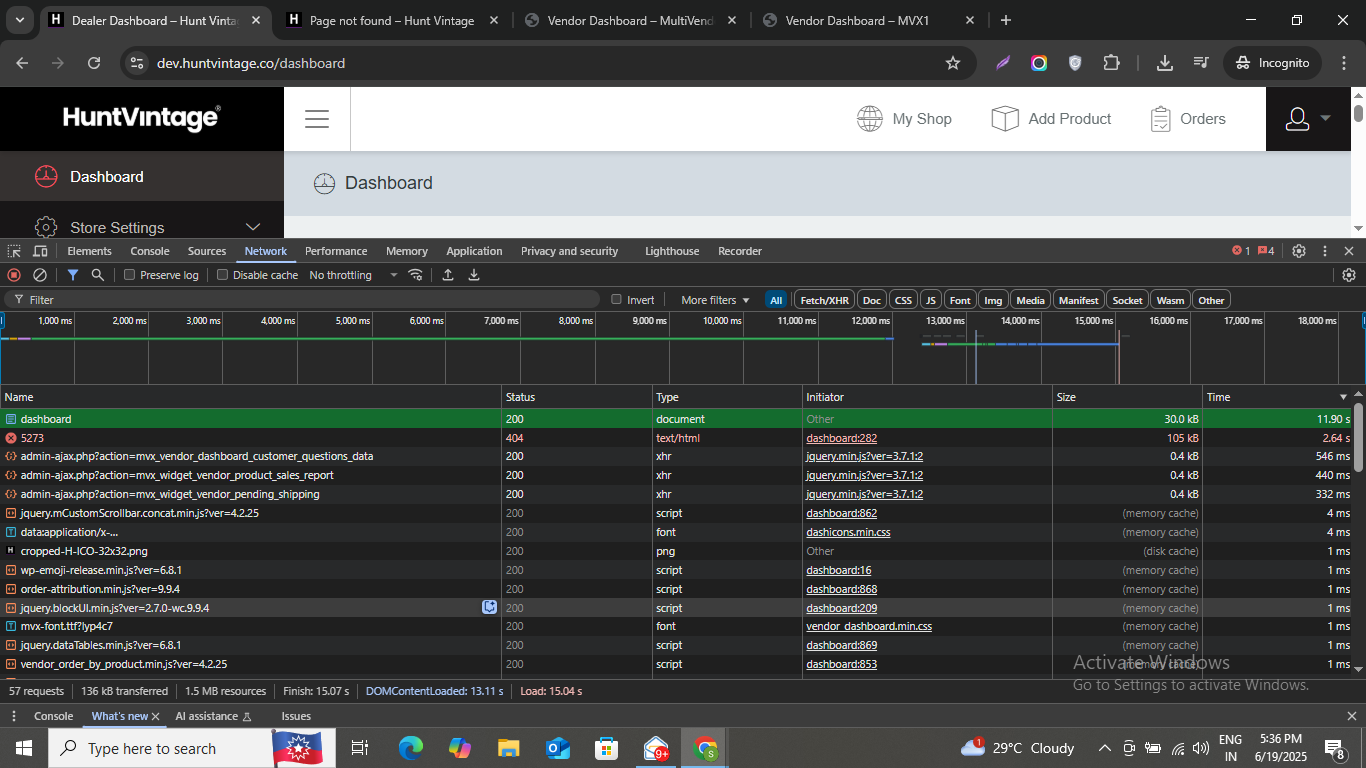
Upon checking your site, we noticed that the page load time is currently over 11 seconds, which is significantly higher than the default expected load time.
During our review, we identified that a 404 error page ( https://dev.huntvintage.co/5273 )is being loaded along with other pages. This particular request alone is adding over 2 seconds to the total load time. We recommend removing or correcting this broken link, as doing so should help reduce the overall page load time.
For the remaining performance issues, we suggest reaching out to your server or hosting team and requesting a detailed report on the site’s loading performance. Once you have that report, please share it with us so we can further analyze the issue and assist you accordingly.Attachments:
-
June 19, 2025 at 10:01 PM #246876ParticipantThis reply has been marked as private.
-
June 19, 2025 at 10:09 PM #246877Keymaster
Thanks for sharing the details. Let me share this with my team and we’ll review the email flow accordingly. I’ll keep you posted on any updates or findings.
-
June 20, 2025 at 11:03 AM #246893Keymaster
Hello there, We’ve reviewed the order flow on our end once again, specifically when a customer places an order for a vendor’s product using WooCommerce Stripe. Here’s how the process currently works:
After the order is placed:
— The order status is set to “Processing.”
— The customer receives two emails: One for the main order.One for the vendor suborder.
— The admin also receives two emails: One for the main order, One for the suborder.
— The vendor receives one email notification for the suborder.
When the admin updates the order status to “Completed” from the dashboard:
–The vendor receives an email notification about the order status update.
— The customer again receives two emails: One confirming the completion of the main order, Another for the suborder.
Now could you please share two separate videos – one with the code added and one without it? Also, kindly let us know which emails are being triggered on your end in each case. Additionally, may I ask who is updating the order status – admin or vendor?
-
June 23, 2025 at 4:53 AM #247415ParticipantThis reply has been marked as private.
-
June 23, 2025 at 5:15 PM #247605Moderator
Hi @zedmandesign,
Thank you for your cooperation.
We’re currently in the process of debugging the issue on your end. During our review, however, we noticed that a 404 error page is still being loaded alongside other pages: https://snipboard.io/YGKFgV.jpg
We recommend removing or correcting this broken link, as it may be affecting the investigation. Once that’s resolved, we’ll be able to proceed further and work toward a proper solution.Please let us know once it’s updated – we’ll be happy to continue assisting you!
-
June 23, 2025 at 10:58 PM #247701ParticipantThis reply has been marked as private.
-
June 24, 2025 at 6:50 PM #247878Moderator
Hi @zedmandesign, Thanks again for your continued patience while we look into this.
Based on our ongoing investigation, we’re currently facing a couple of issues that seem strongly related to the server configuration and performance environment, rather than the plugin itself.
Issue 1: WP_CACHE_KEY_SALT Warning in wp-config.php
We noticed the following warning is being generated:Constant WP_CACHE_KEY_SALT already definedThis suggests that WP_CACHE_KEY_SALT is being declared multiple times in your wp-config.php file. While this might not directly break the site, it can create unexpected behavior with object caching or performance, particularly if a persistent object cache is being used. We recommend checking your wp-config.php to clean up any redundant or conflicting declarations.
Issue 2: Intermittent Backend Slowness
While our dashboard typically loads in about 13 seconds under normal conditions, we’ve observed that the Plugins page in the WordPress backend occasionally takes up to 90 seconds to load. Since this persists even after all plugins are deactivated, it points toward a deeper issue possibly related to the hosting environment.We’re currently reviewing several root causes that might be contributing to the delay:
1. Theme or Custom Code
tag), which can significantly slow down the backend.
Some themes or custom code snippets may be injecting unnecessary styles or scripts into the admin area (especially within the2. Database Overhead
It’s possible that the database is bloated with autoloaded options, transients, or leftover data. This can lead to longer processing times even for basic admin pages.3. Server-Level Performance
Delays from MySQL queries, limited PHP memory or execution time, or low-tier server resources can all result in significant backend lag—particularly when loading heavier admin pages like the Plugins list.🛠️ Next Steps
To move forward efficiently, we suggest the following:1. Server Scan : Please ask your hosting/server admin to perform a detailed scan of:
2. Server load : MySQL query performance
3. PHP memory/execution limits : Object cache conflicts any processes causing bottlenecks in the admin areaCollaboration with Our Team
If your server team finds everything is fine on their end, we’d be happy to coordinate directly with them for deeper troubleshooting.
You can loop us in by emailing both teams together — our support address is: contact@multivendorx.comWe’re committed to getting to the bottom of this and ensuring your WordPress site performs reliably. Thanks again for working with us on this, and please don’t hesitate to reach out with any updates from your hosting provider.
-
July 9, 2025 at 2:42 PM #248364Moderator
Hi there!
Thanks for your message!
Yes, the flow you’re aiming for , where the customer is notified that the order is on hold until the vendor confirms , can be easily achieved through template overriding.
You can override the “Order On-hold” email template found under:
WooCommerce >> Settings >> Emails >> Order on-hold
From there, you can customize the message to reflect your exact flow.
Let us know if this works for you. -
July 9, 2025 at 3:13 PM #248365ParticipantThis reply has been marked as private.
-
July 9, 2025 at 7:04 PM #248375Moderator
Hi @zedmandesign,
Thank you for your patience. Our replies are inline here: –1. Regarding the vendor email notification:
By default, in MultiVendorX, vendors receive the order email only when the sub-order status is updated to “Processing” or “Completed.” The “On-hold” email is not sent to vendors by default.
If you want, we can share a code snippet that will help you to send the new order mail to vendor.2. Wholesale : We’ve already addressed this in our latest release of MultiVendorX Pro. Please update to the latest version to access the fix.
Let us know if you need any further assistance.
-
July 9, 2025 at 10:25 PM #248394ParticipantThis reply has been marked as private.
-
July 10, 2025 at 5:43 PM #248482Moderator
Hi there,
Thank you for sharing the details.
To clarify, in our default flow, emails are triggered to vendors based on the order status, when it is “Processing” or “Completed” .
If you would prefer that vendors only receive emails when the order status is “On-hold”, we can provide a code snippet to restrict vendor emails from being sent when the order is marked as “Processing”.However, please note that with this change, if an order is placed and its status is “Processing,” the vendor won’t receive an email notification.
If you’d like to proceed with this flow, kindly let us know, and we’ll be happy to share the code with you.
-
July 10, 2025 at 6:17 PM #248495ParticipantThis reply has been marked as private.
-
July 10, 2025 at 6:24 PM #248498Moderator
Hi there,
Thankyou for your response.Our team is currently focused on a major product release scheduled for this week.
We kindly request you to give us some time , our development team will begin working on the code snippet for you from the next week.We will keep you posted as soon as we hear back from them.
We truly appreciate your understanding and cooperation.
-
July 14, 2025 at 6:05 PM #248599Moderator
Hi there,
Thank you for your continued cooperation.
As discussed earlier, you wanted to restrict vendors from receiving the “Processing” order status email, please find the relevant code snippet below:
add_action( 'woocommerce_order_status_changed', 'disable_mvx_vendor_order_email_for_processing', 98, 4 );

function disable_mvx_vendor_order_email_for_processing( $order_id, $from_status, $to_status, $order ) {

    if ( ! $order_id || ! is_a( $order, 'WC_Order' ) ) return;

    // Check if this is a parent order with MVX suborders

    if ( ! $order->get_parent_id() && $order->get_meta( 'has_mvx_sub_order', true ) ) {

        // Only run if to_status is 'processing'

        if ( $to_status === 'processing' ) {

            $vendor_orders = get_mvx_suborders( $order_id );

            foreach ( $vendor_orders as $vendor_order ) {

                // Mark the email as already triggered to prevent the original MVX function from sending it

                $already_triggered = $vendor_order->get_meta( '_mvx_vendor_new_order_mail_triggered', true );

                if ( ! $already_triggered ) {

                    $vendor_order->update_meta_data( '_mvx_vendor_new_order_mail_triggered', true );

                    $vendor_order->save();

                }

            }

        }

    }

}
Please Note: The code previously shared for triggering the “On-hold” email will send vendors a new order notification when an order is placed and this new snippet will restrict the mail for order status on ‘Processing’.Both snippets work independently.
If your goal is to:
– Allow the vendor to receive the “On-hold” email
– Restrict the “Processing” email
You can safely use both snippets together.
Let us know if you need any further assistance we will be happy to help. -
July 23, 2025 at 2:19 AM #248912ParticipantThis reply has been marked as private.
-
July 23, 2025 at 4:53 PM #248927Moderator
Hi there,
Sorry to hear that the code didn’t work as expected on your end.We’ve reviewed the flow again by testing the code on our end, and it worked as intended.
Now ,to investigate this further on your end and replicate the issue, we kindly request you to create a staging site (a clone of your live site). Once it’s ready, please share the following details with us:– Staging site URL
– Temporary admin access
– FTP credentials
This will allow us to replicate the issue in your environment and troubleshoot it more effectively.
Please make sure to mark your reply as private while sharing sensitive information.
Looking forward to your response.
-
July 24, 2025 at 12:48 PM #248943Moderator
Hi there,
We’re waiting for the FTP access to proceed with resolving the issue. Kindly share it at your convenience so that we can assist you further.
Kindly make sure to mark your reply as private when sharing sensitive information. -
July 26, 2025 at 10:23 AM #248968Moderator
Hey there!
Just a reminder – we’re still waiting for the FTP access details. Kindly share them at your earliest convenience so we can proceed with the investigation.Kindly make sure to mark your reply as private when sharing sensitive information.
-
September 25, 2025 at 10:47 AM #249929Keymaster
It’s been a while since we last heard from you, so we’ll assume that your query has been resolved and will close this thread for now. If you need any further assistance or encounter any issues in the future, please don’t hesitate to open a new support ticket—we’ll be glad to help.
-
-
AuthorPosts
- The topic ‘Remove unused sections on edit product’ is closed to new replies.


