





Tagged: accommodation, Persons, Resources
- This topic has 7 replies, 2 voices, and was last updated 1 week, 5 days ago by
Sangita Support Squad.
-
AuthorPosts
-
-
June 24, 2026 at 3:51 PM #255065
Som Turisme Ecosocial, SCCL
ParticipantDear Support Team,
We’re checking MVX 5 and MVX-PRO 2 in a devel, localhost environment and we realized that Resources and Persons panel is only available for Bookings, but not for Accommodation Bookings.
Is it planned to be integrated soon?
Thank you so much and best regards,
Juane -
June 24, 2026 at 4:09 PM #255066
Sangita Support Squad
KeymasterHello,
Thank you for reaching out.
We’re pleased to let you know that support for the Persons and Resources tabs for accommodation products is already on our roadmap. We hope to include them in one of our upcoming updates.
As soon as these features are implemented and available, we’ll be sure to keep you informed.
Thank you for your patience, support, and cooperation. If you have any further questions or suggestions, please feel free to let us know.
-
June 24, 2026 at 4:18 PM #255068Participant
Hi Sangita,
thank you so much for your quick reply, with such a pleasant content.Will you happen to add more hooks and that upcoming release?
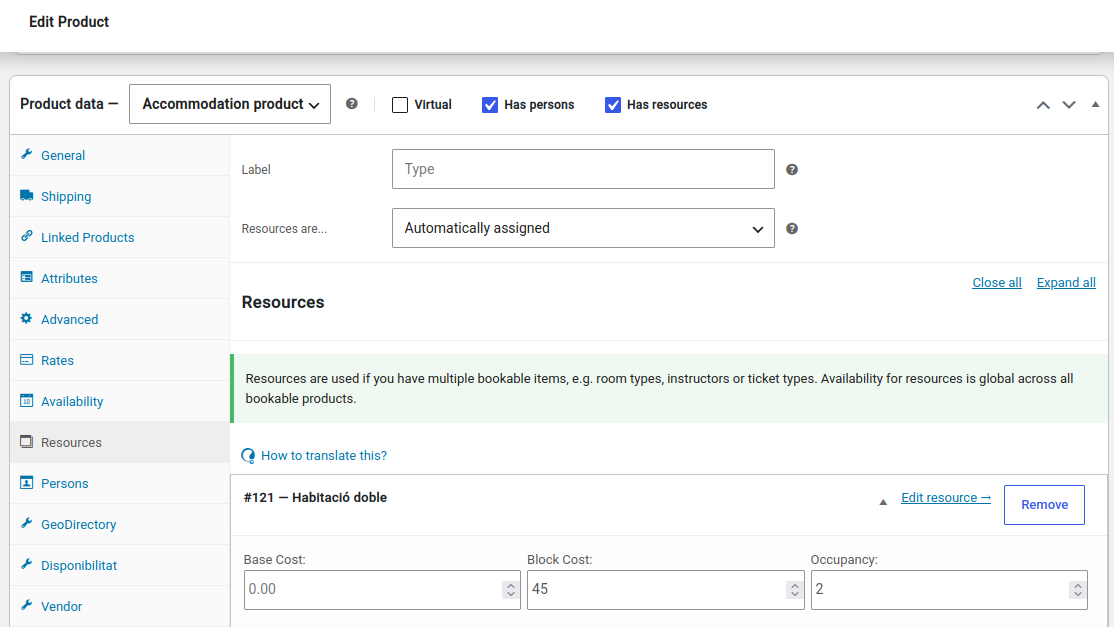
I’m really interested in something similar to the ‘afm_bookings_after_resource_block_cost’ you had in version 1.3 which allowed us to add more content in the past.In our case, we took advantage of this hook to place an additional field: occupancy. This allows us to have an occupancy breakdown among resources like ‘Double room’: occupancy=2, ‘triple room’: occupancy=3, and so on.
Kind regards
Juane -
June 24, 2026 at 4:35 PM #255069Keymaster
Hi Juane,
Thank you for getting back to us and for sharing your thoughts. We truly appreciate your patience and continued support.
With **MultiVendorX 5.0 & MultiVendorX 2.0**, our goal has been to make the plugin more versatile by incorporating many commonly requested features directly into the core functionality. We aim to provide a smoother and more flexible experience while reducing the need for customizations wherever possible.
At the same time, we also strive to ensure that custom code does not interfere with the plugin’s default workflow or create compatibility challenges during future updates. That’s why we encourage users to discuss their requirements with us first. Our development team carefully evaluates every request and, whenever it addresses a broader use case or benefits a wider range of users, we make every effort to implement it as part of the core plugin rather than relying on custom hooks or filters.
With that in mind, we’d be grateful if you could share a bit more about the customization flow you had previously implemented. Understanding your specific use case will help us better evaluate your requirements and guide you toward the most suitable solution.
We sincerely appreciate your cooperation and look forward to learning more. Please feel free to share any additional details, and we’ll be happy to assist you further.
-
June 24, 2026 at 5:56 PM #255071Participant
Hello,
Then I think it would be great, not just for us but for the whole community, to have a “Resources” (or a “Products” -> “Resources”) tab where Multivendor’s adopters could decide, from a commonly basic types of fields (text, select, booleam, …) if they need one or more fields to be added to the resources record (or it’s correspondent meta).
Thanks a lot for taking this into account for the future,
Juane -
June 24, 2026 at 6:50 PM #255072Keymaster
Hello there,
Thank you for sharing the information.
To help us better understand your requirement, would it be possible for you to share a screenshot indicating exactly where you would like this functionality to be implemented? Having a visual reference will give us a clearer understanding of the workflow you’re aiming to achieve.
Once we have that information, we’ll be able to discuss it with our development team in greater detail and work towards identifying the most suitable approach for the implementation.
We appreciate your cooperation and look forward to your update. If you have any additional details that might be helpful, please feel free to share them as well.
-
June 24, 2026 at 11:48 PM #255084Participant
Hi Sangita,
Please find attached the following examples.wp_admin.png: occupancy field using the WorPress admin
mvx_dashboard.png: occupancy field using the MVX dashboardBoth can be found at the left bottom area in the images.
Attachments:
-
June 25, 2026 at 10:21 AM #255088Keymaster
Hello,
Thank you very much for your valuable suggestion.
I have already forwarded your feedback to our development team for review. They are currently working on the integration for the Persons & Resources tab and will also evaluate the custom field addition workflow to determine the most suitable approach that aligns with the overall product experience and enhances the global functionality.
We truly appreciate you taking the time to share your ideas and feedback with us.
In the meantime, if you have any further questions or need any assistance from our end, please don’t hesitate to let us know. We’re always happy to help.
-
-
AuthorPosts

- You must be logged in to reply to this topic.
