






Tagged: add product
- This topic has 20 replies, 2 voices, and was last updated 1 year, 5 months ago by
Sangita Support Squad.
-
AuthorPosts
-
-
July 1, 2024 at 2:46 AM #221111
zedmandesign
ParticipantHi,
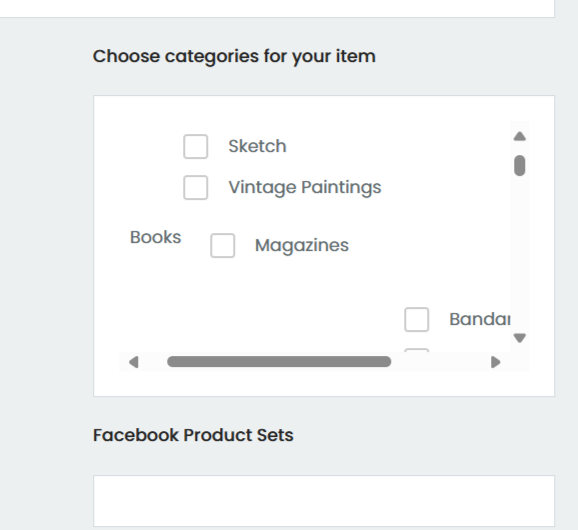
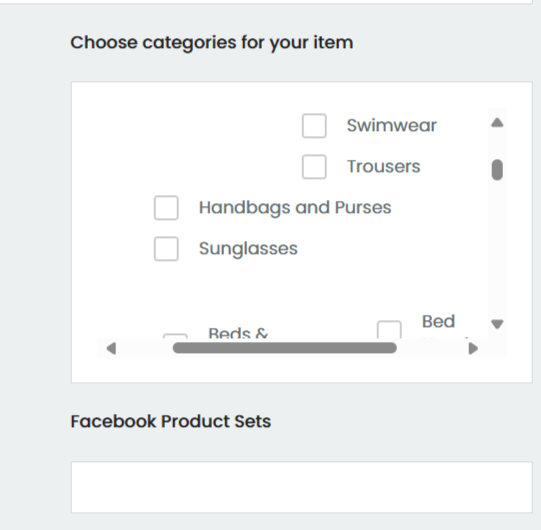
I have a new bug on the add product screen following the recent update. The category selector no longer looks tidy with sub-categories sitting below main categories.
They are all showing to the side/mixed up.
Is there a fix for this bug?
Thank you,
-
July 1, 2024 at 3:06 AM #221114Participant
UPDATE: Removing ‘flex’ from the CSS on that page, seemed to correct this issue?
.panel-body.panel-content-padding.form-group-wrapper label {
margin: 0;
display: flex;
align-items: center;
gap: .5rem;
}TO
.panel-body.panel-content-padding.form-group-wrapper label {
margin: 0;
display: ;
align-items: center;
gap: .5rem;
} -
July 1, 2024 at 10:23 AM #221117
Sangita Support Squad
KeymasterHello there, Thanks for sharing this with us.
We will add a fix for this broken CSS issue in our next update and keep you updated accordingly.
You can also keep track of the progress of the issue from here https://github.com/multivendorx/MultiVendorX/issues/784.Let us know if you need any further assistance from our end.
-
July 6, 2024 at 7:42 PM #221490Participant
Hi,
Following an update to version 4.1.14, we have noticed that any attributes added by vendors are being wiped when an item is submitted, or edited.
Attributes only appear when added from woocommerce directly.
Can you test this and provide a fix for this please? As this is doubling our workload at present.
Thank you
-
July 6, 2024 at 7:51 PM #221492Keymaster
Hello there, We have added a fix for the issue with the attributes not getting saved in our github. Kindly download the fixed plugin from here : https://github.com/user-promi/MultiVendorX/tree/issue-788. And then follow these steps :
– Delete the installed MultiVendorX via wp-admin >> plugin
– Unzip the GitHub plugin
– Rename the folder as “dc-woocommerce-multi-vendor” and Now, zip this folder again.
– Install this plugin on your site.Let us know if you need any further assistance from our end.
-
July 6, 2024 at 8:19 PM #221494ParticipantThis reply has been marked as private.
-
-
July 6, 2024 at 8:11 PM #221493ParticipantThis reply has been marked as private.
-
July 6, 2024 at 9:29 PM #221498Keymaster
Hello there, There should not be any issue with the earlier shared fixed plugin. But just to be sure you can add the fixed plugin on your staging site first and check the flow there. If everything works accordingly on your staging site then add the same plugin on your live site.
Also for the Allowed memory size issue kindly create a staging site where the issue is replicated and share the staging site url, temporary admin and FTP access of your staging site with us so that we can look into the issue and assist you accordingly to resolve it.
Also while sharing the access don’t forget to mark your reply as private.
-
July 7, 2024 at 6:47 PM #221509ParticipantThis reply has been marked as private.
-
July 7, 2024 at 7:34 PM #221511Keymaster
Hello there, Glad to hear that you have resolved the memory size issue on your end.
Regarding the shared fix, there should not be any issue with the fixed plugin. Some of our users have confirmed about the fix working fine on their end. However, just to be sure you can add the fixed plugin on your staging site first and if everything works accordingly on the staging site then add the same on the live site.
-
July 9, 2024 at 12:43 PM #221537Keymaster
Hello @zedmanshere, We have released an update with the fix for the attributes not getting saved issue. Kindly update the MultiVendorX plugin to the latest version on your end and check the same.
-
July 9, 2024 at 6:52 PM #221542ParticipantThis reply has been marked as private.
-
July 9, 2024 at 7:14 PM #221543Keymaster
Hello there, Sure update the plugin to the latest version and check the flow on your end.
Regarding the memory size issue as we are not able to recreate it on our end we would request you to create a staging site where the issue is replicated and share the staging site url, temporary admin and FTP access of the staging site with us so that we can look into it and assist you accordingly to resolve the issue.
Also while sharing the access don’t forget to mark your reply as private. -
July 18, 2024 at 12:58 AM #221736ParticipantThis reply has been marked as private.
-
July 18, 2024 at 10:07 AM #221743Keymaster
@zedmanshere, I’m glad to hear that the attribute issue has been resolved on your end.
Could you please provide us with steps to recreate the error shared by you? This will help us assist you further in resolving it.
-
July 19, 2024 at 2:20 AM #221776ParticipantThis reply has been marked as private.
-
July 19, 2024 at 2:32 PM #221795ParticipantThis reply has been marked as private.
-
July 19, 2024 at 10:12 PM #221797Keymaster
For the memory size issue, our dev team needs to debug the issue on your site so we kindly request you to create a staging site that should be an exact replica of your live site and share the staging site url, temporary admin and FTP access with us. So that we can look into it and assist you accordingly to resolve the issue.
Regarding the other error it is quite difficult for us to provide you with a fix without being able to recreate the same. So it would be really nice if you can share details about the recreation of the error.
Also while sharing the access of your staging site don’t forget to mark your reply as private.
-
September 13, 2024 at 4:01 AM #235237ParticipantThis reply has been marked as private.
-
September 13, 2024 at 10:39 AM #235243Keymaster
Hi @zedmanshere, We’ve reviewed the latest version of the Elementor plugin on our end and haven’t encountered the issue you described on the dashboard.
Could you please provide a video demonstrating how to replicate the problem? This will help us better understand the issue and assist you in resolving it. Thank you!
-
November 12, 2024 at 5:44 PM #236866Keymaster
It’s been long and we have not heard back from you. We presume your query is resolved now. We are closing this thread. If you need help or face issue in future please do create a new support ticket.
-
-
AuthorPosts
- The topic ‘Select Categories Bug (on add product) after Update to Version 4.1.13’ is closed to new replies.
