





- This topic has 6 replies, 2 voices, and was last updated 11 months ago by
Anushka Sinha.
-
AuthorPosts
-
-
July 10, 2025 at 3:45 AM #248397
yakdokur
ParticipantHello MVX Team,
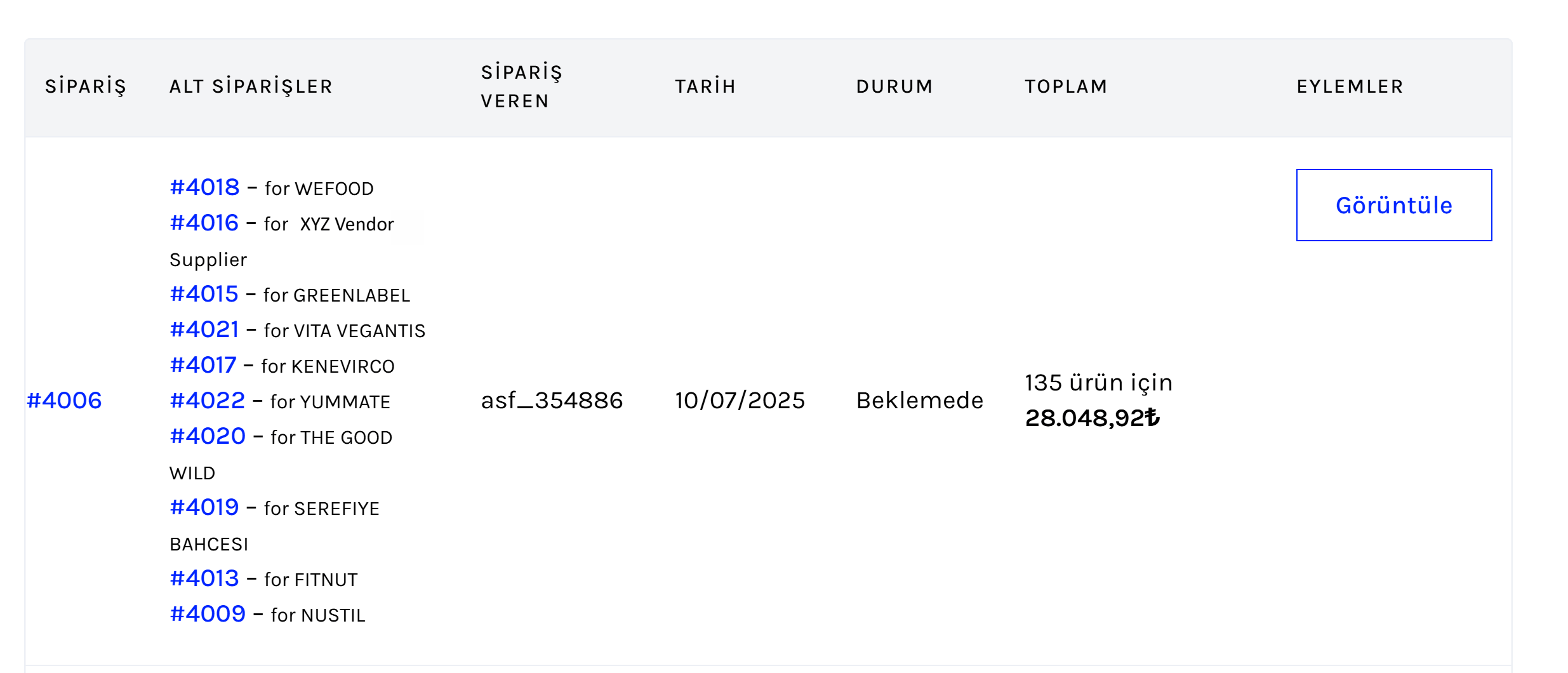
We’ve encountered an issue in our MultivendorX system. When a parent order has more than 10 suborders, only 10 of them are displayed on the customer account page and also in the admin order view.
For example, a parent order with 16 suborders only shows 10 of them.
However, when we retrieve the data via REST API or webhook, all 16 suborders are visible — so they are created correctly.This seems to be a display limitation, not a data issue.
Could you please let us know how we can resolve this and display all suborders?
Best
-
July 10, 2025 at 1:25 PM #248439
Anushka Sinha
ModeratorHi @yakdokur,
Thank you for bringing this issue to our attention.If I’m understanding correctly, you’re referring to that on both the Admin Order page (refer to this screenshot: https://snipboard.io/OPyqF7.jpg) and the Customer’s My Account page (refer to this screenshot: https://snipboard.io/gVzLkF.jpg), only the suborder IDs are being displayed, while the products within those suborders are not visible.
We’re sorry for the inconvenience this may have caused. No worries , we’ve reported this to our development team, and they will be working on a fix soon. We expect it to be resolved it in the next one or two updates.To keep you posted , we’ve tested the flow on our end by placing an order that generated more than 10 suborders. We checked both the Admin’s Order Details page and the Customer’s My Account page, and in both cases, all suborders were listed correctly. Here’s a video of the flow we verified:
Admin’s view: https://www.loom.com/share/325129124b7d4f32a480928a8968792b?sid=e095c1f1-50bf-40bf-a5ac-552458aa36af
Customer’s view : https://www.loom.com/share/6f2e18acb00a45c0af8313bb83f31fa7?sid=e7cbff3b-da93-47d4-8360-e516b44d5a53If you’re referring to a different flow or page where the issue is occurring, kindly share a screenshot or video. This will help us better understand the scenario and assist you more effectively.
In the meantime, you can track the progress of this issue here: https://github.com/multivendorx/mvx/issues/977
Thank you for your understanding and patience.
-
July 10, 2025 at 3:09 PM #248456Participant
Hello,
No, there is a misunderstanding here.
In the videos you showed, there is only 1 sub order, I am talking about the problem that occurs in 10+ suborder scenarios.
You ordered from a single supplier, you have 1 suborder.
To test it, you need to add 15 products from different vendors to your cart and place an order. Only then can you create 15 suborders 🙂
In the screenshot below, there are 16 different suborders but 10 of them are shown. This is the issue.
Attachments:
-
July 10, 2025 at 4:36 PM #248468Moderator
Hi there,
Thank you for the clarification.
I’ve rechecked the flow and was able to replicate the same issue on our end.
No worries, we’ve reported this to our development team, and they will begin working on a fix shortly. We’ll keep you updated as soon as we hear back from them.In the meantime, you can track the progress of the issue here:
https://github.com/multivendorx/mvx/issues/978Thankyou for your understanding.
-
July 15, 2025 at 3:30 PM #248644Moderator
Hi there,
Thankyou for your patience.The issue with the suborder display can be resolved by adjusting a simple setting in your WordPress dashboard. Please follow the steps below:
1. Go to your WordPress admin dashboard
2. Navigate to Settings > Reading
3. Locate the ‘Blog pages show at most’ option (https://snipboard.io/loApeY.jpg )
4. Increase the number to your desired limit (e.g., 50 or 100)After updating this setting, all suborders should be displayed as expected.
If you need any further assistance , let us know- we will be glad to help ..
-
July 15, 2025 at 4:16 PM #248647Participant
Hi there,
You guys are great! Issue resolved.
Thank you so much MVX Team!
-
July 15, 2025 at 5:08 PM #248652Moderator
Hi there,
So happy to hear your issue has been resolved, it’s always a pleasure helping you out!
Your continued trust and engagement mean a great deal to us.
If you have a moment, we would greatly appreciate it if you could leave us a 5-star review here: https://wordpress.org/support/plugin/dc-woocommerce-multi-vendor/reviews/#new-post
Your support motivates our team to keep doing even better!
Thanks again for being such an amazing part of our community!
-
-
AuthorPosts
- The topic ‘Suborder Display Limitation on Parent Orders’ is closed to new replies.



