






- This topic has 10 replies, 3 voices, and was last updated 1 year, 4 months ago by
Sangita Support Squad.
-
AuthorPosts
-
-
December 26, 2023 at 9:48 AM #215430
Picflick
ParticipantHi. Unfortunately this issue is occurring again – https://multivendorx.com/support-forum/topic/vendor-address-defaults-to-store-address/
When I create a new vendor, the address defaults to our store address.
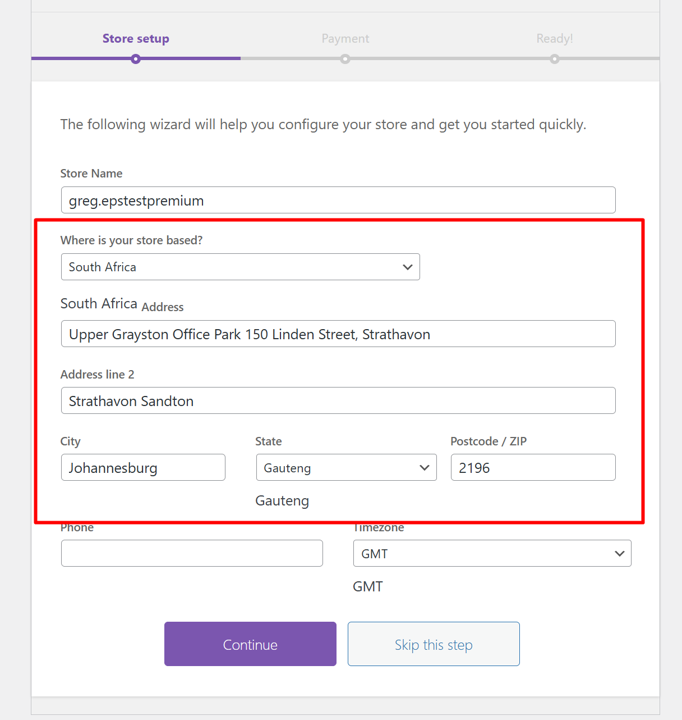
See here as an example (https://ibb.co/Xx01Qzc). This has happened for 3 of my vendors when signing up.
Also, when they navigate to the store setup page, our store address is set there as default. This could perhaps be the reason… that they user is leaving it prepopulated with our store address because the system has put it there.
Please investigate and revert back -
December 26, 2023 at 2:12 PM #215461
Sangita Support Squad
Keymaster@Picflick Let me assist you with the flow here.
As per our default flow, once a vendor registers on the site and runs the setup wizard in the store setup wizard the country and state are set as per the address set in WooCommerce (https://tinyurl.com/yph9onfg). There they can change the address as per their needs. If they do not change that the default address will be stored as their store address.
Now if the vendor skips the vendor store setup wizard after registration then the address section in vendor storefront comes blank (https://tinyurl.com/yp8qtryd). This is the default flow of MultiVendorX. -
December 28, 2023 at 11:01 AM #215528Participant
Thanks for explaining.
Please can you help amend this… For both flows I dont want the vendors’ addresses to be PicFlick default address.
So when the vendor proceeds to the setup wizard I want those address fields to be blank please.
Kindly assist. Thanks. -
December 28, 2023 at 6:05 PM #215559
NerdySupportExpert Moumita
KeymasterHi, As per our current code, the default value can’t be removed. However in our next update, we will provide a solution, using this you can remove the set value.
You can track the progress of this request from here https://github.com/multivendorx/MultiVendorX/issues/623
-
January 2, 2024 at 9:27 PM #215675Participant
Thank you. Awaiting.
-
January 3, 2024 at 10:38 AM #215698Keymaster
Hi @Picflick, We will certainly keep you informed once this enhancement will get incorporated.
-
September 5, 2024 at 10:51 AM #235031Participant
Guys this is still happening… Huge bug in your system which you have failed to correct. Please can you prioritize fixing. This is not a feature enhancement that i’m requesting – its a bug that you are obliged to resolve. Please!
Attachments:
-
September 5, 2024 at 11:18 AM #235035Keymaster
@Picflick, As mentioned earlier, the default value cannot be removed with the current code. To alter this flow, we would need to revise our existing codebase. We have already escalated this request to our product enhancement team, and they will take further decision rehgarding the implementation based on the mass request from our users.
In the meantime, you can track the progress of this issue here: https://github.com/multivendorx/MultiVendorX/issues/623.
-
October 6, 2024 at 6:30 PM #235955Participant
Please advise an update. It has been over a year since this was logged. Also, please categorize it as a bug (not enhancement). Thanks.
-
October 6, 2024 at 7:00 PM #235958Keymaster
We are sorry for the delay. But not to worry our team will soon start working on the restructuring of our plugin and hopefully this flow will also be updated Also once this will be updated we will keep you posted accordingly.
Thanks for your understanding and cooperation so far.
-
December 20, 2024 at 10:50 AM #237950Keymaster
We’re pleased to inform you that the requested flow has already been implemented in our latest MultiVendorX update. Kindly update the plugin to the newest version and give it a try.
As this addresses your query, we will now close this thread. If you need any assistance or encounter any issues in the future, please feel free to create a new support ticket.
-
-
AuthorPosts
- The topic ‘Vendor address defaults to store address’ is closed to new replies.
