





- This topic has 15 replies, 2 voices, and was last updated 2 months ago by
Sangita Support Squad.
-
AuthorPosts
-
-
April 9, 2026 at 10:02 PM #251690
Joanna Maj-Dubińska NIP PL 1132767029
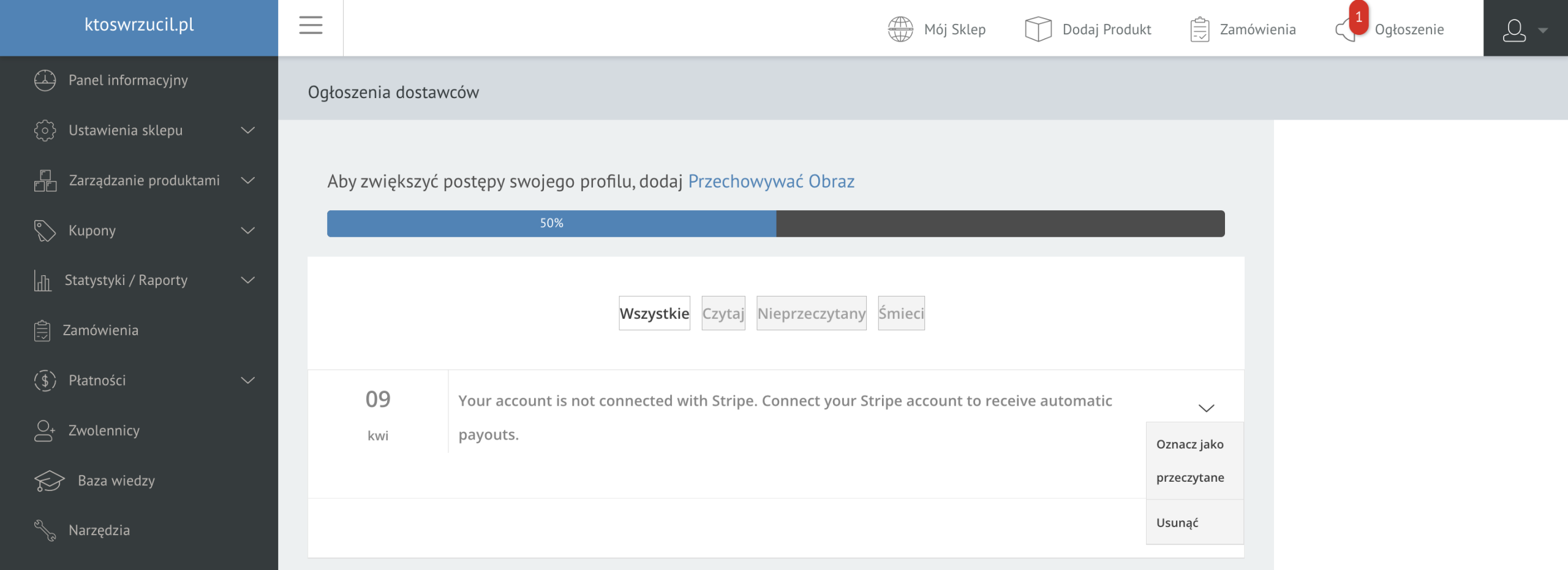
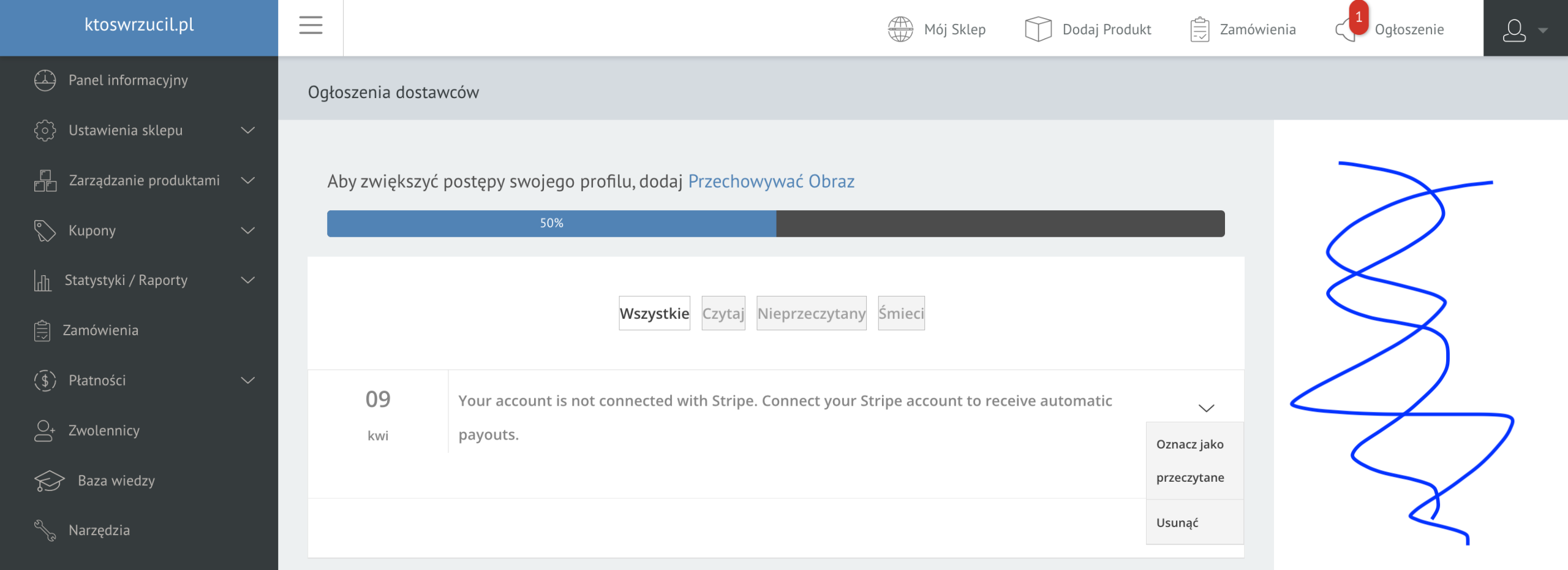
ParticipantOn the “vendor’s store” page and in the vendor’s dashboard, the window is only partially active. How can I make it visible across the full width of the window (no empty white space on the right side)?
Attachments:
-
April 9, 2026 at 10:18 PM #251698
Sangita Support Squad
KeymasterHi there,
Thank you for getting back to us with your query. Could you please provide more details about the modification you’re looking for? This will help us better understand your requirements and assist you more effectively.
-
April 9, 2026 at 10:39 PM #251703Participant
-
April 9, 2026 at 10:51 PM #251705Participant
I’d like the seller panel to display full width—without leaving any empty space. This means the panel where you add products and view reports would display across the entire screen, not just a section.
-
April 10, 2026 at 10:13 AM #251712Keymaster
Hello,
Thank you for getting back and sharing the information.
As we understand, you are referring to making the screen similar to this: https://www.awesomescreenshot.com/image/59732016?key=160f6fda50a4fdf664950dfe4d7cb8e5
for the “Add Product” and “Reports” pages. By default, vendors can do so by clicking here: https://www.awesomescreenshot.com/image/59732088?key=3b5311c3cd82a6bf080de4abb75b1d61.If you are referring to any additional modifications beyond this, those would require customizations from your end.
If you have any further queries, please feel free to let us know.
-
April 10, 2026 at 3:58 PM #251717Participant
No, that’s not the point. I don’t mean for the left sidebar to hide and expand by clicking the hamburger.
I mean that there’s empty space on the right side. This means that the content of the merchant panel on any page isn’t displayed at 100% width, but at 80%.
If you enlarge the screenshot I sent, you’ll see an empty white space on the right side. I don’t want that.
Attachments:
-
April 10, 2026 at 4:14 PM #251719Keymaster
Hi there,
Thank you for explaining the issue in detail. It appears that this might be caused by a theme conflict.
To confirm this, could you please switch to a default theme such as Twenty Twenty-Five or Storefront and check if the issue persists there as well?
We look forward to hearing back from you.
-
April 10, 2026 at 4:31 PM #251721Participant
I don’t have any other themes, not even the default ones. I only have this one. Is it possible to extend this window using some CSS?
-
April 10, 2026 at 5:24 PM #251724Keymaster
Hi Joanna,
Apologies for any confusion, and thank you for your patience.
On our end, we tested the flow using default themes and did not encounter any extra white space while expanding the screens. You may refer to this screenshot for clarity:
https://www.awesomescreenshot.com/image/59739961?key=d6390160ab03379c63246f90f30cbaf5Based on this, it seems possible that the additional white space is coming from your currently active theme on your site. To confirm this, we kindly request you to switch to a default theme such as Twenty Twenty-Five or Storefront and check if the issue persists.
Alternatively, if you prefer, you may share your staging site (a replica of your live site) with us so that we can check the set up with the default theme.
This will help us pinpoint the exact source of the issue, and based on that, we’ll be able to assist you further.
-
April 10, 2026 at 7:34 PM #251731ParticipantThis reply has been marked as private.
-
April 10, 2026 at 7:48 PM #251732Keymaster
Thank you for sharing the details. We kindly request some time to review them, and we will keep you updated accordingly.
Additionally, could you please confirm if we may proceed with deactivating the plugins and themes on the shared site?
We look forward to your confirmation.
-
April 10, 2026 at 8:05 PM #251736ParticipantThis reply has been marked as private.
-
April 10, 2026 at 9:47 PM #251739Keymaster
Hi there, Thanks for your confirmation.
Kindly provide us some time to check the issues on your end and we will get back to you accordingly.
-
April 11, 2026 at 11:28 AM #251741Keymaster
Hello Joanna,
Thank you so much for your cooperation.
We have reviewed your site and updated the page assigned to the Vendor Dashboard under the General Settings. For your reference, please check the screenshot below:
https://www.awesomescreenshot.com/image/59754573?key=8461f0b8074fabeee6776269340a3cb9After making this adjustment, the reported issues no longer appear on the vendor dashboard. You can verify this from the following screenshots:
https://www.awesomescreenshot.com/image/59754602?key=2180f8fcf946ae22cb5cbf53e7b30952https://www.awesomescreenshot.com/image/59754620?key=1f856755cafdd40c20710453ec010272
Whenever you have a moment, could you please check this on your shared site as well? If anything still seems unclear or if you need any further assistance, we’ll be more than happy to help.
Looking forward to your feedback.
-
April 12, 2026 at 4:24 PM #251751Participant
It works! Who would have thought such a simple thing could make such a difference. Thank you!
-
April 12, 2026 at 7:35 PM #251753Keymaster
Hi there,
That’s great to hear – really glad it worked for you! Sometimes the simplest fixes can have the biggest impact.
If you need any further assistance or have more questions, please feel free to reach out anytime – we’re always here to help.
-
-
AuthorPosts
- The topic ‘width of the vendor panel window’ is closed to new replies.
