Forum Replies Created
-
AuthorPosts
-
Picflick
ParticipantHi,
Thank you again for spending considerable time testing. Appreciate your cooperation to resolving it. I have responded to each of your paragraphs below.
We have tested the product limitation flow for membership plans on your site. We created a new membership plan, assigned it to a test vendor, and confirmed that the product limitation worked as expected. We also updated the product limitation for one of your existing plans and assigned it to a vendor, and in this case as well, the limitation was functioning correctly.
>> Thank you for testing. I appreciate you checking the functionality through a clean test, however, this relates to NEW membership plans created and unfortunately something fundamentally wrong with EXISTING plans. I recognize the need to perform this test though. I trust you agree that it is not viable to recreate all my membership plans (unless there is no impact to my existing vendors).
As you mentioned that a vendor has access to a membership plan where the product limitation is set to 3, but is receiving a limit exhausted message after adding only 1 product, we would like to clarify one point. When the vendor initially subscribed to this plan, was the product limitation already set to 3, or was the limitation updated after the subscription was completed?
>> I can confirm that the product limitation was already set. No change to the limitation was done after they subscribed
Additionally, could you please let us know whether this issue is occurring only with specific membership plan, or if it is happening globally across all plans?
>> It is occurring for all plans. As you saw, we tested with another membership plan ‘ambassador’.
We also request you to try one more scenario for confirmation. Kindly assign a different membership plan to the same vendor once, and then reassign the original plan again. After doing so, please check whether the same limit exhausted message still appears. Since the issue is not occurring consistently on our end, this step will help us better understand the behavior.
>> I tried this and it seems to function properly. I assigned a test vendor to ‘test plan’ and then back to ‘ambassador’ and the limit worked correctly whereby it allowed me to upload more products and correctly stated the number of products left to upload. Now the problem is that I cant use this method because my membership packs are all recurring, and your functionality doesnt allow to assign to a recurring back. So I am interested to hear what your solution is.
Thanks again!
ParticipantThanks for checking. It is concerning indeed.
No updates that would materially impact the product upload feature.
You have permission to temporarily deactivate plugins and switch themes to test.
Please let me know feedback. I’d be interested to know if it requires resetting the DB.
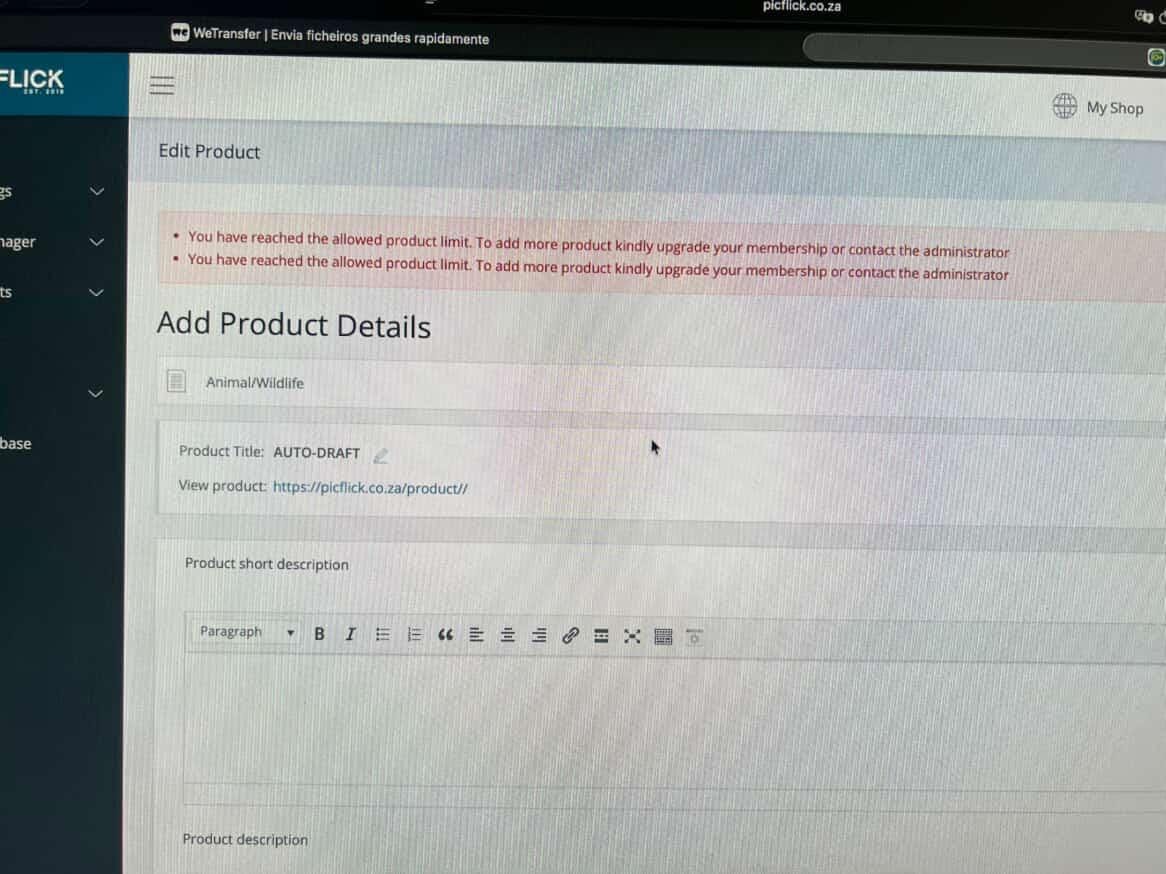
ThanksParticipantAs per my previous post image (Membership-config.jpeg) – the product limit has been set to 100 and my vendors cannot upload greater than 1.
Thanks for actively debugging. I just want to add that I tested the product limit on another membership plan and it also behaved the same where the vendor was only able to upload 1 when the product limit was set to 3. The attached image shows when they uploaded 1 and then when they tried to upload 2.
Please urgently share feedback when possible. Thank you.Attachments:
ParticipantHi, thanks for acknowledging.
Is there any workaround in the meantime?
Can I disable the limit for this specific vendor?
Can the vendor upload draft and admin publish it for them?
Please urgently advise – our paying vendors are requesting feedback.
ThanksParticipantThis reply has been marked as private.ParticipantNoted. Thanks 🙂
ParticipantHi,
Thank you very much for performing the test and confirming.
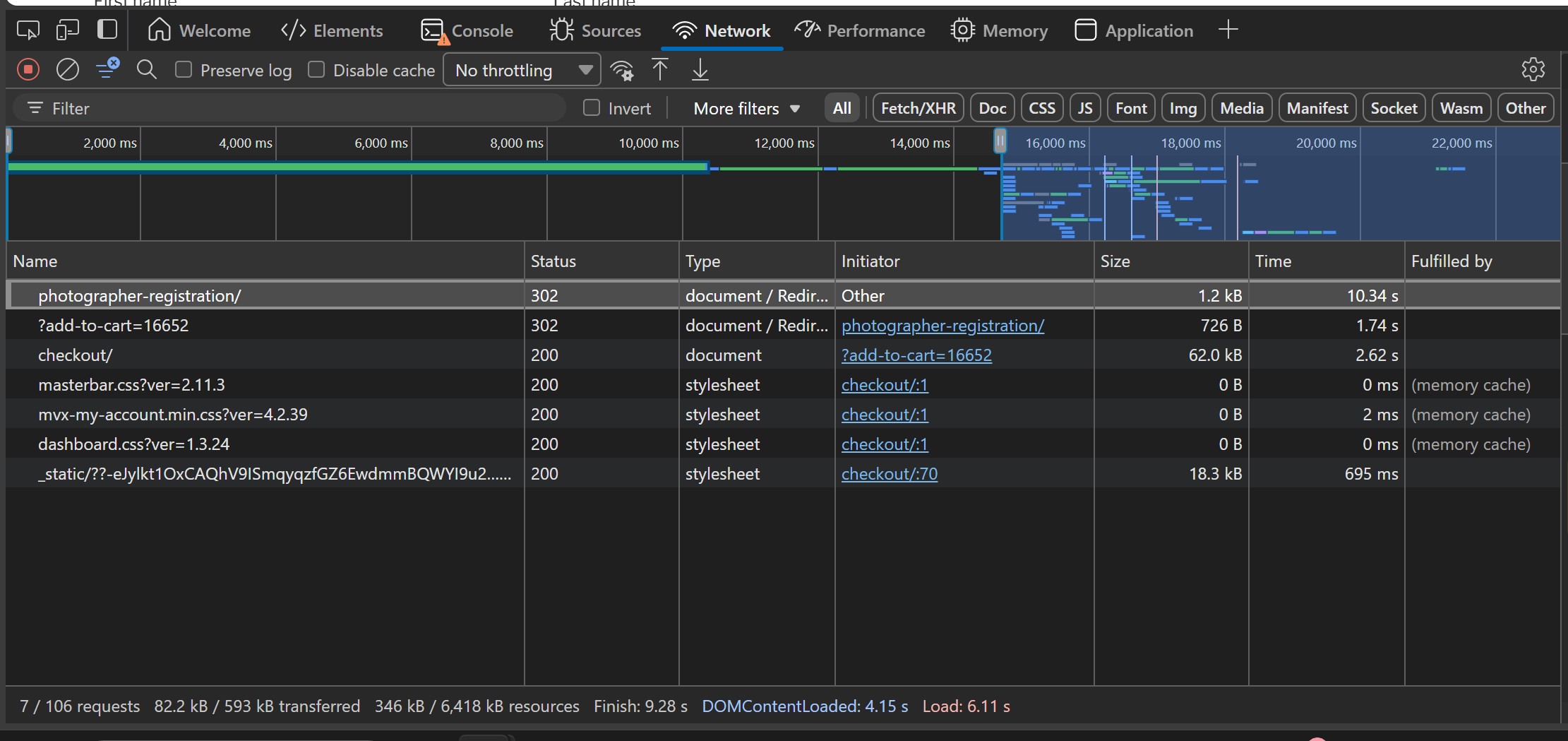
Since the issue lies within loading the /photographer-registration page (as per above image), how can I deep-dive into analysing what is happening during that time period? Is there perhaps some code that can output the processing into the debug file? I’d appreciate your advice how we can have further insight into what is occurring during that extended processing period.
ThanksParticipantThis reply has been marked as private.ParticipantThanks for offering to investigate.
I can confirm that there are no material errors in the console -please see file attached.
Here is the debug file[03-Jan-2026 10:09:56 UTC] PHP Deprecated: Creation of dynamic property WCPA_Settings::$dir is deprecated in /srv/htdocs/wp-content/plugins/woo-custom-product-addons-pro/includes/class-wcpa-settings.php on line 46 [03-Jan-2026 10:09:56 UTC] PHP Deprecated: Creation of dynamic property WCPA_Settings::$assets_url is deprecated in /srv/htdocs/wp-content/plugins/woo-custom-product-addons-pro/includes/class-wcpa-settings.php on line 47 [03-Jan-2026 10:09:56 UTC] PHP Deprecated: Creation of dynamic property WCPA_Updater::$beta is deprecated in /srv/htdocs/wp-content/plugins/woo-custom-product-addons-pro/includes/class-wcpa-updater.php on line 36 [03-Jan-2026 10:09:59 UTC] PHP Warning: session_start(): Session cannot be started after headers have already been sent in /srv/htdocs/wp-content/plugins/mvx-pro/modules/marketplace-membership/mvx-pro-marketplace-membership.php on line 21 [03-Jan-2026 10:10:04 UTC] PHP Warning: session_start(): Session cannot be started after headers have already been sent in /srv/htdocs/wp-content/plugins/mvx-pro/modules/marketplace-membership/mvx-pro-marketplace-membership.php on line 21 [03-Jan-2026 10:10:09 UTC] PHP Notice: Function WP_HTML_Tag_Processor::set_attribute was called <strong>incorrectly</strong>. Invalid attribute name. Please see <a href="https://developer.wordpress.org/advanced-administration/debug/debug-wordpress/">Debugging in WordPress</a> for more information. (This message was added in version 6.2.0.) in /wordpress/core/6.9/wp-includes/functions.php on line 6131 [03-Jan-2026 10:10:09 UTC] PHP Notice: Function WP_HTML_Tag_Processor::set_attribute was called <strong>incorrectly</strong>. Invalid attribute name. Please see <a href="https://developer.wordpress.org/advanced-administration/debug/debug-wordpress/">Debugging in WordPress</a> for more information. (This message was added in version 6.2.0.) in /wordpress/core/6.9/wp-includes/functions.php on line 6131 [03-Jan-2026 10:10:30 UTC] PHP Deprecated: Creation of dynamic property WCPA_Settings::$dir is deprecated in /srv/htdocs/wp-content/plugins/woo-custom-product-addons-pro/includes/class-wcpa-settings.php on line 46 [03-Jan-2026 10:10:30 UTC] PHP Deprecated: Creation of dynamic property WCPA_Settings::$assets_url is deprecated in /srv/htdocs/wp-content/plugins/woo-custom-product-addons-pro/includes/class-wcpa-settings.php on line 47 [03-Jan-2026 10:10:30 UTC] PHP Deprecated: Creation of dynamic property WCPA_Updater::$beta is deprecated in /srv/htdocs/wp-content/plugins/woo-custom-product-addons-pro/includes/class-wcpa-updater.php on line 36 [03-Jan-2026 10:10:32 UTC] PHP Warning: session_start(): Session cannot be started after headers have already been sent in /srv/htdocs/wp-content/plugins/mvx-pro/modules/marketplace-membership/mvx-pro-marketplace-membership.php on line 21 [03-Jan-2026 10:11:12 UTC] PHP Warning: session_start(): Session cannot be started after headers have already been sent in /srv/htdocs/wp-content/plugins/mvx-pro/modules/marketplace-membership/mvx-pro-marketplace-membership.php on line 21 [03-Jan-2026 10:11:15 UTC] PHP Warning: session_start(): Session cannot be started after headers have already been sent in /srv/htdocs/wp-content/plugins/mvx-pro/modules/marketplace-membership/mvx-pro-marketplace-membership.php on line 21 [03-Jan-2026 10:11:26 UTC] PHP Deprecated: Creation of dynamic property WCPA_Settings::$dir is deprecated in /srv/htdocs/wp-content/plugins/woo-custom-product-addons-pro/includes/class-wcpa-settings.php on line 46 [03-Jan-2026 10:11:26 UTC] PHP Deprecated: Creation of dynamic property WCPA_Settings::$assets_url is deprecated in /srv/htdocs/wp-content/plugins/woo-custom-product-addons-pro/includes/class-wcpa-settings.php on line 47 [03-Jan-2026 10:11:26 UTC] PHP Deprecated: Creation of dynamic property WCPA_Updater::$beta is deprecated in /srv/htdocs/wp-content/plugins/woo-custom-product-addons-pro/includes/class-wcpa-updater.php on line 36Also, please see attached image of the ‘Network’ Tab… you can see considerable amount of time was spent on loading the /photographer-registration page
Attachments:
December 31, 2025 at 9:06 PM in reply to: 🚀 MultiVendorX 5.0 Is Here – And It Changes Everything #251077ParticipantThanks for the comprehensive response @Sangita – all clear and understood. Will wait, and looking forward to, receiving the next update 🙂
ParticipantThanks. I will perform a test with those 3 plugins and a default theme. Please advise which server logs/error messages you would like to see? What should I expert and from where?
Appreciate you asissting to resolve this delay in registration to improve our customers’ experience.
December 31, 2025 at 12:17 PM in reply to: 🚀 MultiVendorX 5.0 Is Here – And It Changes Everything #251064ParticipantAlso, will the plugin automatically update? We would prefer to remain on V4 for a little bit until the launch bugs are worked through 🙂
December 31, 2025 at 12:14 PM in reply to: 🚀 MultiVendorX 5.0 Is Here – And It Changes Everything #251063ParticipantThanks very much. We really like the new interface! It’s also great to see a lot of the wordpress functionality (like emails etc.) are integrated into MVX.
I have a few questions…
1a. Please explain the difference between Finance >> Commissions >> Marketplace commissions and membership commission rules.
1b. Currently the specific commission set to each of my membership levels donesnt work. It still requires me to manually set the commission amount for every new vendor that has signed up. Has this now been resolved that the membership level commission gets assigned to the vendor.automatically?2. As per this forum (https://multivendorx.com/support-forum/topic/multivendorx-emails/#post-235355) all membership applications are automatically approved. Is this still the case? Or are we able to manually approve vendor memberships
3. When will it be released please? Just letting you know there are still some bugs (e.g. when creating a membership module and typing in the name field, it duplicated into the price field).
4. What additional features are provided with MultivendorX pro? Because in the demo website you shared I didnt see it activated, yet the memberships module was present.
Thanks
ParticipantHi.
Thanks for sharing these suggestions below. The ‘Manual method’ worked just fine. As soon as we changed their status to ‘Vendor’, the membership pack got linked and their vendor profile was created. So somehow it all seemed to correct itself.
As for the root cause – I tested the flow on our end (with all my plugins activated) and it worked just fine. So there must have been a break in the processing of everything when the user clicked the ‘Submit’ button that prevented everything from processing/loading fully.
Now what we noticed is that when the user clicks ‘register’ on the /vendor-registration page it takes a VERY long time for it to load – does this occur on your test instance as well? We susspect that our users are getting impatient or concerned that nothing is happening and click the button again.
Interested to hear your feedback.
Regards,
PicFlickParticipantOk. I will try that. Do you perhaps know what break in the journey led to this? How the user can sign up for a subscription but not be loaded on vendors. This will help me debug.
Secondly, now that we are in this situation how do I rectify my user? As mentioned above, they only have a paypal subscription and are not loaded as a vendor with a membership package. Thanks.
-
AuthorPosts