





Tagged: commission
- This topic has 7 replies, 2 voices, and was last updated 1 year, 8 months ago by
Sangita Support Squad.
-
AuthorPosts
-
-
August 16, 2024 at 1:31 PM #222330
steven-6784
ParticipantHi – Been unable to generate commissions on my site despite checking configuration and running further tests. I have copied the chat transcript below.
Welcome to MultivendorX, How can we help you ?
Ria
Name : Steven Kayser
Email : steven@kayser.co.uk
Topic : Bug Report
Site URL : imagii.com
Question : Hi – I have only configured a global commission of $0.50 per transaction. in my testing no commission has been given. I have never set up any other commission level, so maybe I’m missing something or there is an issue. Thank you.
Agent profile image
Hello there
Have you set the Revenue sharing mode accordingly?
Zoya
hi – where would I find that?
I was following the directions in the documentation for global commission.
Agent profile image
Go to admin dashboard>>MultiVendorX>>Settings
Commission
Zoya
yes that is set up as vendor with a commission of 0.50
fixed amount
Agent profile image
can you please share a screenshot ?
Zoya
Screenshot 2024-08-16 at 09.21.33.png
Agent profile image
can you please check if the product that has been purchased belongs to a a vendor or not
Zoya
yes it does
Screenshot 2024-08-16 at 09.23.00.png
Agent profile image
Thanks for sharing the screenshot
Zoya
when I look at the product list, the vendor is listed against them
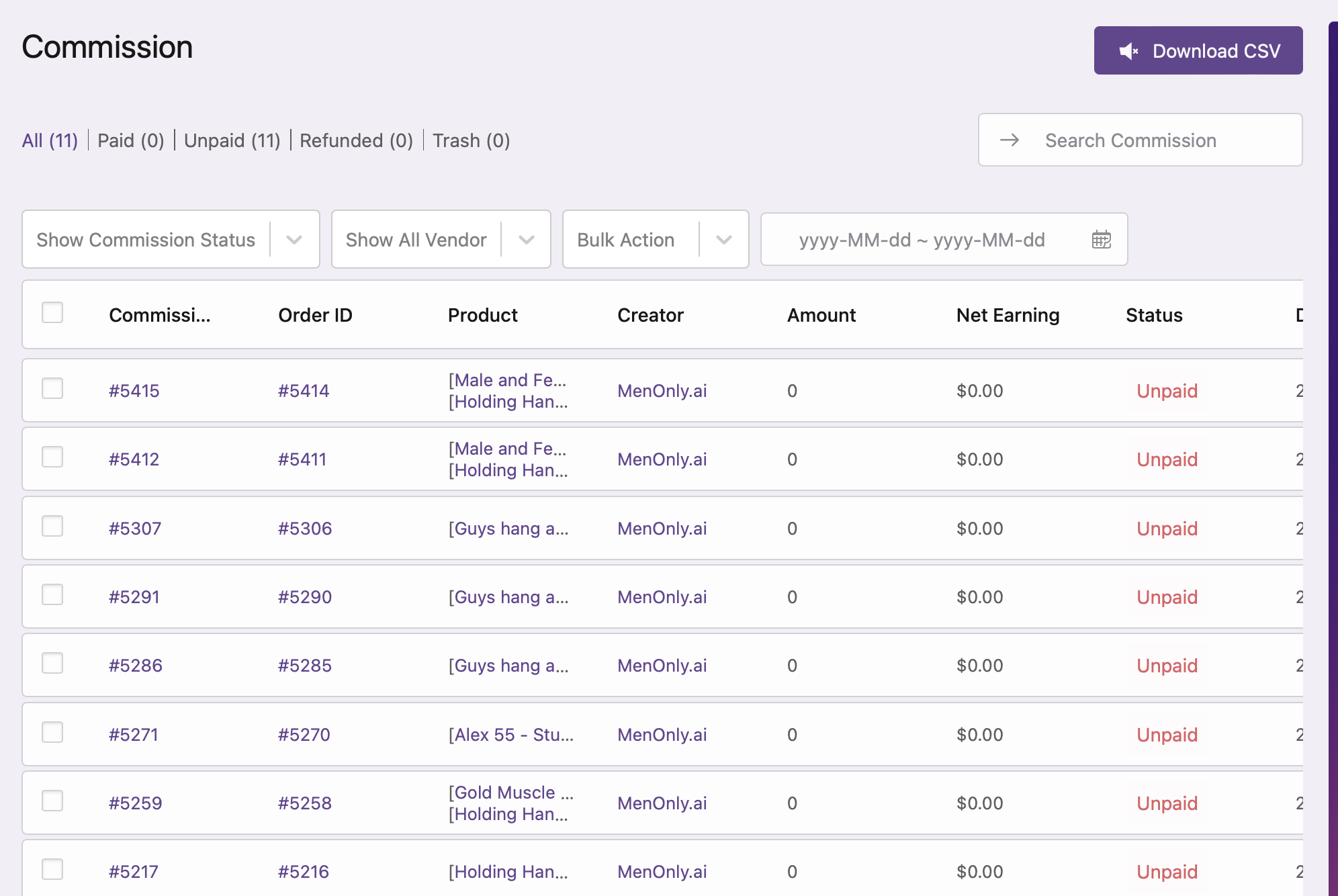
the sale I did today to test has those products and there was no commission listed- its the top one in the screenshot just sent to you
Agent profile image
can you please check once if other type of commission is set for your site
Zoya
I did notice that in something like category, there is a 0 next to commission, but I don’t enter that. its put there when category setup
Agent profile image
so kindly check if other commissions are set on your end
Zoya
same with product level
Agent profile image
because in that case those commission levels will have higher priority
and the commission calculation will be based on that
Zoya
nothing in the vendor commission field, its blank
I didn’t set up the product and category commissions
Agent profile image
check the other commissions as well
Zoya
they were listed as 0 by default when the category and the product is setup. they should be blank not 0
Agent profile image
can you please check once by removing those 0 s
Zoya
I’ve checked vendor, product and category. The only one that is blank is vendor.
yes let me try that test, please hold one moment
Agent profile image
sure
Zoya
to start, I can’t remove the 0 commission in the product. removing it and then saving, it reverts back to 0
Agent profile image
ok
Zoya
same with category
Agent profile image
now kindly place a new order
for vendor products and then check
Zoya
0 commission again
Agent profile image
let me check the same on my end
Zoya
ok thank you 🙂
Agent profile image
I have checked
and the commissions are getting generated accordingly
https://prnt.sc/kAhDVrmsRqXs
So I would request you to check the commission generation flow carefully again
on your end
with the WooCommerce and MultiVendorX plugins activated
Zoya
oh wow – let me see why I’m not seeing the same thing
Agent profile image
sure
Zoya
I’m not seeing the same thing
Agent profile image
I have checked the flow on our site
Zoya
your screenshot shows there are a total of 7 but I see 12
Agent profile image
I asked you to check the flow on your site
Zoya
I’m so sorry, I’m not sure I understand what you are asking
your screenshot isn’t my website
Agent profile image
no
I have checked the flow of global commission on our site
to ensure that there is not issue
Zoya
and do you see 0 configured against category and product like I see on my site?
I’ve looked specifically at the vendor configuration and there is a blank field next to commission. the category and the product are showing 0 next to the configuration of the product I just purchased.
Agent profile image
yes everything is set accordingly on our end
Zoya
and the product I purchased shows that vendor linked to it
so should there be a ‘0’ next to the product and category commission fields?
Agent profile image
yes,now as you are facing issue , I would request you to create a support ticket here https://multivendorx.com/support-forum/
the team will be able to assist you further
Zoya
how do I reference this conversation so I don’t have to repeat it ?
Agent profile image
i will inform the teamAttachments:
-
August 16, 2024 at 1:52 PM #222335
Sangita Support Squad
KeymasterWe’re sorry to hear you’ve encountered an issue. After reviewing the commission generation process on our end, everything appears to be working fine.
Since you’re facing an issue, please create a staging site that mirrors your live site exactly. Share the URL, along with temporary admin and FTP access to the staging site, so we can investigate the commission generation flow and help resolve the problem.
Also please ensure to mark your response as private when sharing the access details.
-
August 16, 2024 at 3:50 PM #222339ParticipantThis reply has been marked as private.
-
August 16, 2024 at 3:51 PM #222340ParticipantThis reply has been marked as private.
-
August 16, 2024 at 4:23 PM #222341Keymaster
@steven-6784, thank you for providing the access details.
We reviewed your settings for the various commission levels and set the commission amounts for all levels, except the global commission, to blank. After placing a test order, we found that the vendor commissions are being calculated correctly. You can view the screenshot here: https://prnt.sc/m_dh10oWE3zw.
Please check the flow on your site, and if you need any further assistance, feel free to reach out. We’re happy to help
-
August 16, 2024 at 6:55 PM #222343ParticipantThis reply has been marked as private.
-
August 16, 2024 at 7:34 PM #222344Keymaster
Hello there, I’ve just logged into your site to verify the commission settings. To ensure accuracy, I cleared all the other commission fields and placed an order for the vendor’s product. The commission was applied as expected.
Since other commission types take priority over global commissions, I double-checked the settings to confirm everything is correct.
For a more detailed understanding of how commission management works in MultiVendorX, feel free to check out our documentation here: https://multivendorx.com/docs/knowledgebase/commission-concept/.
Let us know if you need any further assistance.
-
October 16, 2024 at 12:40 PM #236170Keymaster
It’s been long and we have not heard back from you. We presume your queries are resolved now. We are closing this thread. If you need help or face issues on your end in future please do create a new support ticket.
-
-
AuthorPosts
- The topic ‘Commissions not being generated’ is closed to new replies.
