




- This topic has 31 replies, 2 voices, and was last updated 8 months, 3 weeks ago by
Sangita Support Squad.
-
AuthorPosts
-
-
December 14, 2024 at 10:08 PM #237770
donald_punk
ParticipantHi, I have troubles, showing the policy site of a vendor in the right design. I am not sure but it seems to be, that the vendor’s page uses the template of page.php but the vendor’s policy page uses the single.php. Could this be and how can I change it, that the policy page uses the page.php, too?
-
December 14, 2024 at 10:11 PM #237771ParticipantThis reply has been marked as private.
-
December 15, 2024 at 11:44 AM #237777
Sangita Support Squad
KeymasterKindly provide us some time to check and we will get back to you accordingly.
-
December 16, 2024 at 5:30 PM #237796Keymaster
Hello, Thank you for your cooperation.
Could you please create a staging site that is an exact replica of your live site? Kindly share the staging site URL along with temporary admin and FTP access. This will allow us to thoroughly investigate the scenario and provide you with further assistance.
Also while sharing the access don’t forget to mark your reply as private.
Looking forward to your response.
-
January 9, 2025 at 12:48 AM #238258ParticipantThis reply has been marked as private.
-
January 9, 2025 at 6:33 PM #238276Keymaster
Hi there, We have checked your mentioned issue on your site and found out that the problem originates from the theme. In this case,implementing a fix from our side wouldn’t be the most effective solution. As with an update of our plugin the fixes will be lost and the same issue will appear again.
So we have reached to the themes’s team regarding a permanent resolution. We’ve also kept you in the loop and are hoping to work with the theme team to provide a proper fix for the issue soon.For the other mentioned queries ur replies are inline –
1. Adding a Tracking number doesn’t work anymore. I always get a critical error when I try to send it from the vendor Dashboard. Could this happen because of the php version?
Do you need a test order on an test-account for that? Or can you do this on your own?
>> We have reviewed the flow you mentioned by creating a test order, but we were unable to replicate the error you described. Please check this video for reference: https://www.awesomescreenshot.com/video/35342595?key=d61f49be3b4bd36ba62156dd35a62c1a.
Since you are experiencing an issue with the flow, kindly share the error details with us so that we can investigate further.2. I there a possibility to rework the PHP-File class-mvx-pdf-invoices-utils.php?
I have to do some changes for the invoices in this file but to make them there is not save for updating
>>If you make any changes to the main plugin file, those changes will be lost after a plugin update. Instead, if possible, you can implement your modifications by overriding the template file in your active theme.Let us know if you have any further queries.
-
January 10, 2025 at 6:43 PM #238299Participant
Thank you for the fast support! I read the mail to the Theme-Developer and hope that there is a fast reply.
1. Sadly the link to the video is broken. Did you actively switch off any plugin on my staging that may cause the problem?
2. I would like to make the changes in the active theme but sadly I couldn’t figure out that this file has any hooks or the possibility to put it as an override in my theme. -
January 10, 2025 at 8:43 PM #238302Keymaster
Hi there, Thanks for getting back to us. Our replies are inline –
1. We have checked by deactivating all plugins except WooCommerce, MultiVendorX and MultiVendorX Pro on your end and also switched to a default theme. So please activate the deactivated plugins one at a time to check which one is causing the problem.
2. Let me share this with the dev team and I will get back to you accordingly. -
January 11, 2025 at 5:16 PM #238324Keymaster
Hello There, Regarding the changes to the class-mvx-pdf-invoices-utils.php file, we have confirmed with our team that there is currently no template file available for overriding.
To assist you further, could you please share the specific changes you wish to implement in the mentioned file? This will help us guide you more effectively regarding potential hook usage or alternative solutions.
-
January 14, 2025 at 10:48 AM #238388Keymaster
Hello There, The theme team has shared a custom CSS with us for the solution of the issue you are facing with the subtabs of the vendor store page. Kindly add the below custom CSS in your style.css file of the current active theme and check accordingly.
.blog.product-vendor :is(.woocommerce-products-header,.site-main) { grid-column: auto/span var(--wd-col); }Let us know if you need any further assistance from our end.
-
January 14, 2025 at 8:19 PM #238421Participant
Hi Sangita, thank you for the great support! The CSS is working!
I will send you in the next comment my changings about the invoices.
About the tracking info issue: It is strange and I am not sure, if I find out now, what this error causes. But I might have a clue. Yesterday I deactivated my plugins step by step. I still had the error with a standard wordpress-theme and 2 or 3 plugins running. I only know, that one of the last plugins were the payment plugins. After deactivating I activated every plugin step by step again and it seems to work then. But today I again got a message from a vendor, that it is still not working. When I deactivated again step by step my plugins at the live-environment it immediately worked after deactivating paypal. But also my test order was an order with paypal (so I am not sure, if I have the same issue with the stripe payment). I use this paypal plugin: https://woocommerce.com/de/products/woocommerce-paypal-payments/ should I rather take an other plugin or can you maybe fix this error?
I again describe my error: In the dashboard, when I try to enter a tracking-link with the tracking number, I get a critical error (Internal Server Error 500). Now without this plugin it seems to work.
-
January 14, 2025 at 8:55 PM #238422Participant
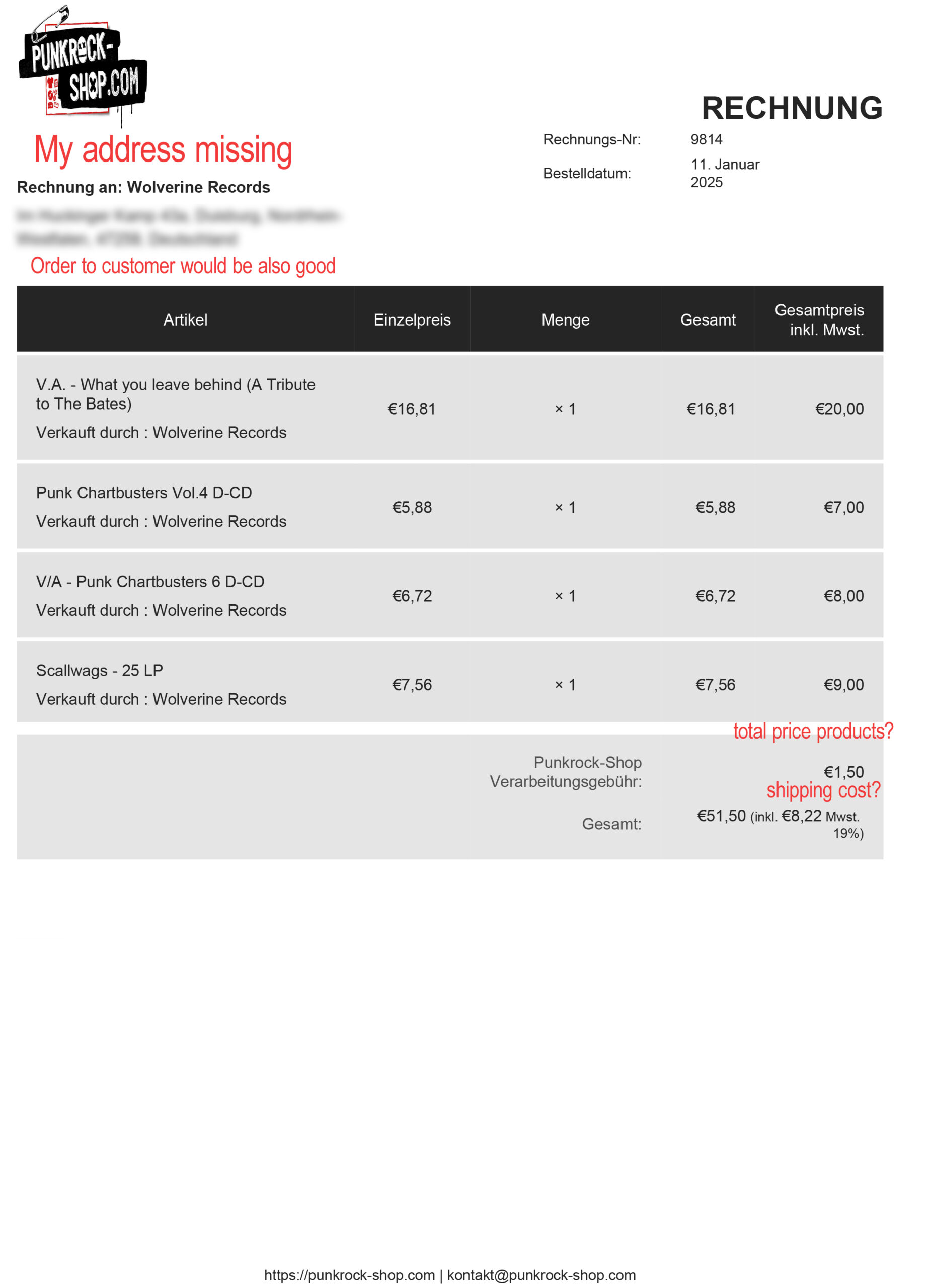
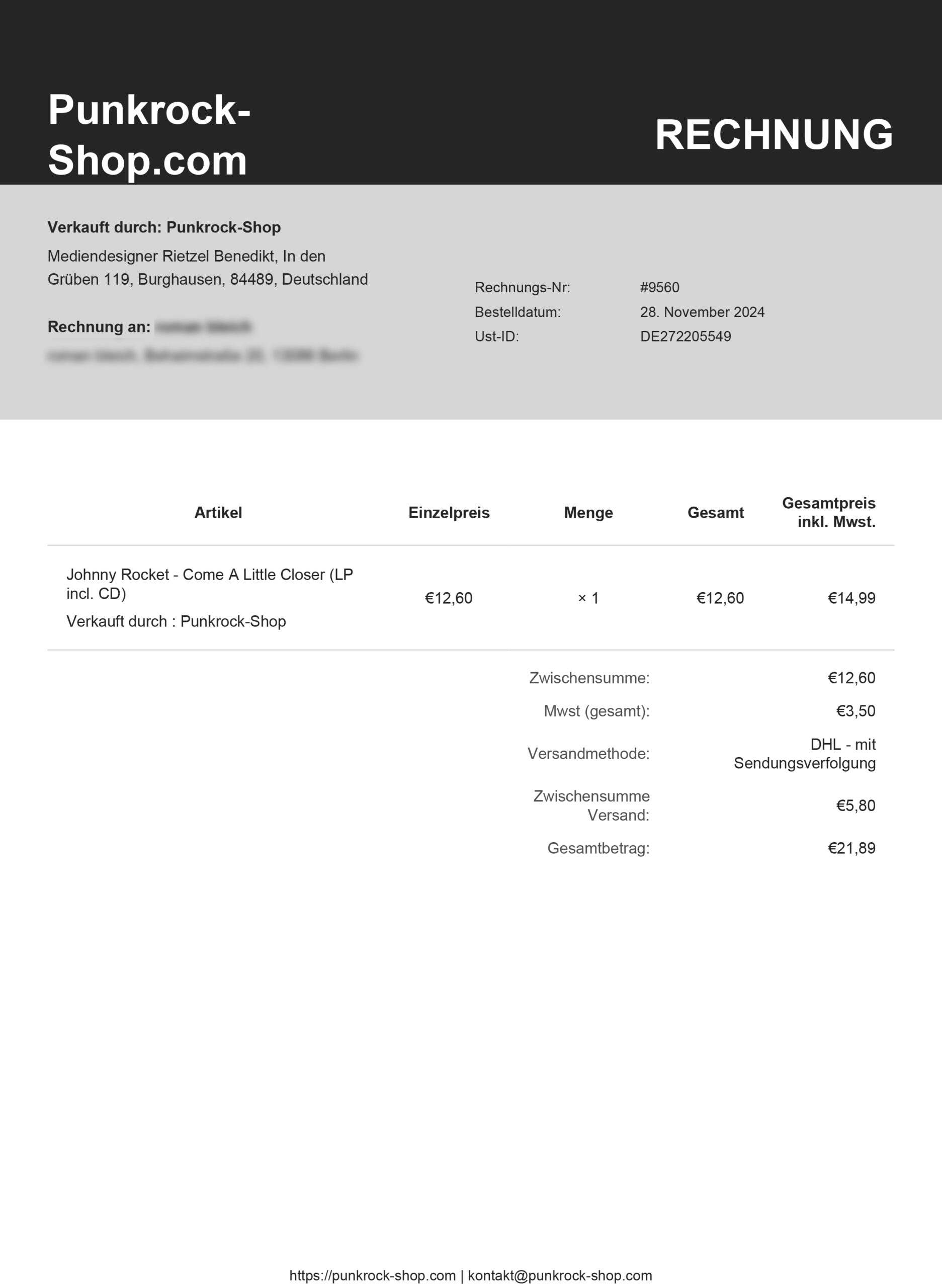
For the invoice issue. It would be great, to have more settings. In Germany we need a lot of “important” things on the invoice.
1. It would be cool, to have the columns like this (or with an option to switch on, off, what you need): price without taxes, amount, total price, taxes for the position, total price with taxes2. The address of the shop should be on the invoice (not sure, if I did this as a change, or if it was there before).
Also it would be good to have the address of the main-shop, the vendor and the customer on the invoice-for order and invoice-for-vendor.3. In the last row there it would be good to have the option for ordering: total price (netto), shipping-cost (option to show with or without tax), total price (brutto) with an information, how many taxes are included (e.g. “incl. 5€ 7% taxes, 35€ 19% taxes”)
4. Speaking of invoices: could there be a possibility, that the invoice-numbers are generated automatically at an order? To have it a bit easier I just changed the Order Number to the Invoice Number now.
Attachments:
-
January 14, 2025 at 8:56 PM #238424Participant
I forgot this attachment…
Attachments:
-
January 14, 2025 at 10:31 PM #238428Keymaster
Thank you for getting back to us. Please provide us some time to check and we will get back to you accordingly.
-
January 17, 2025 at 6:23 PM #238516Keymaster
Hi there, Great to hear that your issue on the vendor shop page sub pages has been resolved.
Regarding the issue that you are facing on your end with the tracking info flow, kindly go to admin dashboard >> WooCommerce >> Status >> Logs and from here share the detailed error message with us so that we can look into it and assist you accordingly.
Regarding your queries with the invoice module our replies are inline –
1. It would be cool, to have the columns like this (or with an option to switch on, off, what you need): price without taxes, amount, total price, taxes for the position, total price with taxes
>> Our dev team has checked this and found out that currently there is no such flexibility for adding new fields in the settings section. However, in the future they will surely add the functionality accordingly so that you can add new fields as per your choice.
2. The address of the shop should be on the invoice (not sure, if I did this as a change, or if it was there before).
Also it would be good to have the address of the main-shop, the vendor and the customer on the invoice-for order and invoice-for-vendor.
>>Currently on the invoices the address of the main website comes accordingly https://tinyurl.com/23s3dc7q by default. So kindly check carefully on your end with the default structure and let us know if you need any further assistance.3. In the last row there it would be good to have the option for ordering: total price (netto), shipping-cost (option to show with or without tax), total price (brutto) with an information, how many taxes are included (e.g. “incl. 5€ 7% taxes, 35€ 19% taxes”)
>> We already have the option of showing the tax, shipping etc. field in the settings section and once those are selected the tax details , shipping cost, total amount come on the invoice accordingly (https://tinyurl.com/2cden9nu). Now may I know what changes do you want to have in these default sections.
4. Speaking of invoices: could there be a possibility, that the invoice-numbers are generated automatically at an order? To have it a bit easier I just changed the Order Number to the Invoice Number now.
>> Currently there is a setting for putting invoice number format in the settings section (https://prnt.sc/wbNWWDu38Yey). And the invoice number is generated automatically using that format (https://tinyurl.com/26tluwbr). Kindly check this on your end and let us know more in details if you are looking for any further changes.We will look forward to hear back from you.
-
January 18, 2025 at 2:36 AM #238524ParticipantThis reply has been marked as private.
-
January 18, 2025 at 2:38 AM #238525ParticipantThis reply has been marked as private.
-
January 18, 2025 at 7:59 PM #238532Keymaster
Kindly provide us some time to check the logs and we will get back to you accordingly.
-
January 20, 2025 at 2:17 PM #238561Keymaster
Hi there, Based on the error log, it seems that the issue may be due to a conflict with a third-party plugin. To confirm this, please follow these steps:
— Deactivate all plugins except for WooCommerce, MultiVendorX, and MultiVendorX Pro.
— Check if the error still persists.
— If the error is resolved, reactivate the deactivated plugins one by one to pinpoint which plugin is causing the conflict.
Please let us know the results, and we’ll be happy to assist you further based on your findings! -
January 20, 2025 at 5:28 PM #238579Participant
Hi Sangita, I told you that it is an error because of the Woocommerce Paypal Payments Plugin. Everything is working, when this Plugin is deactivated. I use this Paypal-Plugin: https://de.wordpress.org/plugins/woocommerce-paypal-payments/
Should I use another Paypal-Plugin instead? But I use this from Woocommerce… -
January 20, 2025 at 5:35 PM #238580Keymaster
Hi @donald_punk, You can easily use our PayPal Marketplace module to receive payments from customers. You can learn more about this module here: https://multivendorx.com/docs/knowledgebase/paypal-marketplace-real-time-split/.
If you need any further assistance, feel free to reach out to us—we’re here to help!
-
January 30, 2025 at 1:46 AM #238845Participant
Hi Sangita, today I was checking the Paypal Marketplace module. Somehow I don’t get the option for disbursement mode. That is not really optimal when the vendor doesn’t setup the paypal method and then the customer get an information like this: Error! Remove product “XYZ” and continue checkout, this product/vendor is not eligible to be paid with PayPal
How can I collect the money of a vendor who didn’t setup Paypal?
Attachments:
-
January 30, 2025 at 2:37 AM #238848ParticipantThis reply has been marked as private.
-
January 30, 2025 at 12:00 PM #238854Keymaster
@donald_punk, Thank you for getting back to us.
Please note that, as per the PayPal Marketplace flow, commission disbursement to both the admin and vendor happens instantly. This means that as soon as a customer makes a purchase, the respective shares of the payment are transferred to the admin and vendor’s PayPal accounts. If a vendor’s PayPal account is not connected, the payment cannot be processed correctly. Therefore, when offering PayPal Marketplace as a payment option, both the admin and vendors must have their PayPal accounts properly linked.
Regarding the webhook, the webhook URL is set automatically in your application settings with the required events once you enter the correct API credentials. There is no need to manually configure the webhook URL. Please ensure that the PayPal Marketplace module is set up correctly with the necessary details.
If you need any further assistance, feel free to reach out.
-
January 30, 2025 at 1:37 PM #238859ParticipantThis reply has been marked as private.
-
January 30, 2025 at 1:57 PM #238860Keymaster
@donald_punk, I completely understand your concern. However, since PayPal Marketplace is designed to split payments directly between the admin and vendors, it is essential for vendors to connect their PayPal accounts.
Now to sell on a multi vendor site with a smooth selling experience it the vendor’s responsibility to add their payment option accordingly for avoiding any issues with the payouts. So to simplify this for vendors, you can deactivate other payment modules for vendor commission payouts and keep only the PayPal Marketplace module enabled. Additionally, to ensure all vendors have connected their PayPal accounts, you can use our “Announcement” module to notify them. This will prompt vendors to update their payment details in the Billing section, ensuring a smooth selling experience on your site.
Regarding the error, it is occurring due to permission issues with your PayPal account. Please share the error message with PayPal support, and once they enable the necessary permissions for your account, the issue should be resolved.
Let us know if you need any further assistance.
-
January 30, 2025 at 4:11 PM #238864ParticipantThis reply has been marked as private.
-
January 30, 2025 at 5:18 PM #238869Keymaster
@donald_punk, To work with PayPal Marketplace, certain authorization permissions need to be enabled for your PayPal account. Once these permissions are granted, you shouldn’t face any further issues. We recommend sharing the error message with the PayPal support team, and they should be able to assist with the necessary authorization.
Regarding the error you’re encountering with the WooCommerce PayPal payment option enabled, could you please share the error details with us? We haven’t been able to reproduce the issue on our end with the mentioned plugin enabled.
Looking forward to your response.
-
January 30, 2025 at 7:12 PM #238876ParticipantThis reply has been marked as private.
-
January 30, 2025 at 9:48 PM #238878Keymaster
Thank you for sharing the error. Kindly provide us some time to check and we will get back to you accordingly.
-
January 31, 2025 at 5:58 PM #238901Keymaster
@donald_punk, We investigated the issue and found that it is related to a gateway called “Payuponinvoice” in the WooCommerce PayPal Payment plugin.
Could you please try rolling back to an older version of the WooCommerce PayPal Payment plugin and check if the issue persists? Let us know the results.
Looking forward to your update.
-
September 2, 2025 at 4:22 PM #249666Keymaster
Hello there, It has been a while since we last heard from you, so we’ll assume that your issue has been resolved. We are closing this thread for now.
If you face any issues in the future or need further assistance, please feel free to create a new support ticket, and we’ll be happy to help.
-
-
AuthorPosts

- The topic ‘Troubles with seller’s policy site.’ is closed to new replies.
