


Claim your freedom to choose the perfect partner for your multi-vendor journey.

FREEDOM25

Celebrate the festive season by giving your marketplace a powerful lift!

FESTIVE20

5.0.0
Multi-store. Franchise. Facilitator. AI tools.
Everything your marketplace needs - now in one platform.
Power your marketplace dreams with unbeatable Black Friday deals!

MVXBLACK30

Supercharge your marketplace vision with unstoppable Cyber Monday deals!

MVXCYBER30

Holiday cheer, bigger savings
Take 25% off-because your marketplace deserves a gift too.

happyholiday

View Categories

Configure Store Template Layout for Block-Based Themes

If you are using a block-based WordPress theme, you can customize the store page layout directly from the Site Editor templates.

To configure the store template:

  1. Go to Pages → Store Templates from your WordPress dashboard.
  2. Click on Edit for the template you want to customize.
  3. This will open a sample store shop page in the block editor.
  4. Inside the editor, look for the Template option.
  5. From there, you can choose any of the available template layouts based on your preferred store page design.
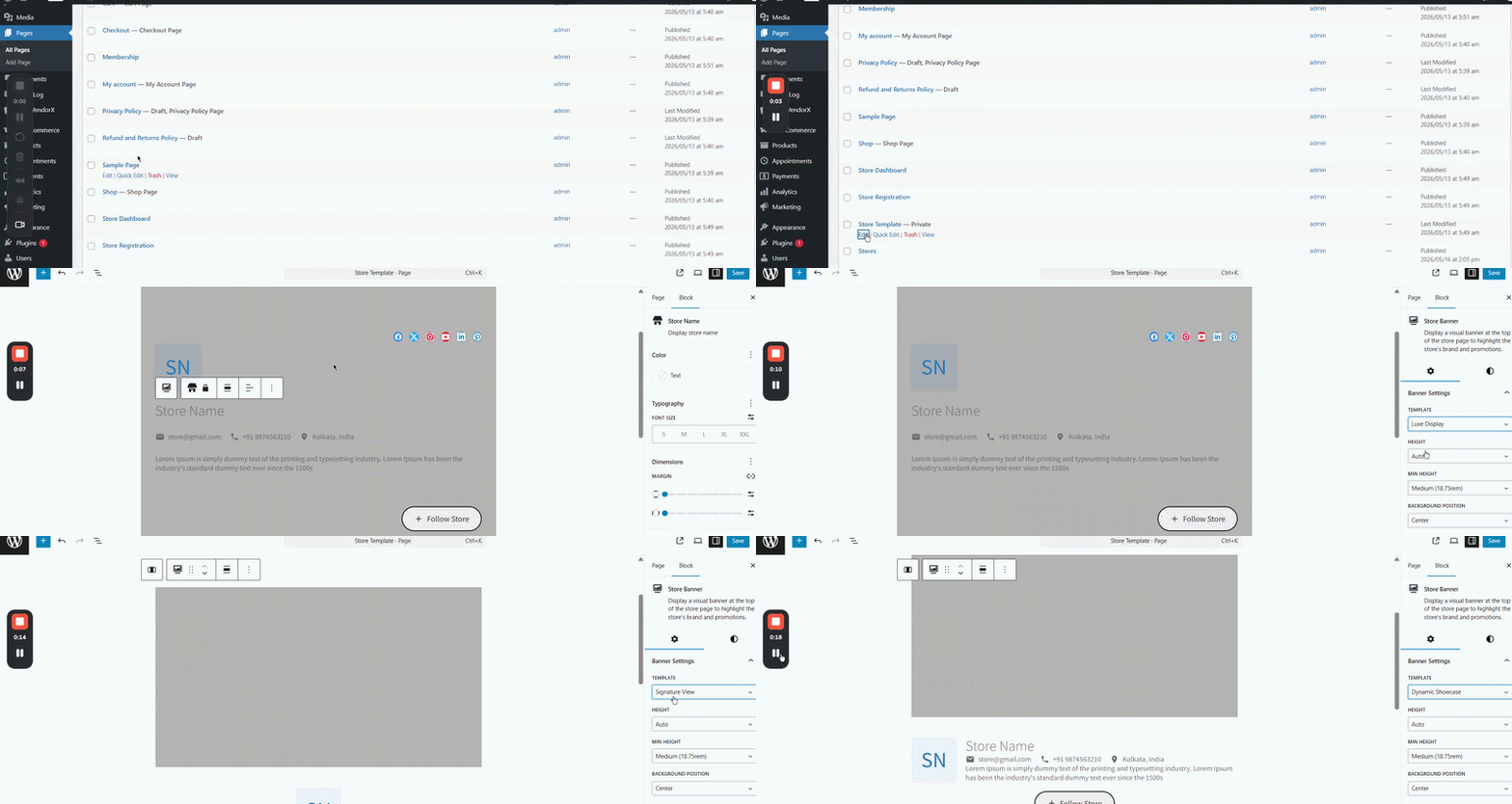
This allows you to quickly switch between different store page structures and customize the storefront experience for your marketplace.

Leave a Reply

Shopping Cart
Scroll to Top
