





- Brief Introduction
- Required module
- Admin Configuration
- Configure who can see wholesale prices
- Configure wholesale price display
- Configure the wholesale application form
- Store owner setup workflow
- Customer wholesale application workflow
- Wholesale purchasing workflow
- Approval queue workflow
- Important behavior
- Conclusion
Brief Introduction #
Wholesale purchasing plays a major role in modern commerce by allowing businesses to buy products in bulk at discounted prices for resale or operational use. Many marketplaces use wholesale pricing to attract distributors, retailers, resellers, and business buyers while maintaining strong sales volume.
The Wholesale module in MultiVendorX Pro helps marketplace owners support both retail and wholesale selling within the same platform. Store owners can create wholesale pricing rules for their products, while customers can apply for wholesale access directly from their account area.
This workflow explains how the Wholesale module works from end to end, including:
- Admin configuration
- Wholesale customer approval
- Store owner product setup
- Wholesale pricing behavior
- Frontend customer experience
- Approval queue management
By the end of this guide, you will understand how wholesale buyers, store owners, and admins interact throughout the complete wholesale purchasing process.
Required module #
Before using wholesale functionality, the following module must be enabled:
- Wholesale
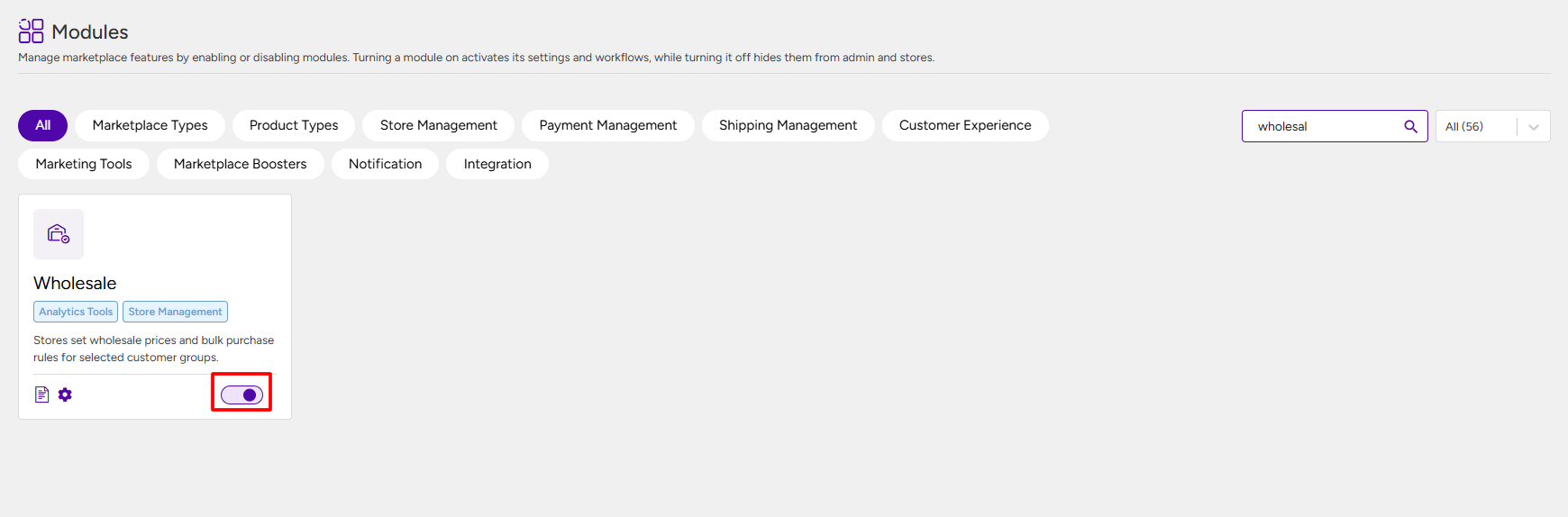
Admin Configuration #
Configure wholesale buyer approval #
The admin must first decide how customers will become wholesale buyers.
Manual approval
If Manual approval is selected:
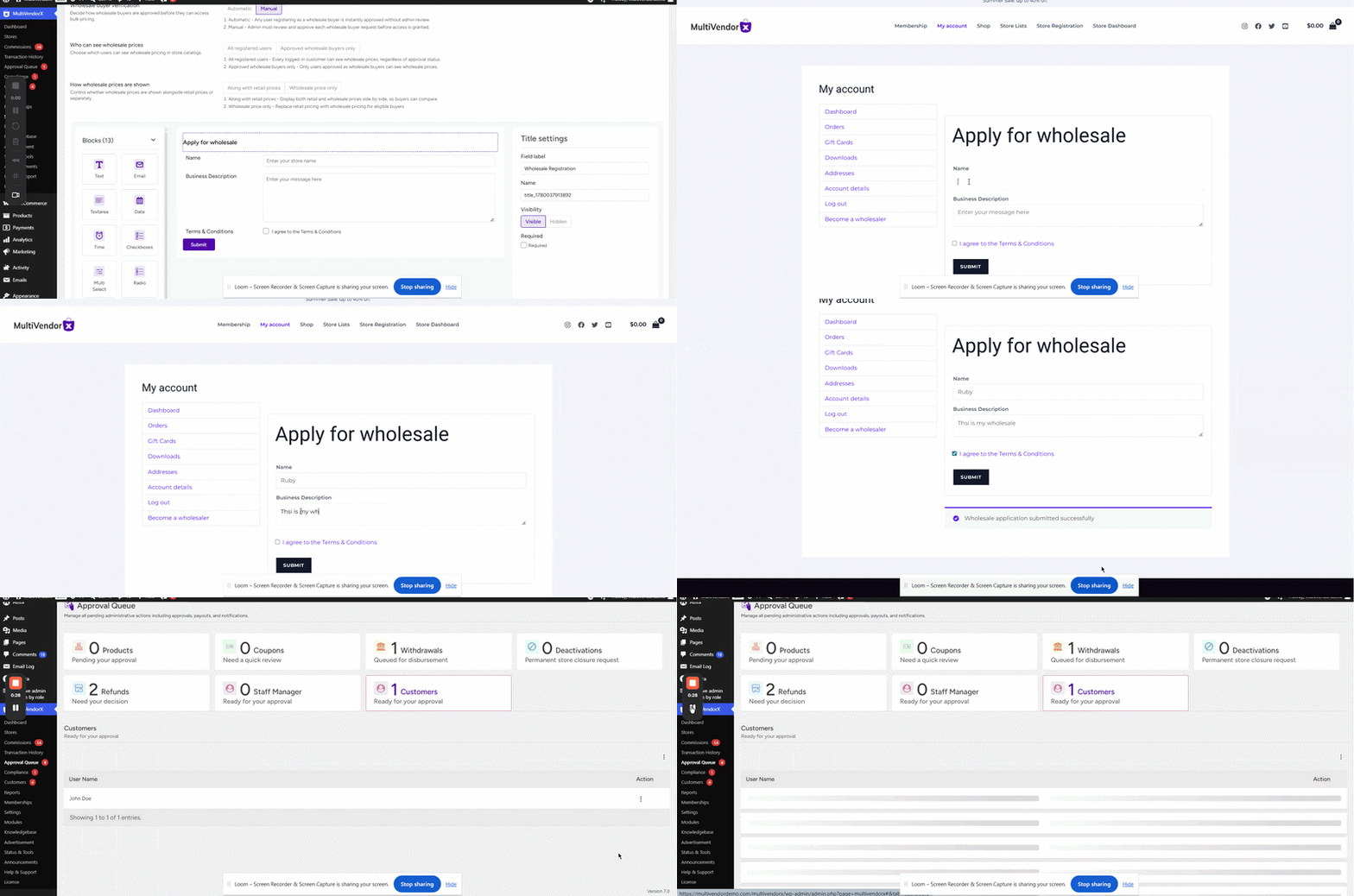
- The customer submits the wholesale application form
- The request is added to the Approval Queue
- The admin reviews the application
- The admin approves or rejects the request
If approved:
- The customer becomes a wholesale buyer
- Wholesale prices become visible
- The customer can purchase wholesale products
If rejected:
- Wholesale access is not granted
- The customer continues as a normal retail customer
Note:
Manual approval is useful when the marketplace wants to verify business buyers before allowing wholesale access.
Automatic approval
If Automatic approval is selected:
- The customer submits the wholesale application form
- The customer is approved instantly
- Wholesale access becomes active immediately
No admin review is required.
Configure who can see wholesale prices #
The admin can decide who will see wholesale pricing.
All registered users #
- Every logged-in customer can see wholesale prices
Approved wholesale users only #
- Only approved wholesale buyers can view wholesale prices
This is commonly used for B2B marketplaces.

Configure wholesale price display #
The admin can control how prices appear on product pages.
Along with retail prices #
Customers can see:
- Retail price
- Wholesale price
Wholesale price only #
Only wholesale pricing is displayed to eligible buyers.

Configure the wholesale application form #
The admin can add fields to the wholesale application form.
For example:
- Company name
- Business type
- Tax information
- Contact details
Customers must complete this form while applying for wholesale access.
Store owner setup workflow #
Once the admin completes the setup, store owners can start adding wholesale pricing to products.
Configuring wholesale pricing for simple products #
Navigate to:
- Store Owner Dashboard → Products
Then:
- Click Add Product or edit an existing product
- Scroll to the Wholesale section
- Enable Wholesale for this product
- Enter the Wholesale Price
- Enter the Minimum Quantity for Wholesale
- Save the product
Example #
| Type | Price |
|---|---|
| Retail price | $50 |
| Wholesale price | $40 |
| Minimum quantity | 10 |
In this case:
- Customers buying less than 10 units pay the retail price
- Customers buying 10 or more units receive the wholesale price
Configuring wholesale pricing for variable products #
For variable products, wholesale settings must be added separately for each variation.
Example variations
- Large Green
- Large Red
- Small Green
- Small Red
For every variation, the store owner can configure:
- Regular price
- Wholesale price
- Minimum wholesale quantity
This allows different wholesale pricing for different variations.
Customer wholesale application workflow #
Step 1: Customer applies for wholesale access #
The customer navigates to:
- My Account → Wholesale Application
Then the customer:
- Fills out the application form
- Submits the request
Step 2: Approval process #
If automatic approval is enabled
- The customer becomes a wholesale buyer immediately
If manual approval is enabled
- The application is added to the Approval Queue
- The admin reviews the request
- The admin approves or rejects the customer
While waiting for approval:
- The customer cannot access wholesale pricing
After approval:
- Wholesale pricing becomes visible
- Wholesale purchasing becomes available
Wholesale purchasing workflow #
Viewing wholesale pricing #
Approved wholesale customers can see:
- Wholesale price
- Minimum quantity requirement
Depending on admin settings, they may also see the retail price.
Purchasing products at wholesale price #
Wholesale pricing is applied only when the minimum quantity requirement is met.
Example #
| Quantity Added | Applied Price |
| 5 units | Retail price |
| 10 units | Wholesale price |
This ensures wholesale discounts apply only to bulk purchases.
Approval queue workflow #
When manual approval is enabled, customer requests are stored inside the Approval Queue.
The admin can:
- Review applications
- Check submitted business details
- Approve requests
- Reject requests
Once approved:
- The customer status changes to Approved
- Wholesale pricing access becomes active
Once rejected:
- Wholesale access remains disabled
Important behavior #
Wholesale pricing depends on quantity #
Wholesale prices apply only when the required minimum quantity is added to the cart.
Wholesale visibility depends on approval status #
If the admin restricts pricing visibility:
- Pending customers cannot see wholesale prices
- Only approved wholesale buyers can access wholesale pricing
Variable products require separate wholesale setup #
Each variation must have its own:
- Wholesale price
- Minimum quantity
configured individually.
Conclusion #
The Wholesale module helps marketplace owners create a complete wholesale buying system inside MultiVendorX.
Admins can control approvals and pricing visibility, store owners can configure bulk pricing for products, and customers can apply for wholesale access directly from their account dashboard.
This workflow allows marketplaces to support both retail and wholesale buyers efficiently from a single platform.


