- Brief Introduction
- Understanding the marketplace wallet concept
- Why the wallet system is important
- Step 1: Customer places an order
- Step 2: Order reaches eligible payout status
- Step 3: Earnings move to pending wallet balance
- Understanding pending wallet balance
- Step 4: Clearance period begins
- Why clearance periods are important
- Step 5: Earnings move to available wallet balance
- Step 6: Minimum payout threshold validation
- Step 7: Minimum wallet reserve gets applied
- Step 8: Store becomes eligible for payout
- Understanding manual payouts
- Understanding automatic payouts
- Understanding withdrawal approval workflows
- Understanding withdrawal fees
- Understanding payout methods
Brief Introduction #
Once marketplace commission and deductions are calculated, the remaining store earnings move through the wallet system before stores can receive payouts.
The wallet system acts like a virtual balance manager for store earnings inside your marketplace.
Instead of sending money directly to stores immediately after every order, MultiVendorX temporarily manages the earnings inside a wallet system first.
This wallet system helps marketplaces:
- Manage pending earnings
- Handle refunds safely
- Control payout timing
- Maintain payout stability
- Automate store disbursement
Understanding how the wallet system works is important because every store payout depends on it.
This document explains how store earnings move from completed orders to final payouts in MultiVendorX.
Understanding the marketplace wallet concept #
The store wallet inside MultiVendorX is not a real bank account or payment wallet.
Instead, it works as an accounting layer that tracks and manages store earnings before payouts are released.
The wallet system tracks:
- Store earnings
- Pending balances
- Available balances
- Withdrawal requests
- Payout history
Think of the wallet as a temporary holding system for marketplace earnings.
Whenever a customer places an order:
- MultiVendorX calculates the marketplace commission
- Store earning gets generated
- The earning enters the wallet workflow
- The system decides when the amount becomes withdrawable
- The payout process begins based on marketplace payout settings
This gives marketplace admins better financial control before releasing store payments.
Why the wallet system is important #
Without a wallet system, marketplaces would need to manually calculate and release earnings for every order.
The wallet system automates this process safely.
It also protects marketplaces against:
- Refund requests
- Chargebacks
- Payment disputes
- Fraudulent transactions
- Premature withdrawals
This is why most professional marketplaces use delayed wallet-based payout systems instead of instant payouts.
Store wallet earning flow #

This process helps marketplaces protect against:
- Refunds
- Cancellations
- Payment disputes
- Failed transactions
Step 1: Customer places an order #
The wallet process starts when a customer successfully places an order in the marketplace.
At this stage:
- WooCommerce processes the order
- Marketplace commission rules apply
- Store earning gets calculated automatically
However, the earning does not immediately become withdrawable.
Instead, MultiVendorX waits until the order reaches the eligible payout status configured by the marketplace admin.
Step 2: Order reaches eligible payout status #
Store earnings are added to the wallet workflow only after the order reaches specific payout-eligible statuses.
Marketplace admins can configure these statuses from:
Settings → Finance → Wallet
Common payout statuses include:
- Completed
- Delivered
- Processing
- Shipped
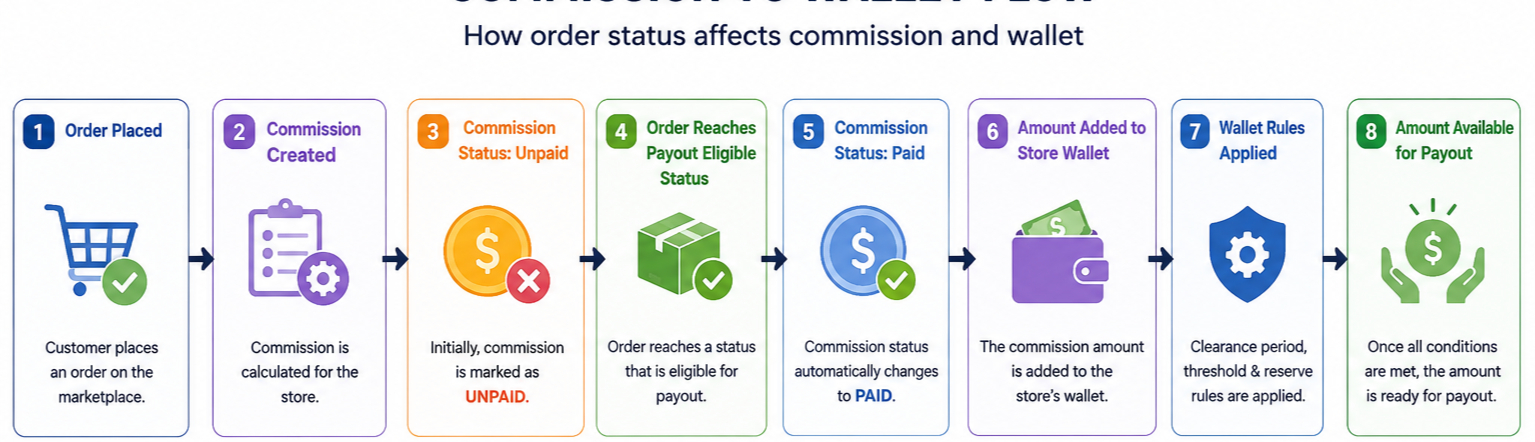
How commission status is affected
When an order is first placed:

- A commission record is created
- The commission amount is calculated
- The commission is marked as Unpaid
The commission remains unpaid until the order reaches one of the payout-eligible statuses configured by the marketplace.
Once the order reaches an eligible status:
- The commission status automatically changes to Paid
- The store earning is added to the store wallet
- The wallet workflow begins
Example #
Assume the marketplace admin has selected:
Completed as the payout-eligible status.
Order flow:
- Customer places an order
- Commission is calculated
- Commission status = Unpaid
- Order status = Processing
- Commission remains Unpaid
- Order status = Completed
- Commission status changes to Paid
- Store earning is added to the wallet
At this point, the earning enters the wallet system and becomes subject to wallet rules such as:
- Clearance period
- Minimum payout threshold
- Minimum wallet reserve
Only after these wallet conditions are satisfied does the earning become available for payout.

Step 3: Earnings move to pending wallet balance #
Once the order reaches the eligible payout status, the store earning moves into the pending wallet balance.
The earning still does not become withdrawable immediately.
Instead, the pending balance acts as a temporary holding area before the earning becomes available to the store.
This helps marketplaces safely manage potential order-related issues.
Pending balance protects against #
- Customer refund requests
- Order cancellations
- Chargebacks
- Payment disputes
This extra verification period helps marketplaces avoid releasing payouts too early.

Understanding pending wallet balance #
Pending balance represents earnings that are waiting for marketplace verification before payout release.
At this stage:
- The earning is visible inside the store wallet
- The amount cannot be withdrawn yet
- The clearance timer begins
- Marketplace admins still maintain payout control
This creates a financial protection layer between completed orders and actual payouts.

Step 4: Clearance period begins #
After earnings enter the pending balance, the configured clearance period starts.
The clearance period controls how long earnings remain in pending status before becoming available for withdrawal.
You can configure this from:
Settings → Finance → Wallet

Example
If the clearance period is set to 7 days:
- The order completes today
- Store earning enters pending balance
- The earning remains locked during the clearance period
- Funds become available after 7 days
This delay gives the marketplace enough time to safely handle refunds, disputes, or payment reversals before releasing payouts.
Why clearance periods are important #
Many new marketplace owners initially skip clearance periods.
However, clearance periods are extremely important for marketplace stability.
They help protect against:
- Refund abuse
- Fraudulent transactions
- Early withdrawals before disputes
- Payment reversals
Most marketplaces use a clearance period between:
- 7 days
- 14 days
- 30 days
depending on the business model and risk level.
Step 5: Earnings move to available wallet balance #
Once the clearance period ends successfully, the pending earning automatically moves into the available wallet balance.
This means the earning is now fully cleared for payout processing.
Available balance means #
- The earning is now cleared
- The store can request withdrawals
- Automatic payout schedules can process the amount
- The earning becomes withdrawable
This is the actual withdrawable balance visible to stores inside their wallet.
Step 6: Minimum payout threshold validation #
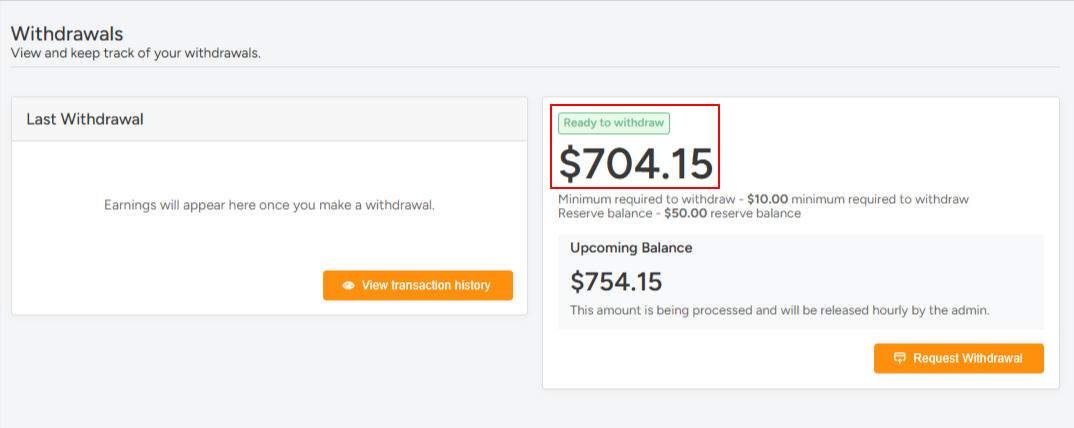
Before stores become eligible for payouts, MultiVendorX can verify whether the wallet balance meets the minimum payout threshold.
Marketplace admins can configure this from:
Settings → Finance → Wallet
This helps prevent very small withdrawal requests.

Example
If the minimum payout threshold is set to $100:
- A store with $40 cannot request payout yet
- A store with $120 becomes eligible for payout
This helps marketplaces reduce operational payout overhead and payout management complexity.
Step 7: Minimum wallet reserve gets applied #
Marketplace admins can also keep a fixed reserve amount inside the store wallet.
This reserve amount remains locked and cannot be withdrawn by the store.
The reserve acts as a financial safety buffer for the marketplace.

Example
If the reserve amount is $50:
- Wallet balance = $200
- Withdrawable balance = $150
This helps marketplaces maintain additional financial protection during disputes or unexpected adjustments.
Step 8: Store becomes eligible for payout #
Once:
- The clearance period completes
- The minimum payout threshold is reached
- Wallet reserve rules are satisfied
the store becomes eligible for payout.
At this stage, payouts can happen in two ways:
- Manual payout
- Automatic payout
You can configure payout behavior from:
Settings → Finance → Wallet

Understanding manual payouts #
If manual payout is enabled:
- Store submits a withdrawal request
- Admin receives the withdrawal request
- Admin reviews the payout details
- Admin manually releases the payment
This gives marketplace admins complete payout approval control.

Commonly used for #
- New marketplaces
- High-risk marketplaces
- Manual verification workflows
- Compliance-sensitive businesses
Understanding automatic payouts #
If automatic payout scheduling is enabled, MultiVendorX automatically disburses store earnings based on the configured payout schedule.
Available payout schedules #
- Hourly
- Daily
- Weekly
- Fortnightly
- Monthly
This reduces manual payout management for marketplace admins.
Automatic payouts are commonly used by established marketplaces with stable operational workflows.

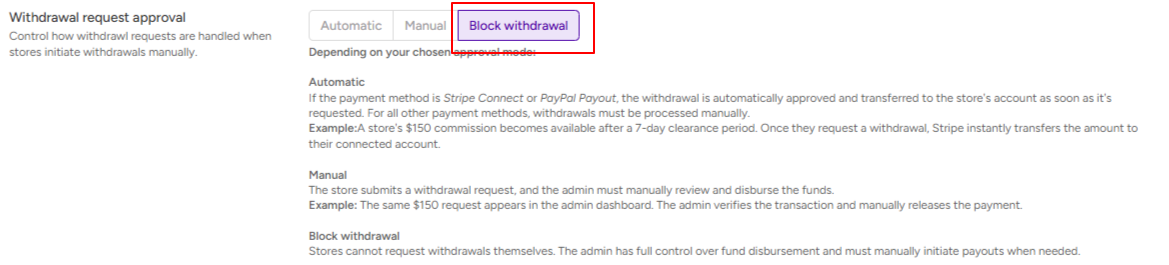
Understanding withdrawal approval workflows #
For payout systems, MultiVendorX supports different withdrawal approval models.
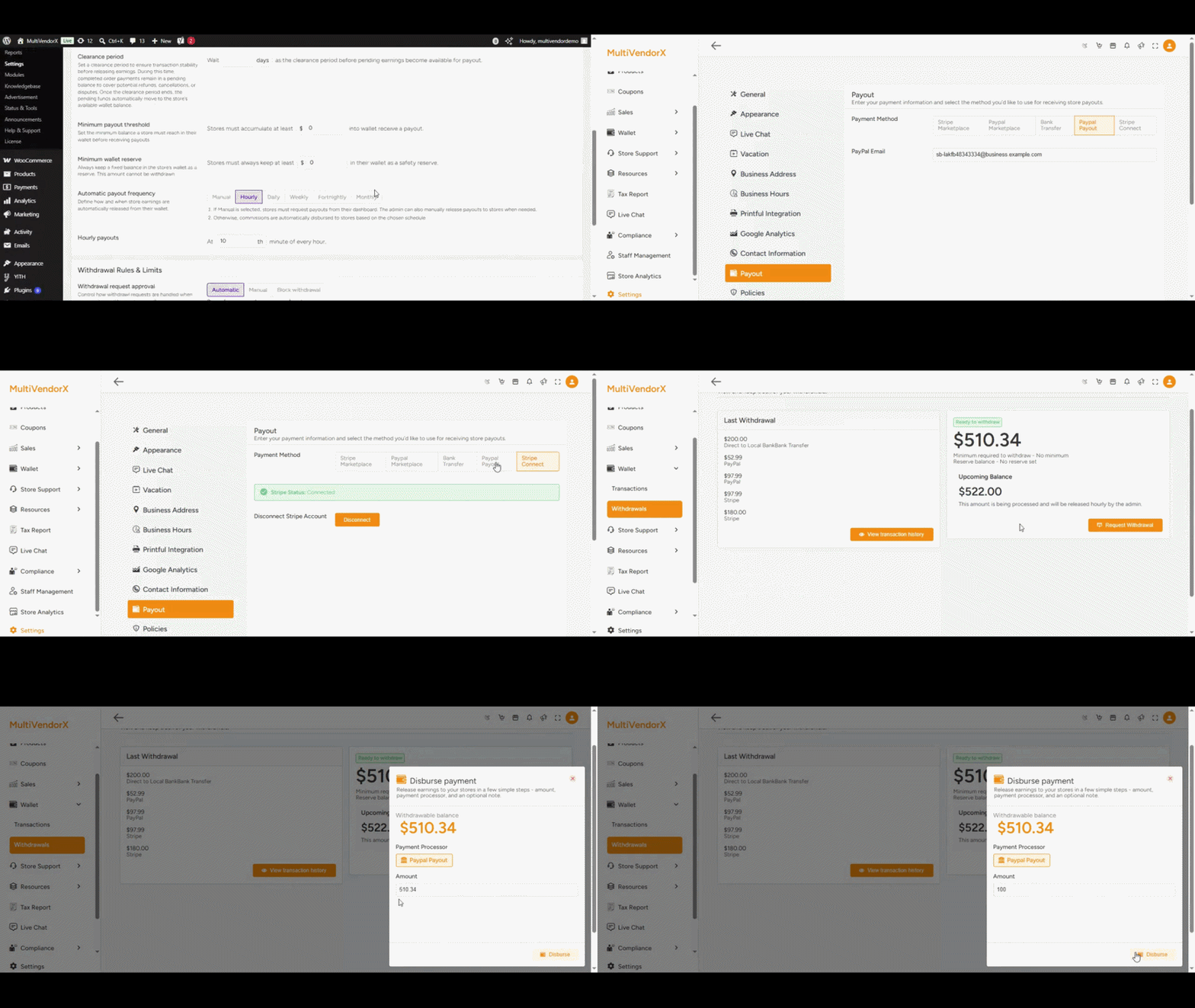
Automatic approval #
If Stripe Connect or PayPal Payout is used:
- Withdrawal requests can be approved automatically
- Funds transfer directly to the store account
- Payout processing becomes faster
This creates a smoother payout experience for stores.
Manual approval #
In this workflow:
- Store submits a withdrawal request.
- The admin then reviews the request and manually releases the payment accordingly.
- To keep the balance updated in the system, the admin can simply navigate to:
- MultiVendorX >> Approval Queue >> Withdrawals
- From there, the admin can approve or reject the withdrawal request as needed.
This provides additional verification and financial control.
Blocked withdrawals #
Marketplace admins can also block withdrawal requests entirely.
In this setup:
- Stores cannot request payouts themselves
- Admins fully control payout release timing
- Payouts are manually initiated by the marketplace
This model is commonly used in highly controlled marketplaces.
Understanding withdrawal fees #
MultiVendorX also allows marketplaces to charge withdrawal processing fees.
This helps discourage frequent small withdrawals.
Marketplace admins can configure:
- Number of free withdrawals
- Fixed withdrawal fees
- Percentage-based withdrawal fees
Example
- First 2 withdrawals are free
- Third withdrawal includes a processing fee
If a withdrawal fee exists:
- The fee gets deducted before payout
- Final store payout becomes lower
Understanding payout methods #
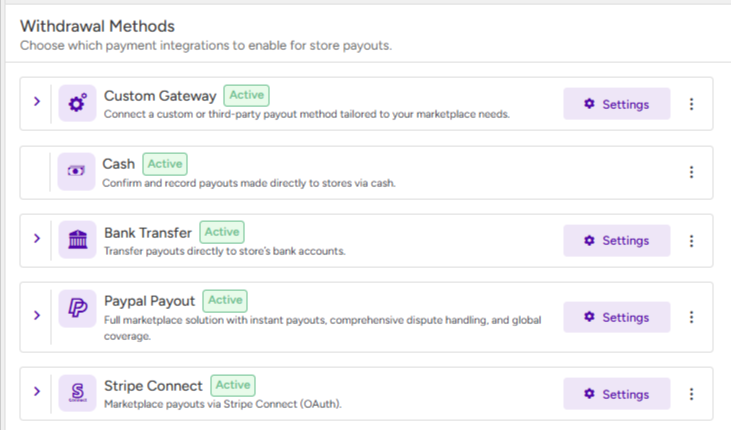
MultiVendorX supports multiple payout methods for store disbursement.
Marketplace admins can enable or disable payout methods depending on business requirements.
Supported payout methods #
- Bank transfer
- Stripe Connect
- PayPal Payout
- Cash payout
- Custom payout gateways
The selected payout method controls how stores finally receive their earnings.